Programmatic video creation has triggered a fierce architectural battle across the developer and creator ecosystems. Instead of dragging keyframes inside timeline GUIs like Adobe Premiere or After Effects, modern engineering teams generate hundreds of dynamic social shorts, personalized SaaS product demos, and data-driven reels completely in code.
The common mistake is treating GSAP, HyperFrames, and Remotion as mutually exclusive competitors. The true 10X production pipeline chains all three: GSAP handles micro-motion and physics, HyperFrames provides instant zero-setup frame capture, and Remotion directs the master timeline with multi-track audio ducking and auto-synchronized subtitles.
Direct YouTube Short: Watch on YouTube (@Softreviewed)
1. The Three Tool Paradigms Explained in Plain English
To understand which tool solves your specific production bottleneck, you must understand their distinct roles in the software stack:
- GSAP (The Motion Designer): GreenSock is the undisputed king of browser-based animation physics. It specializes in sub-pixel interpolation, elastic bounces, rolling SVG numbers, and bezier easing. However, GSAP runs purely inside the browser runtime—it does not compile or render MP4 or WebM video files on its own.
- HyperFrames (The Instant Video Snapper): Built by HeyGen under an unrestricted Apache 2.0 license, HyperFrames solves the browser-to-video bridge. It requires zero NPM setup or build steps. Its lightweight frame adapter hijacks Chromium’s rendering clock, allowing you to capture HTML, CSS, and GSAP animations frame-by-frame directly into transparent WebM or MP4 video files.
- Remotion (The Cloud Studio): Remotion is a complete programmatic video production framework built for React and TypeScript. It handles full timeline orchestration: multi-track sequencing, automatic Whisper subtitle alignment, dynamic background music ducking, and parallel cloud rendering across AWS Lambda clusters.
2. The Master Decision Matrix: When to Use Each Tool
Every production tool has distinct strengths and architectural boundaries. Use this decision matrix to identify exactly which framework matches your workflow:
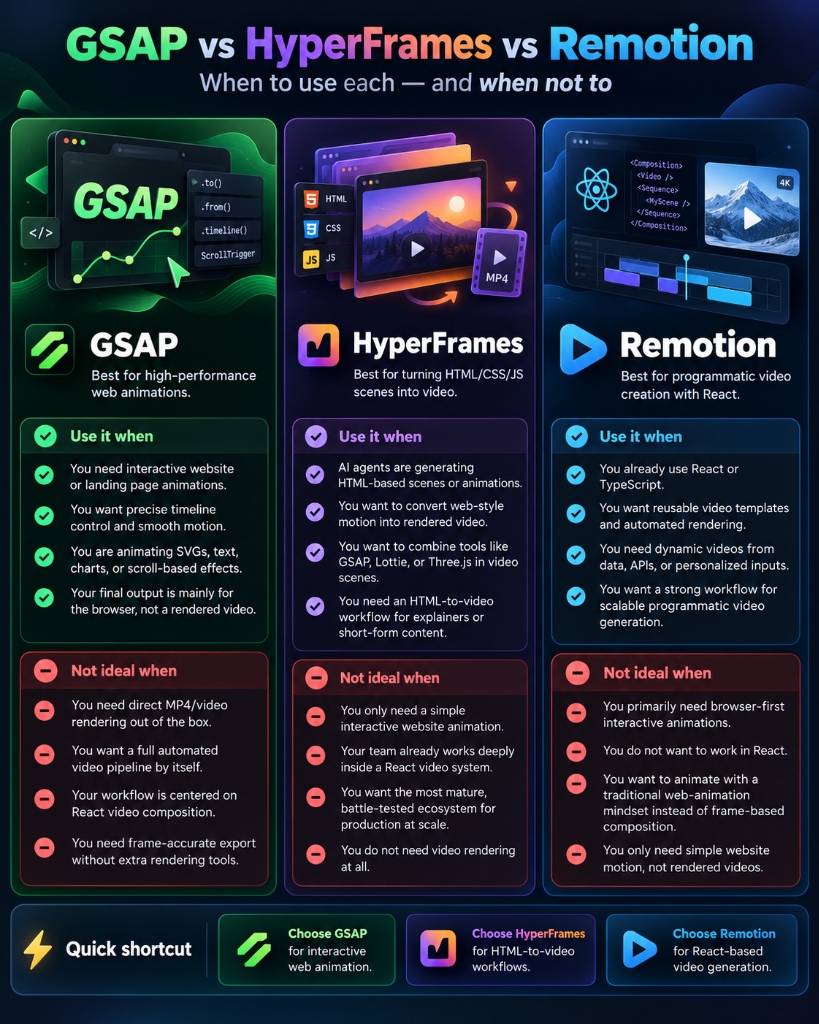
Architectural Decision Matrix: When to use GSAP, HyperFrames, and Remotion.
3. Concrete Implementation: How the 10X Production Pipeline Works
Rather than forcing Remotion to write complex elastic spring equations from scratch or struggling with headless browser desyncs, professional automated video teams implement a modular three-step assembly line:
Step 1: Build High-Impact Micro-Animations with GSAP
Inside a clean HTML card, initialize GSAP to animate your data tickers and UI elements. Expose a deterministic seek hook (window.seekToFrame) so external video renderers can control Chromium frame-by-frame:
// GSAP Timeline with Deterministic Frame Stepping
const tl = gsap.timeline({ paused: true });

// Rolling Revenue Counter to $1,000,000
tl.to(counterObj, {
  val: 1000000,
  duration: 2.5,
  ease: "power2.out",
  onUpdate: () => {
    document.getElementById("ticker").innerText = "$" + Math.floor(counterObj.val).toLocaleString();
  }
}, 0);

// Bouncing SaaS Pricing Card
tl.to("#dealCard", {
  y: -20,
  rotation: -2,
  duration: 1.2,
  ease: "sine.inOut",
  repeat: -1,
  yoyo: true
}, 0);

// Deterministic Frame Hook for HyperFrames & Playwright
window.seekToFrame = function(frameIndex, totalFrames) {
  const progressSec = (frameIndex / totalFrames) * 3.0;
  tl.seek(progressSec, false);
};
Step 2: Instant Video Capture via HyperFrames
Execute HyperFrames to snapshot the HTML animation into a transparent VP9 Alpha WebM or H.264 MP4 clip with zero build configuration:
# 1-Click Transparent Video Export via HyperFrames
npx hyperframes render scene3_live_data.html \
  --fps 30 \
  --frames 90 \
  --format webm \
  --transparent \
  --output scene3_live_data_alpha.webm
Step 3: Direct the Master Short in Remotion
Ingest the rendered video clips into Remotion as full 960×960 Hero Stages. Remotion handles audio ducking, Jogg AI presenter compositing, and syllable-level Whisper captions:
// Ingesting HyperFrames GSAP Clips as Hero Stages in Remotion
export const gsapExplainerPreset: AiNewsProps = {
  voiceover: "voiceover.mp3",
  captionsSrc: "captions/voiceover.json",
  scenes: [
    {
      durationInFrames: 312,
      kicker: "none",
      headline: "",
      stage: {
        type: "media",
        src: "gsap/scene3_live_data.mp4",
        mediaType: "video",
        shape: "hero", // 960x960 Fullscreen UI Mode
      },
      sfx: "switch",
    },
  ],
};For ultra-low latency workflows and automated triage decisions, explore our complete technical guide on the TypeSafe AI Jev System One decision engine, which operates at sub-second speeds to route incoming requests before heavy generative models execute.
4. Commercial Licensing, Legal Rules & Pricing Models
For developers building commercial SaaS products, automated agencies, or internal enterprise tools, software licensing is not an afterthought—it is a make-or-break legal boundary. The three tools diverge dramatically in their commercial terms:
Many founders assume GSAP and Remotion are standard open-source libraries like React or Vue. They are not. If you build a video generation micro-SaaS and charge customers a monthly subscription, using GSAP without a paid Business Green membership or using Remotion with a 5-person engineering team without a Remotion Company License violates their legal terms. In contrast, HyperFrames is governed by the Apache 2.0 license, granting complete commercial freedom with zero royalty obligations.
5. Cloud Rendering at Scale: AWS Lambda vs. Headless Docker
Executing a 10-second animation on a local laptop is trivial; rendering 10,000 customized product videos for a viral marketing campaign requires an industrial-grade cloud backend. Here is how the three architectures scale under enterprise pressure:
Splits video compositions into hundreds of micro-segments, dispatches them across parallel AWS Lambda functions, and stitches them back together in Amazon S3.
Runs headless Chromium frame stepping inside standard Docker containers. Zero React compilation steps mean cold container start times are virtually instantaneous.
GSAP has no native video export server. Developers must manually write headless browser orchestration scripts to pause and screenshot canvas frames into FFmpeg pipes.
6. Audio Mixing, Auto-Ducking & Subtitle Synchronization
Video is only 50% visual; professional engagement hinges on crisp audio mixing and kinetic subtitles:
- Remotion’s Native Audio Suite: Features programmatic audio ducking (automatically dipping background music when a voiceover track is active), pitch modulation, and direct parsing of OpenAI Whisper JSON files for word-level and syllable-level animated subtitles.
- HyperFrames & GSAP: Operate purely as visual animation and canvas capture engines. Audio tracks, sound effects, and voiceovers must be multiplexed downstream using Remotion or an FFmpeg CLI command.
7. Final Strategic Verdict: Which Tool Should You Choose?
Select your primary tool based on your project’s target deliverable, licensing constraints, and infrastructure requirements:
- Choose GSAP if your final deliverable is an interactive website, SaaS dashboard, or landing page where users click, scroll, and interact with the elements live in the browser.
- Choose HyperFrames if you need a 100% free, Apache 2.0 open-source engine to convert HTML/CSS/JS components or AI-generated web cards into transparent video clips with zero build overhead and zero commercial licensing fees.
- Choose Remotion if you are building an automated video production business, multi-track content engine, or massive cloud rendering pipeline that requires serverless AWS Lambda scaling, automatic audio ducking, and word-by-word animated subtitles.
8. Objective Pros & Cons Comparison Matrix
Every engineering decision involves tradeoffs. Here is a balanced evaluation of each tool’s operational strengths and limitations:
- Unmatched timeline sequencing, elastic springs & physics.
- Works seamlessly across vanilla HTML, SVG, Canvas & WebGL.
- 15+ years of battle-tested cross-browser stability.
- Browser runtime only; cannot export video files natively.
- Requires paid Club GreenSock ($150–$999/yr) if charging commercial SaaS users.
- 100% Free & Open-Source under Apache 2.0 (zero commercial fees).
- Converts HTML/CSS/JS scenes to transparent video with 1 CLI command.
- Lightweight and Docker-ready with zero React compilation overhead.
- Focuses on single-scene captures rather than multi-scene master timelines.
- No native audio mixing, ducking, or automated subtitle engines.
- Massive parallel cloud rendering on AWS Lambda (10-min 4K video in 30s).
- Programmatic audio ducking, pitch-shifting, and Whisper subtitle auto-sync.
- Full power of React components, props, state, and npm packages.
- Requires full React & TypeScript development environment.
- Companies with ≥ 4 employees must buy a paid Company License.
9. Official Developer Resources & Quickstart Directory
Start building immediately with the verified terminal commands, primary GitHub repositories, and official documentation portals:
Have questions about commercial licensing, implementing GSAP with Remotion, or configuring HyperFrames frame adapters? Connect with our engineering team on the official SoftReviewed software platform.