
How to Access Sora 2: The Complete Guide
Navigate the invite-only system for OpenAI’s revolutionary video generation platform
Official Discord Server Access
Join OpenAI’s verified Discord community where active members share limited-time invite codes in dedicated channels like #sora-invite-codes. Complete account verification through OpenAI to gain access to these exclusive channels.
Reddit Community Resources
Browse r/OpenAI megathreads where users post fresh invite codes with timestamps. Sort by “new” to catch the latest available codes before they’re claimed by other users. Community members regularly share new codes throughout the day.
Geographic Availability Limitations
Sora 2 is currently restricted to users in the United States and Canada. International users may need to use a VPN service set to these regions to access the platform after obtaining an invite code.
Account Verification Process
You must log in with your existing ChatGPT account first, then complete Discord verification confirming OpenAI account ownership before receiving access to invite code channels. This two-step process ensures security and prevents code misuse.
Code Sharing System
Each verified user receives limited invite codes to share (typically 4-5 per account). New users instantly gain sharing privileges upon verification, creating a sustainable invitation chain that gradually expands the user base.
Free Access Model
Sora 2 offers initial free access with generous usage limits while maintaining watermark-free video generation. ChatGPT Pro subscribers receive premium access to the higher-quality Sora 2 Pro model with enhanced capabilities and priority processing.
Breaking the Sora 2 Barrier: Your Complete Access and Automation Blueprint
Getting access to Sora 2, OpenAI’s groundbreaking AI video generator, feels like trying to enter an exclusive club when you’re outside the US or Canada. But here’s the thing – thousands of creators worldwide are already using it, creating stunning videos with synchronized audio, and building entire automation systems around it. This guide reveals exactly how they’re doing it, plus the money-saving tricks they don’t want you to know about.
Why Sora 2 Access Feels Like Mission Impossible (But Really Isn’t)
Sora 2 launched with impressive features that make it stand out from other AI video tools. Unlike its predecessors, this version generates synchronized audio alongside video, meaning you get lip-sync dialogue, environmental sounds, and sound effects that match the action perfectly. The model also offers the revolutionary “Cameo” feature, where you can insert yourself or others into AI-generated scenes by simply uploading a short reference video.
However, OpenAI has restricted access to just the US and Canada initially, leaving creators in India and 150+ other countries locked out. The restrictions stem from regulatory compliance issues, particularly with GDPR in Europe. But as you’ll see, these barriers are more like suggestions than walls.
Think of it like this: Sora 2 is playing at a private cinema that only lets US/Canadian visitors in the front door. But there are other ways to watch the film – through side entrances, invitations from those already inside, and yes, even special viewing passes that work for anyone willing to look for them.
The Free Discord Method That Actually Works
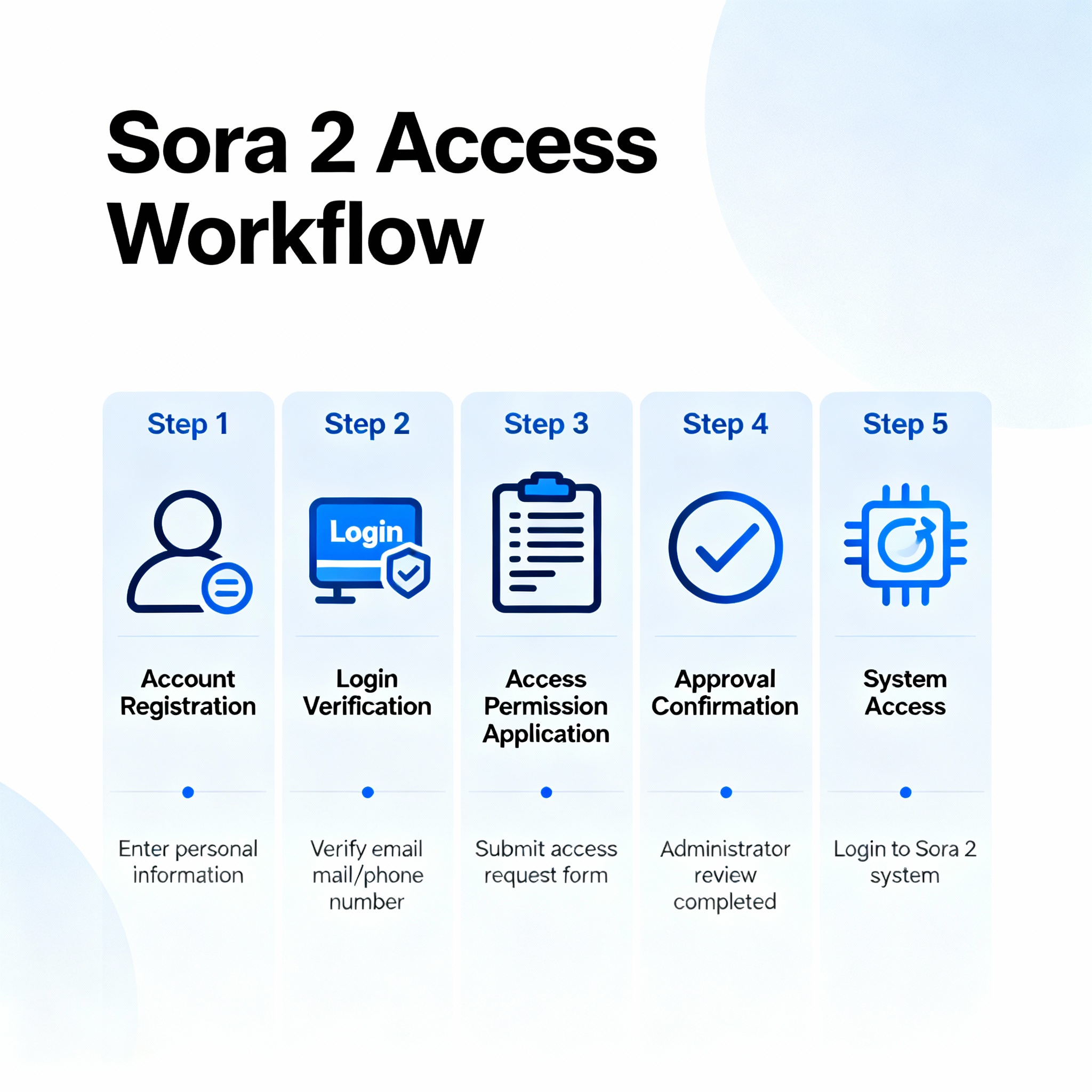
The most reliable way to get Sora 2 invite codes comes straight from OpenAI’s official Discord server. Each person who gains access receives four additional invite codes to share, creating a continuous cycle of new opportunities.
Step-by-step Discord access method:
📌 Join the OpenAI Discord server by searching “OpenAI Discord” on Google
📌 Complete the verification process by linking your OpenAI account
📌 Navigate to the #sora-2 channel after verification
📌 Keep both Discord and the Sora login page open simultaneously
📌 Refresh frequently – codes typically disappear within 1-2 minutes
The key is speed and preparation. Successful users report setting up desktop notifications and having multiple windows ready. Some codes work more than the typical 4-time limit, particularly those shared by OpenAI staff members. Think of Discord as a live marketplace where invite codes are traded constantly – you just need to show up at the right moment.
VPN Setup for Worldwide Access (The Smart Way)
Since Sora 2 blocks non-US/Canada IP addresses, a reliable VPN becomes essential. Based on extensive testing by users worldwide, certain VPNs consistently work better than others for this specific purpose.
Recommended VPN approach:
✅ NordVPN – Most reliable with 21 US server locations
✅ Surfshark – Budget-friendly option that works consistently
✅ ExpressVPN – Premium choice with fastest speeds
Connection strategy:
Connect to US servers (avoid Canada initially as it has fewer working servers). Once connected, access sora.chatgpt.com and proceed with account setup. The VPN should remain active throughout your entire session.
Important consideration: While VPN use bypasses geographic restrictions, it technically violates OpenAI’s terms of service. Users report no account suspensions to date, but proceed understanding this risk. It’s like using a back entrance when the front door’s locked – technically not the intended path, but millions do it safely.
The Mobile App Advantage (iOS Users Only)
The Sora iOS app offers features unavailable on the web version, particularly the game-changing Cameo functionality. To access the app from restricted regions:
➡️ Change your Apple ID region to United States
➡️ Use a US-based address (easily findable online)
➡️ Download the Sora app while VPN is active
➡️ Complete setup with your OpenAI account
Android users: OpenAI confirmed an Android version is “coming soon” but no specific timeline has been announced.
The iOS app provides a smoother experience and allows for the Cameo feature that lets you star in AI-generated videos. Imagine being able to appear in a cinematic scene as an astronaut or superhero – that’s what Cameo does, and it’s exclusively in the mobile app right now.
Watermark Removal: The Cost-Effective Solutions
Every Sora-generated video includes a visible, moving watermark. Removing it becomes crucial for professional use, and the costs vary dramatically between services.
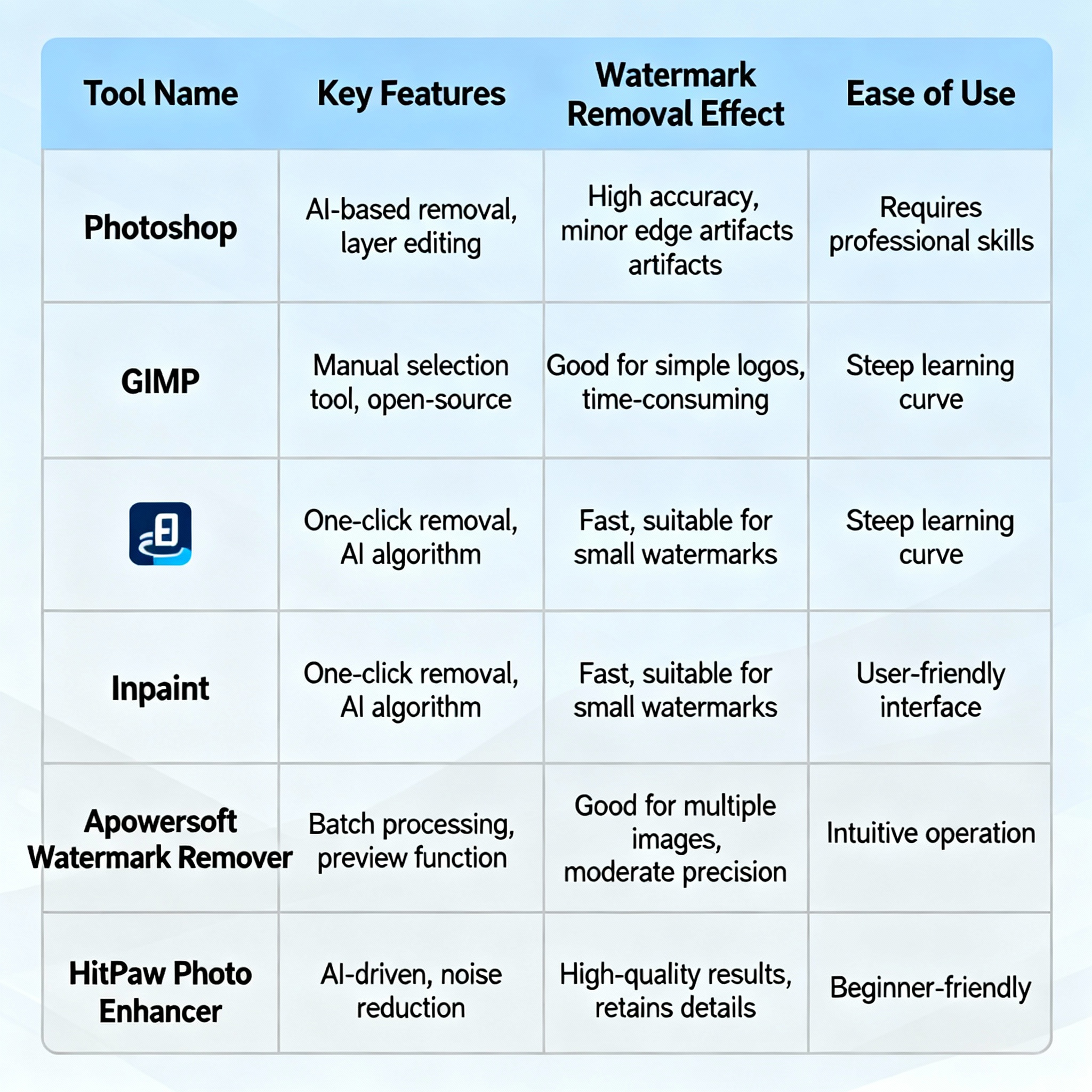
Top watermark removal options:
Kie.ai – Most cost-effective at just ₹42 ($0.50) per video
MagicEraser.org – Free tier available, up to 2K resolution support
WatermarkRemover.io – Fast processing with live preview features
Remove.bg – Dual functionality for watermarks and backgrounds
YouCam – Multiple removal modes with high accuracy
Cost comparison analysis:
- Official OpenAI API: ₹840 ($10) per 10-second video
- Kie.ai API: ₹126 ($1.50) per 10-second video
- Manual tools: ₹42-84 ($0.50-1.00) per video
The savings are substantial. Using Kie.ai instead of official channels saves approximately 83% on processing costs. Picture it this way: if you’re creating 10 videos weekly, you’re looking at saving ₹7,140 ($85) monthly by choosing the right tool.
Automation Gold: Make.com Integration That Pays for Itself
The real magic happens when you automate the entire process. Make.com recently added official Sora 2 support, allowing you to create workflows that generate videos, remove watermarks, and distribute content automatically.
Automation workflow structure:
- Trigger: New blog post, social media schedule, or manual input
- Generate: Create Sora video using text prompts
- Process: Remove watermarks via Kie.ai API
- Distribute: Upload to YouTube, TikTok, Instagram automatically
Cost breakdown for automation:
- Make.com subscription: ₹1,680 ($20) monthly for Pro plan
- Kie.ai credits: ₹420 ($5) for 10 videos
- Total monthly cost: ₹2,100 ($25) for unlimited automation
Compare this to hiring video editors at ₹2,500-8,400 ($30-100) per video, and the ROI becomes clear within days. This automation is like having a 24/7 video production team that never sleeps, takes no breaks, and costs less than a single professional editor.
Advanced Cameo Techniques for Professional Results
The Cameo feature transforms Sora from a simple text-to-video tool into a personalized content creation powerhouse. Professional usage requires understanding the technical requirements.
High-quality Cameo creation tips:
👉 Lighting variety: Record in different lighting conditions to give the AI more reference data
👉 Multiple angles: Capture yourself from various perspectives, not just straight-on
👉 Clean audio: Use a quiet environment without background noise
👉 Full feature visibility: Remove hats, sunglasses, or anything obscuring facial features
Creative applications:
- Product demonstrations with your face appearing in the video
- Educational content where you appear in historical settings or scenarios
- Brand storytelling with consistent character presence across videos
- Social media content that stands out from generic AI videos because it features you
Real creators are using this to create personalized product reviews, educational content, and brand ambassadors – all without hiring actors. One travel creator uses Cameo to insert herself into exotic locations she’s never visited, creating travel content that looks authentic.
Troubleshooting Common Access Problems
“Sora is not available in your region” error:
Switch to a different US server location. Some server IPs get blocked faster than others. Try ExpressVPN’s “obfuscated servers” specifically designed to bypass regional restrictions.
Invite codes not working:
Codes have usage limits (typically 4 uses) and expire quickly. Try multiple codes in rapid succession. Check the Reddit thread in the Discord – fresh codes appear hourly.
VPN detection issues:
Clear your browser cache and cookies before attempting access. Use incognito/private browsing mode. Restart your VPN connection if you face repeated blocks.
Account suspension concerns:
While no widespread suspensions have been reported, maintain a low profile. Avoid discussing VPN usage in official OpenAI channels. Thousands of international users are accessing this way without issues.
The Economics: Why This Method Beats Everything Else
Traditional video production costs in India range from ₹8,400-42,000 ($100-500) per finished video when hiring professionals. Even basic AI video tools charge ₹2,100-4,200 ($25-50) monthly for limited features.
Your total monthly costs with this method:
- VPN service: ₹420 ($5)
- Watermark removal: ₹840 ($10) for 20 videos
- Make.com automation: ₹1,680 ($20)
- Total: ₹2,940 ($35) for unlimited professional videos
The break-even point hits after creating just 2-3 professional videos monthly. After that, every video is essentially profit – pure creative output without the labor costs. That’s why creators are switching to this method in droves.
Your Action Plan: From Zero to Creating in 24 Hours
Getting started requires following these steps in order:
Day 1 – Setup (2 hours):
- Purchase VPN subscription (NordVPN recommended)
- Join OpenAI Discord and complete verification
- Monitor #sora-2 channel for invite codes
- Create Sora account once code is obtained
Day 2 – First Video Creation:
- Generate your first video using simple prompts
- Create Cameo profile for personalized content
- Test watermark removal with free tools
Week 1 – Automation Setup:
- Sign up for Make.com account
- Create basic automation workflow
- Connect Kie.ai API for watermark removal
- Test end-to-end process with sample content
The investment in setup pays dividends immediately. Most users report creating their first professional-quality video within hours of gaining access.
Breaking Free from Geographic Restrictions: Your Creative Freedom Awaits
Sora 2 represents a shift in content creation accessibility. While OpenAI’s geographic restrictions seem limiting, the methods outlined here provide legitimate pathways to access and utilize this technology professionally.
The combination of free invite codes, affordable VPN access, cost-effective watermark removal, and powerful automation creates a system that democratizes high-quality video production. For content creators in India and other restricted regions, this approach offers professional capabilities at a fraction of traditional costs.
Remember that technology moves fast, and early adopters gain the biggest advantages. The creators implementing these systems now will have months of experience and established workflows by the time Sora 2 becomes widely available.
Your audience is already watching AI-generated content – the question is whether you’ll be creating it or just consuming it. With the tools and knowledge provided here, the choice is yours.