Yesterday morning, my phone buzzed with an emergency bulletin that stopped me in my tracks.
The U.S. National Security Agency (NSA) and the FBI had issued an urgent cybersecurity directive: anyone running web servers powered by PHP needed to update their software immediately—or literally pull their servers offline until they could.
When intelligence agencies tell thousands of companies to consider pulling the internet plug on their servers, it is not a routine maintenance reminder. It means something massive slipped through the cracks.
And in this case, “massive” is an understatement. Roughly 70% of the world’s web servers run on PHP. If you manage a WordPress blog, an e-commerce shop on WooCommerce, a Drupal platform, or a custom web app, your infrastructure runs on PHP.
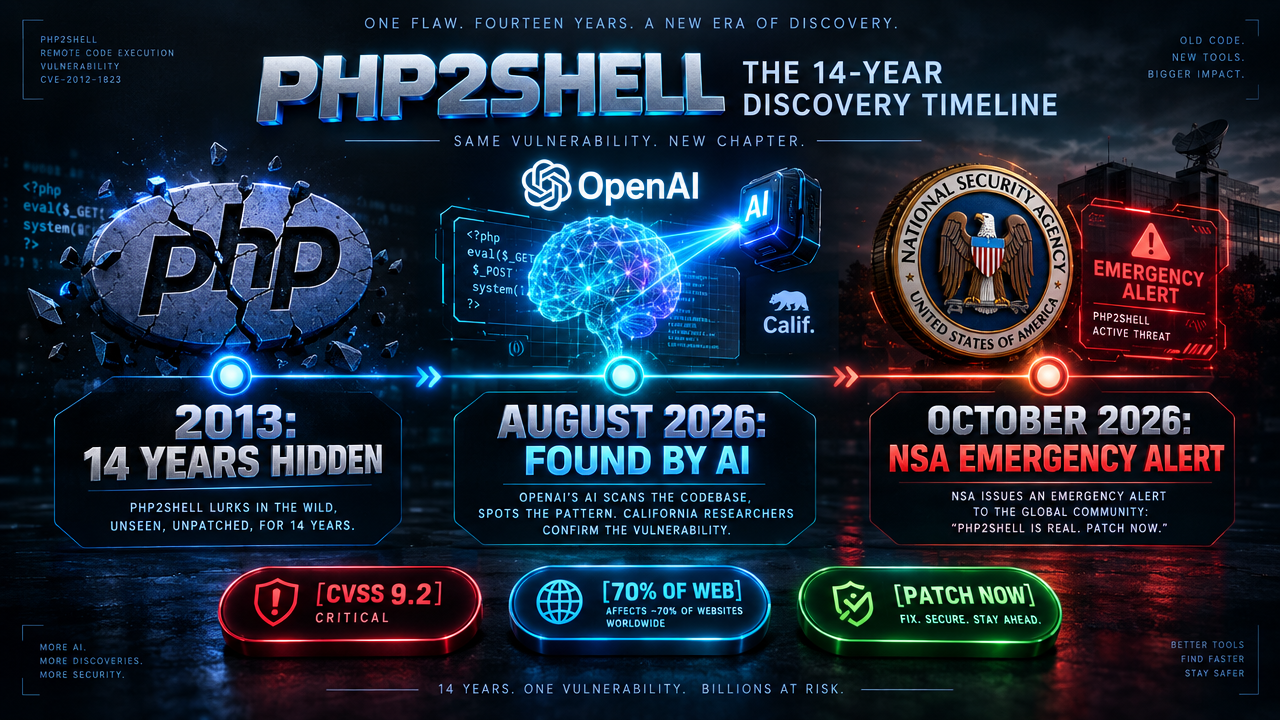
The most astonishing part of this whole story isn’t just the sheer size of the target. It’s the fact that this flaw sat completely undiscovered in the open-source code for almost 14 years. Human security teams scrutinized it, automated linters scanned it, and millions of websites ran on top of it every single day since 2013.
It took frontier artificial intelligence—specifically security researchers collaborating with OpenAI—to finally spot the flaw and prove how dangerous it truly was.
Here is what happened, why the security community is scrambling to patch, and the exact steps I took to protect my own live servers within minutes.
The 14-Year Ghost in the Engine
To understand how serious this is, you have to look at what PHP actually does when a visitor lands on your site.
Whenever someone opens an article or clicks “Add to Cart,” your web server hands that incoming request to an internal PHP worker process. The worker executes your site code, generates the HTML page, sends it back to the visitor’s browser, cleans up its temporary memory, and waits for the next person. A single worker can serve thousands of visitors back-to-back throughout the day.
The vulnerabilities—collectively nicknamed PHP2Shell and officially cataloged as CVE-2026-109618 and CVE-2026-109619—sit right in the middle of that memory cleanup loop.
Security researchers have traced the architectural roots of this memory issue all the way back to PHP 5.4 in 2013, with related code patterns going as far back as 2004. In fact, an external security audit flagged subtle memory limit warnings back in 2024. But at the time, human developers couldn’t find a reliable way for an outside attacker to weaponize it. Without a working proof-of-concept, the issue stalled in the development queue.
Then AI stepped into the arena.
Watch the full 60-second video breakdown of the 14-year bug and emergency patch below:
In August 2026, security researchers at Calif, operating under OpenAI’s “Patch the Planet” research initiative, used GPT-5.6 Sol to audit deep-seated open-source codebases. Instead of just highlighting syntax errors, the AI model traced complex memory execution paths across request cycles. It successfully generated a working, unauthenticated remote code execution exploit.
Shortly after, researchers at Wiz independently validated the attack surface using their own AI tooling alongside Gemini 4 Argon and GPT-5.6 Sol. As one security researcher noted on social media, AI did the heavy lifting that human code reviews missed for over a decade.
How the Bug Works (Without the Technical Jargon)
Most web vulnerabilities require a trick: an attacker needs to find an outdated plugin, guess an admin password, or inject code through a vulnerable contact form.
PHP2Shell bypasses all of that. An attacker doesn’t need a password. They don’t need an account. They don’t even need your WordPress plugins to have bugs. The flaw lives in the underlying PHP engine itself.
The two vulnerabilities attack the server using two distinct memory tricks:
1. CVE-2026-109618: The Half-Built Wall (Out-of-Memory Corruption)
When a server receives a specially crafted, unusually heavy web request, PHP tries to allocate memory to handle it. If the request hits PHP’s memory limit at the exact wrong split-second, the process halts halfway through building its internal data structures.
Under normal circumstances, PHP should throw away the scrap data. Instead, the engine’s cleanup routine mistakenly assumes the half-built structure is valid. An attacker who times this correctly can execute arbitrary code right inside the server memory.
2. CVE-2026-109619: The Unwiped Table (Stale Global State)
Think of a busy restaurant where a waiter clears away dirty plates from Customer A, but accidentally leaves Customer A’s credit card receipt on the table. Customer B sits down, grabs the receipt, and charges dinner to Customer A’s card.
In PHP, a worker process is supposed to wipe its memory clean before serving the next visitor. With this bug, references from one request can survive in memory after being marked as freed. When the next visitor’s request arrives on the same worker, PHP can get tricked into running whatever residual data was left behind.
Because this happens at the web server layer (especially on Apache servers using mod_php), the attack triggers before your WordPress or application security filters even have a chance to inspect the traffic.
Why the Emergency Alert Was Leaked Early

The original plan by the PHP Foundation and security labs was a coordinated, quiet release scheduled for late October. Coordinated disclosures give web hosting companies time to test and deploy patches behind closed doors before hackers find out the vulnerability exists.
That plan fell apart on October 20th.
A leak appeared on Hacker News claiming that a catastrophic Remote Code Execution bug in PHP was imminent. Within hours, security researchers on Mastodon and X verified that the leak was real. A developer mistakenly uploaded a demonstration video before the embargo lifted, and downstream container maintainers began publishing early patched builds.
With the secret out, attackers began building scanners to look for unpatched targets.
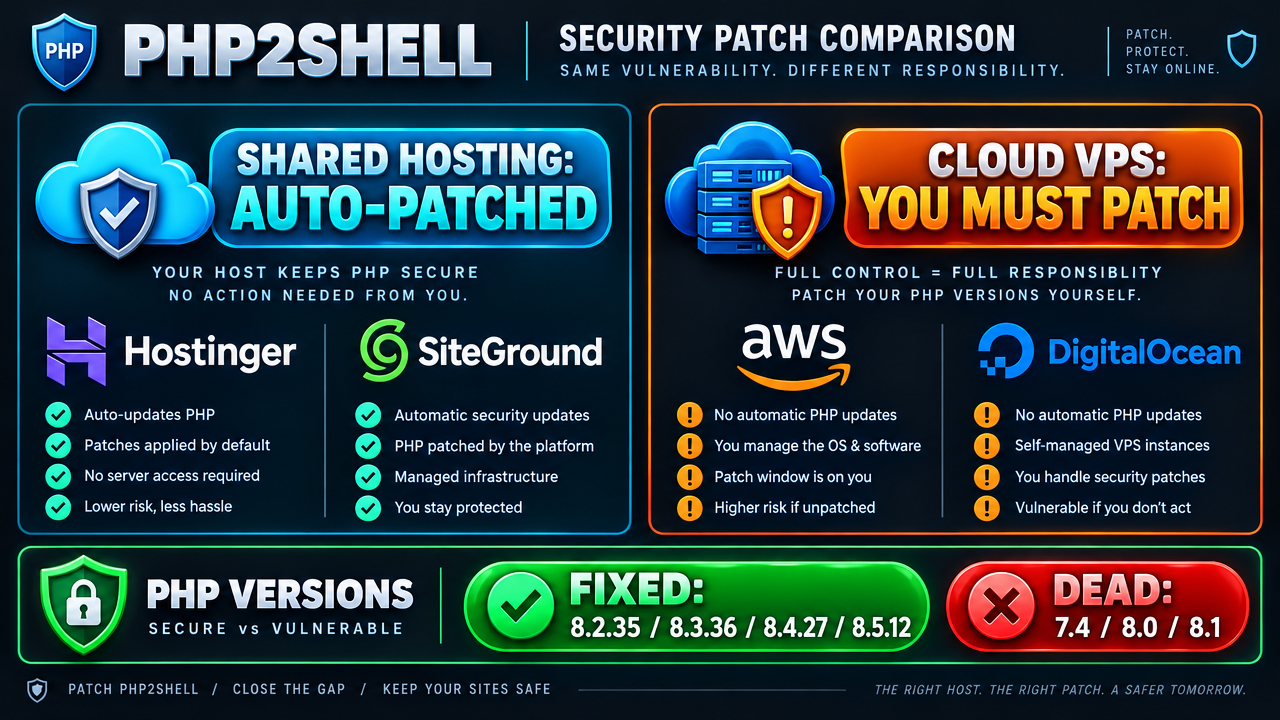
The PHP Foundation rushed their emergency security update out the door on October 21st, pushing official patches across every supported version branch:
- PHP 8.5 $\rightarrow$ Patched in 8.5.12
- PHP 8.4 $\rightarrow$ Patched in 8.4.27
- PHP 8.3 $\rightarrow$ Patched in 8.3.36
- PHP 8.2 $\rightarrow$ Patched in 8.2.35
The Great Hosting Divide: Shared Hosting vs. Self-Managed VPS
When a vulnerability of this scale breaks out, who is responsible for fixing it?
The answer depends entirely on how your website is hosted:
Scenario A: You Are on Shared Hosting (Hostinger, SiteGround, Bluehost)
If your website sits on standard shared hosting or managed WordPress hosting, your web host manages the PHP installation for you.
Hostinger, SiteGround, DreamHost, and major cPanel providers began rolling out server-level patches across their fleets immediately after the official release. If you log into your hosting dashboard and see that your site runs on PHP 8.2, 8.3, or 8.4, your host has likely already applied the fix or will complete it automatically without causing downtime.
However, there is one major catch: End-of-Life PHP versions.
If your website is running an abandoned version like PHP 7.4, 8.0, or 8.1, the official PHP project has discontinued security updates for those branches. While some hosting providers use custom vendor backports, running an unsupported version on a public server right now is an unnecessary gamble. You should switch your site to PHP 8.2 or 8.3 inside your hosting control panel today.
Scenario B: You Run a Cloud VPS (DigitalOcean, AWS, Oracle Cloud)
If you run an unmanaged virtual private server (VPS)—like many developers, digital agencies, and independent site owners do—you are completely on your own.
Cloud providers supply the raw virtual server, but they do not manage your operating system packages, your Docker containers, or your PHP runtimes. If you manage your own VPS and have not updated your packages since October 20th, your server is currently exposed to the internet with this vulnerability active.
Case Study: How I Patched My Own Oracle VPS in 10 Seconds
As soon as the advisory dropped, I logged into my own Oracle Cloud VPS to audit our active infrastructure.
Our WordPress site runs inside an isolated Docker container on top of Apache (wordpress:php8.3-apache). I opened a secure terminal and checked the active PHP version running inside the container:
$ docker exec wordpress php -v
PHP 8.3.33 (cli) (built: Aug 5 2026)
My live container was running PHP 8.3.33—built back in August. It was directly vulnerable.
Fortunately, the official WordPress Docker library pushed an updated container image containing the security fix yesterday afternoon. Because our stack uses Docker Compose with isolated data volumes, patching required zero server downtime and zero manual compilation:
# 1. Pull the newly patched image from Docker Hub
$ docker pull wordpress:php8.3-apache

# 2. Recreate the container with the new image
$ docker compose up -d

# 3. Verify the patched version inside the new container
$ docker exec wordpress php -v
PHP 8.3.36 (cli) (built: Oct 21 2026 16:02:46)
Within ten seconds, the container restarted with a clean bill of health: PHP 8.3.36, returning a crisp 200 OK on all web requests.
The 3-Step Action Plan for Website Owners
Whether you are a blogger, an agency owner, or an enterprise sysadmin, take five minutes today to run through this safety checklist:
1. Check Your Active PHP Version
If you use WordPress, you don’t even need terminal access. Log into your WordPress administrative dashboard, navigate to Tools $\rightarrow$ Site Health, click on the Info tab, and expand the Server dropdown. Check your PHP version string.
You want to see one of the verified safe releases:
* 8.2.35 or higher
* 8.3.36 or higher
* 8.4.27 or higher
* 8.5.12 or higher
2. Verify with Your Web Host
If you are on shared hosting and your version shows an older sub-release (such as 8.3.30 or 8.2.20), open a quick support ticket or check your provider’s status page. Ask if their upstream team has applied the emergency security patch for CVE-2026-109618.
3. Keep Web Application Firewalls Active
If you use Cloudflare or an edge firewall in front of your domain, ensure your managed WAF rules are toggled on. Cloudflare deployed automated protection rules across both free and enterprise plans ahead of the public leak. While edge firewalls are a temporary shield rather than a permanent replacement for server patches, they block known exploit probing while your host finishes updates.
What This Means for the Future of AI Security
The discovery of PHP2Shell marks an undeniable turning point in how software vulnerabilities will be found and fought.
For 14 years, human eyes read past this memory flaw. It lived quietly in production environments powering banks, government agencies, e-commerce stores, and personal blogs. Frontier AI models didn’t just spot the flaw; they reasoned through the multi-stage memory corruption required to prove it could be exploited.
The race between defenders and attackers has fundamentally shifted into high gear. When defenders use AI to find zero-day bugs, they have the power to secure 70% of the internet before an attack happens. But when disclosures leak early, threat actors use those exact same AI capabilities to build exploits faster than ever before.
Take a few minutes today to check your server version. Staying safe on the modern web doesn’t require complex engineering—it just requires checking your foundation before someone else does.