What Is Qwen Image Layered? (In Plain English)
Imagine taking a flat photograph and automatically turning it into a Photoshop-like project with separate layers. That’s what Qwen Image Layered does—it uses AI to decompose (split) any image into multiple RGBA layers, where each element sits independently and ready to edit.
Think of it like this: A traditional photo is a single sheet of paper. Qwen Image Layered is like separating that paper into 3, 4, 6, or even 8 transparent sheets, each containing different parts of the image (background, main object, foreground, shadows, etc.). Now you can move, delete, resize, or recolor each layer without affecting the others.
Key idea: This is not just object detection. It’s full editable layer generation with automatic background reconstruction. Released by Alibaba’s Qwen AI team in December 2025, this model is already reshaping how creators and developers approach image editing.
Why Is It Different From Other Tools? (SAM, Photoshop, etc.)
| Feature | SAM (Segment Anything) | Traditional Photoshop | Qwen Image Layered |
|---|---|---|---|
| Output | Binary masks (black & white) | Manual layers | Complete RGBA layers |
| Background Filling | Requires manual work | Built-in | Automatic AI generation |
| Speed | Slow (manual segmentation) | Very slow (manual work) | Instant (one API call) |
| Layer Count | Fixed | User-defined | Variable & automatic |
| Learning Curve | Moderate | Steep (Photoshop is complex) | Zero (fully automated) |
| Price (USD) | Free | $20–$80/month | $0.05–$0.02 per image [₹4–₹1.70 per image] |
The real difference: Traditional tools require you to manually select, mask, and fill. Qwen Image Layered does it all automatically in seconds.
Core Features That Make It Powerful
🎯 1. Variable Layer Decomposition (Choose Your Own Layer Count)
Unlike rigid tools, Qwen Image Layered adapts to your image:
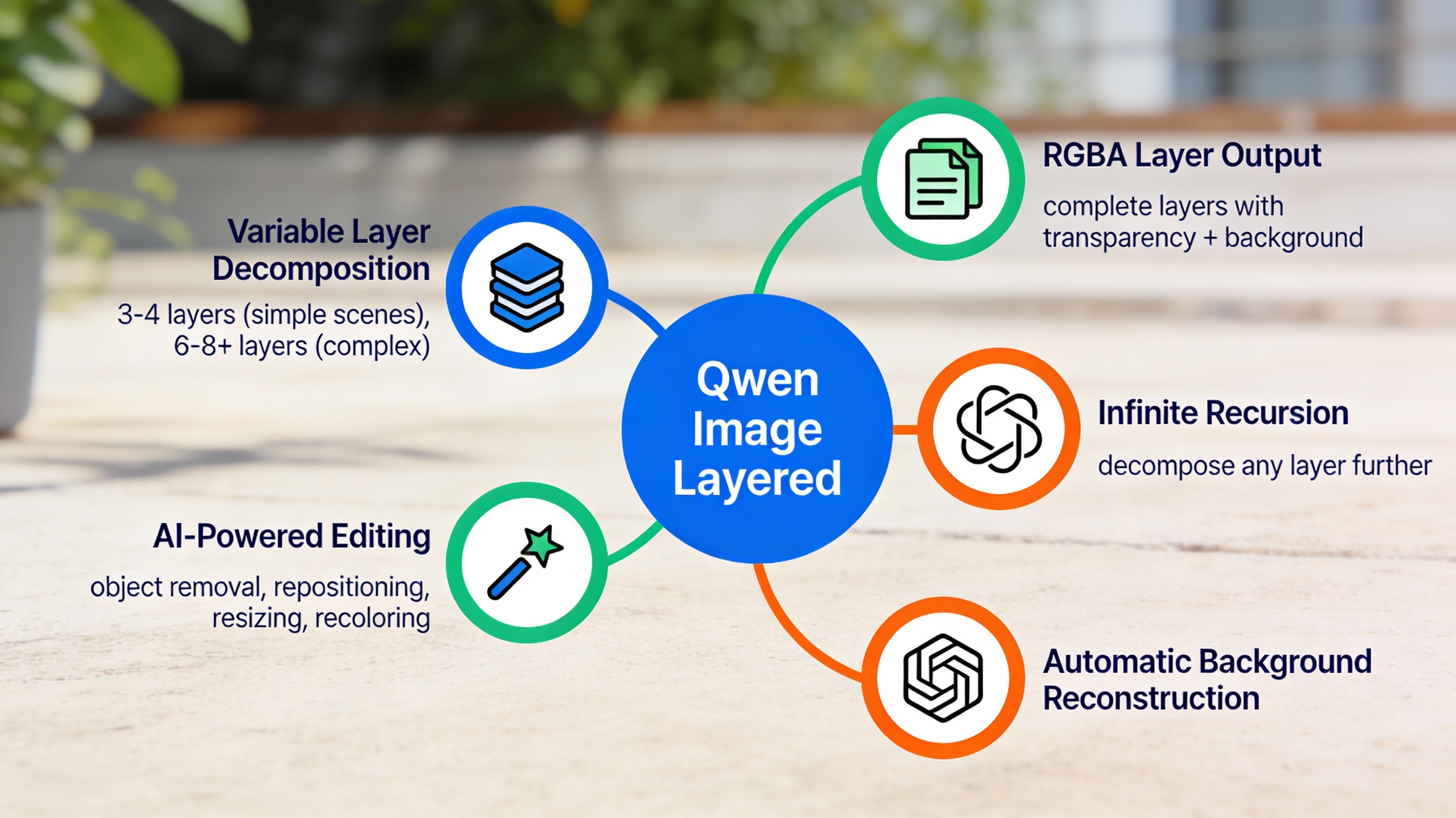
- Simple scenes (minimal objects): 3–4 layers
- Background, main subject, foreground
- Complex scenes (multiple objects, depth): 6–8+ layers
- Each object or depth level gets its own layer
You control it via API parameters—just specify num_layers: 6 and the AI handles the rest.
🖼️ 2. Complete RGBA Layers (Not Just Masks)
This is the game-changer:
- Each layer includes full color + transparency information (RGBA)
- The AI automatically reconstructs hidden areas (e.g., the background behind an object)
- You get lossless editing—move objects without weird gaps or artifacts
Real-world example: Remove a person from a photo. Traditional tools would leave a blank hole. Qwen Image Layered fills it with realistic background automatically.
♾️ 3. Infinite Decomposition (Drill Deeper Into Layers)
Got a complex layer? Decompose it further.
- Select any generated layer and split it again
- Go from global composition → fine details in multiple passes
- No layer limit—keep going as deep as needed
🎨 4. Built-In Editing Operations (No Extra Software Needed)
These editing tasks work perfectly on the generated layers:
- ✅ Object Removal: Delete an object and watch the background fill in automatically
- ✅ Repositioning: Drag objects anywhere without distortion
- ✅ Resizing: Scale individual layers independently
- ✅ Recoloring: Change colors of specific layers without bleeding into others
🔧 5. Prompt-Controlled Precision
Need a specific layer count? Tell it in your request.
- “Decompose into 3 layers” → Gets 3 layers
- “Decompose into 8 layers” → Gets 8 layers
- The model adapts automatically based on image complexity
How Much Does It Cost? (Pricing Breakdown)
| Provider | Price per Image (USD) | Price per Image (INR) |
|---|---|---|
| Fal.ai (recommended for beginners) | $0.05 | ₹4.20 |
| NanoGPT | $0.01 | ₹0.84 |
| Runware | $0.007 | ₹0.59 |
| AI/ML API | $0.021 | ₹1.77 |
| Replicate | $0.025 | ₹2.10 |
Budget example: 1,000 images/month = $10–$50/month (₹840–₹4,200/month).
Compare this to Photoshop ($55/month USD or ₹4,600/month INR) + the time you save. Qwen Image Layered wins for volume creators.
Real-World Use Cases (How You’ll Actually Use It)
📸 YouTube Thumbnails & Social Media
Need 50 thumbnail variations? Use Qwen Image Layered to:
- Isolate the main subject into one layer
- Change backgrounds without re-shooting
- Add text overlays to the foreground layer
- Keep the main subject sharp and professional
Time saved: 5 minutes per thumbnail instead of 20 minutes in Photoshop.
🛍️ E-Commerce Product Photos
Product photographers can:
- Generate lifestyle photos with different backgrounds
- Create “before/after” edits instantly
- Adjust lighting or colors without reshoot budgets
- Scale product photos for different markets
🎬 Content Creation & Video Editing
For YouTube videos, reels, and TikToks:
- Remove distracting objects from background footage
- Extract foreground subjects for green-screen effects
- Create smooth transitions between scenes
- Edit footage faster than traditional tools
🤖 Make.com & Automation Workflows
Your ideal use case as an automation builder:
Trigger: New product image uploaded
↓
Qwen Image Layered API: Decompose into 5 layers
↓
Extract main subject layer
↓
Auto-background replacement with studio white
↓
Upload to e-commerce platform
↓
Notify team via Slack
This automation runs 24/7 without manual work. Cost? ~₹1–2 per image (less than ₹2 / image).
🎮 Game Development & Design
Game studios use it for:
- Extracting characters from complex backgrounds
- Creating asset variations quickly
- Layering elements for visual effects
- Concept art iteration
How to Use It (Step-by-Step for Beginners)
Option 1: Via Fal.ai (Easiest, No Coding)
- Go to Fal.ai Qwen Image Layered
- Upload your image
- Set
num_layers: 4(or however many you want) - Click Generate
- Download the RGBA layer files
- Open in Photoshop, GIMP, or any image editor
Cost: $0.05 per image (₹4.20)
Option 2: Via API (For Developers & Automation)
Install the client:
npm install –save @fal-ai/client
Simple JavaScript code:
import { fal } from “@fal-ai/client”;
const result = await fal.subscribe(“fal-ai/qwen-image-layered”, {
input: {
image_url: “https://your-image.jpg”,
num_layers: 5 // How many layers you want
},
logs: true
});
console.log(result.data); // Your layer files
That’s it. The API returns your layers as separate files.
Option 3: In Make.com (Best for Your Workflow)
- Create a new scenario in Make.com
- Add an HTTP module
- Set method to
POST - Set URL to
https://fal.run/fal-ai/qwen-image-layered - Pass your image URL and layer count in the request body
- Connect the output to your next step (storage, social media, etc.)
Real scenario example:
- User uploads image to Google Drive
- Make.com triggers Qwen Image Layered API
- Layers are automatically saved to a folder
- Slack notifies the design team
Comparing Layer Counts: Simple vs. Complex Images
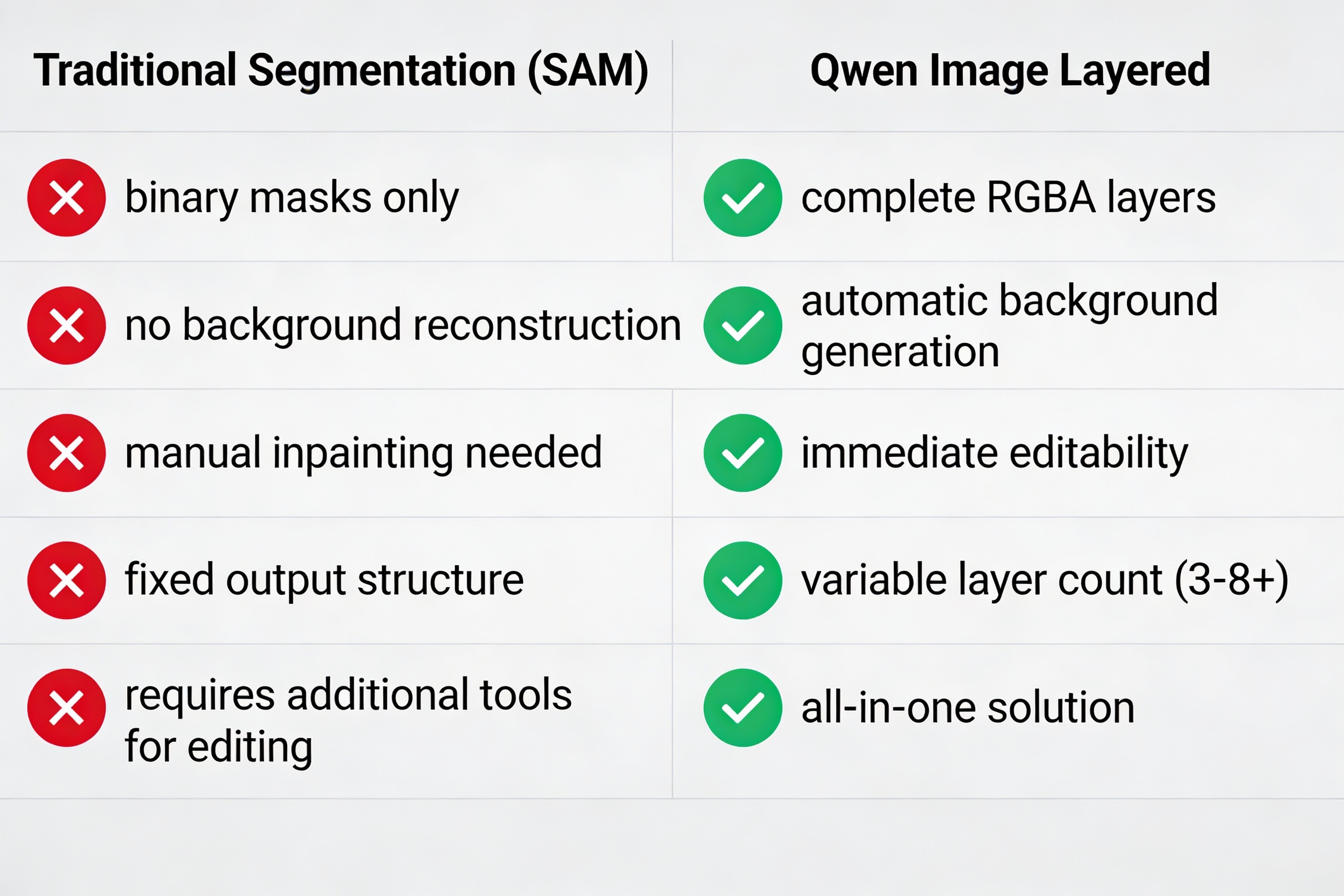
Simple scene (person + plain background):
- 3–4 layers work perfectly
- Faster processing
- Lower cost
Complex scene (crowded room, multiple objects, shadows):
- 6–8+ layers capture all detail
- Better for professional editing
- Slightly higher cost
Features Comparison Table
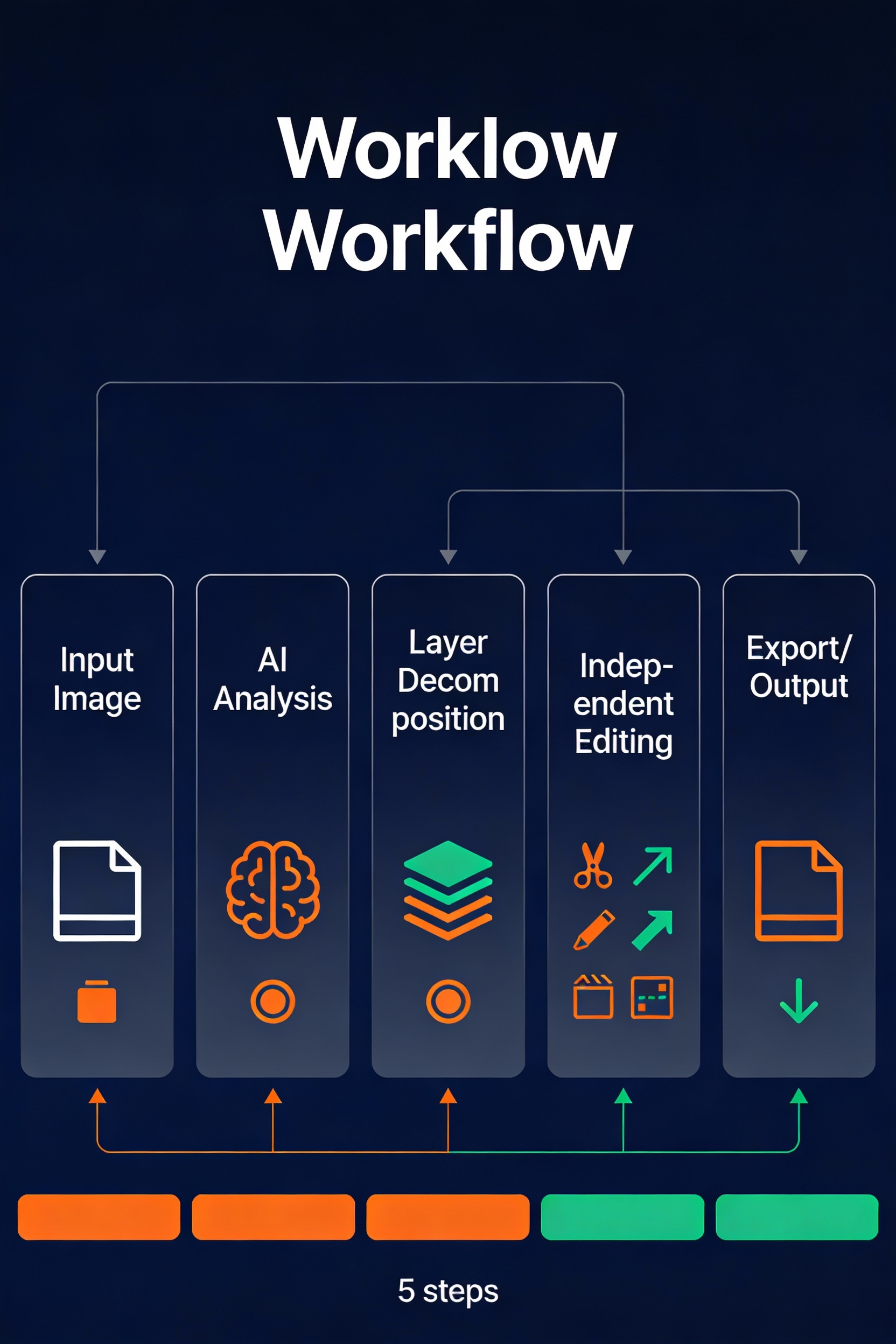
Key takeaway: Qwen Image Layered is end-to-end. You don’t need Photoshop, SAM, or inpainting tools. It’s one model that does everything.
Core Features Mind Map
Common Questions (Burning Questions Answered)
❓ Is this better than Photoshop?
For layer decomposition: Yes, it’s 10x faster and costs a fraction of Photoshop’s $55/month subscription.
For advanced design work (typography, complex masks, color grading): Photoshop is still more powerful. But Qwen Image Layered is perfect for the 80% of image editing tasks that are repetitive.
❓ Can I use it for commercial work?
Yes, fully. It’s open-source (Apache-2.0 license) and API access via commercial providers (Fal.ai, Runware, etc.) explicitly allows commercial use.
❓ What formats does it support?
Input: PNG, JPEG, WebP, and other standard formats.
Output: RGBA PNG files (transparent background). Each layer is a separate file.
❓ How fast is it?
Typical processing time: 10–30 seconds per image (depending on complexity and provider). Much faster than manual editing.
❓ Can I use it offline?
You can self-host the model if you have the hardware (it requires significant VRAM—24GB+ recommended). Most users prefer the API approach for ease.
❓ Will it work with my existing tools?
Yes:
- GIMP, Photoshop, Krita, Affinity Photo (import the PNG layers)
- Make.com, Zapier, n8n (via API)
- Custom scripts (Python, Node.js, bash/curl)
Getting Started: Your First Steps
Step 1: Choose a provider (Fal.ai is easiest for beginners).
Step 2: Test with 1–3 images to see results.
Step 3: If you like it, integrate via API into your workflow (Make.com, custom code, etc.).
Step 4: Batch process images and save hours per week.
Budget estimate for small creators: ₹500–2,000/month ($6–$24 USD) for 100–1,000 images.
Limitations You Should Know
⚠️ Not a replacement for professional design: Qwen Image Layered decomposes existing images. It doesn’t create new ones from scratch (for that, use Qwen Image or other text-to-image models).
⚠️ Variable quality on very complex images: Scenes with heavy occlusion (one object completely hiding another) may not decompose perfectly.
⚠️ Layer names are automatic: You don’t get to name layers like “Sky”, “Subject”, etc. But you can tell from visual inspection which is which.
⚠️ API-based only: There’s no official standalone desktop app yet. You need internet and an API key.
Why This Matters for 2025
For content creators: Less time in Photoshop = more time creating. Batch edit 50 product photos in 1 hour instead of 8.
For developers & automators: A new building block for workflows. Imagine auto-generating social media variations or product visualizations 24/7.
For businesses: Serious cost savings on design teams and photo editing software licenses.
Qwen Image Layered shows that AI isn’t just about generation anymore—it’s about decomposition and control. And that’s a massive shift in how we’ll edit images going forward.
Quick Checklist: Is Qwen Image Layered Right for You?
✅ You need it if:
- You edit 50+ images/month
- You want to automate photo editing
- You’re building Make.com workflows
- You work with product photos or content variations
❌ You might skip it if:
- You edit fewer than 10 images/month (Photoshop might be easier)
- You need AI image generation (not decomposition)
- You do heavy typography or color grading
Final Thoughts
Qwen Image Layered is not the future of image editing—it’s the present. Released in December 2025, it’s already being used by creators, developers, and businesses to automate image workflows.
For automation specialists like you, this opens up entirely new possibilities: batch image processing, dynamic background replacement, automated product photography, and seamless Make.com workflows.
The barrier? None. The cost? Pennies per image. The time saved? Hours per week.
Start with a free trial, process a few test images, and see how it fits your workflow. You’ll understand why people are calling this “Photoshop’s biggest competition in 2025.”
Resources & Links
- Official Model: Qwen Image Layered on Hugging Face
- Official Blog: Qwen Team Announcement
- Easy-to-Use API: Fal.ai – Qwen Image Layered
- GitHub Code: QwenLM/Qwen-Image on GitHub
- Academic Paper: Qwen-Image-Layered on arXiv
Your Next Step
Ready to try it? Start with Fal.ai (no API key needed for initial tests). Upload one of your product images or YouTube thumbnail and see the layers it creates. Takes 2 minutes.
Then, if you’re interested in automating this for Make.com, the Fal.ai API documentation has everything you need to get started in 15 minutes.
Question: What’s your biggest image editing bottleneck right now? Let me know in the comments—I can show you how Qwen Image Layered solves it specifically.