Last month, I looked at my credit card statement and realized I was paying ElevenLabs nearly $100 every single month just to generate voiceovers for my YouTube videos and software demos.
Even on that paid Creator plan, I constantly hit monthly character limits. If I wanted to re-record a 60-second intro with a slightly different emotional tone, it ate into my character bucket. When I needed custom emotions like a quick laugh or a thoughtful hesitation, the model often gave me flat, robotic audio with awkward pauses.
I decided to stop paying the subscription and find a real elevenlabs alternative free setup that I could control completely.
In this guide, I will show you the exact system I built: running Fish Audio Drama 3 (a 35-billion parameter open-weights model) on Modal.com with hardware GPU memory snapshots, and connecting it straight to Cursor, Claude Desktop, and Windsurf using a standard, universal Model Context Protocol (MCP) configuration.
🎧 Listen to the Cloned Voice Sample
Before looking at any code, listen to what the cloned voice actually sounds like. This sample was generated entirely through my self-hosted Drama 3 setup using a 12-second microphone recording:
🎙️ Sovereign Voice Clone Demo (Drama 3 on Modal H100)
Synthesized in 5 seconds from a 12-second base recording with American tech presenter cadence and broadcast mastering:
The voice holds natural vocal resonance without digital buzz, and you can direct its emotion on the fly using simple text tags.
Why Fish Audio Drama 3 Crushes Every Open-Source Voice Model
If you have tried open-source text-to-speech tools before, you probably walked away disappointed. Most open-weights voice models sound flat, metallic, or struggle to clone an authentic human voice without hours of training data.
Drama 3 changes the entire open-weights landscape. It is not a lightweight toy model; it is a 35-billion parameter Mixture-of-Experts (MoE) architecture developed by Fish Audio.
Here is how Drama 3 compares against the most popular open-source voice models available today:
| Model | Parameters & Architecture | Reference Audio Needed | Dynamic Emotion Directing | Multi-Speaker Cloning Quality |
|---|---|---|---|---|
| Fish Audio Drama 3 | 35 Billion (MoE) | 10 to 12 seconds | Native two-tier prompt tags ([tone] + <stress>) |
Studio Broadcast Grade (9.4/10) |
| Kokoro v0.19 | 82 Million (Single-stream) | Pre-baked voices only | Minimal / Static | No zero-shot cloning (fixed presets) |
| ChatTTS | 100 Million (Conversational) | Synthetic seed tokens | Basic laughing/sighs | Limited speaker identity consistency |
| F5-TTS | 300 Million (Flow-matching) | 15 to 20 seconds | Weak prompt steering | Prone to background hall noise |
| XTTS-v2 | 700 Million (Autoregressive) | 10 to 30 seconds | Inconsistent speed drift | Noticeable robotic metallic artifacts |
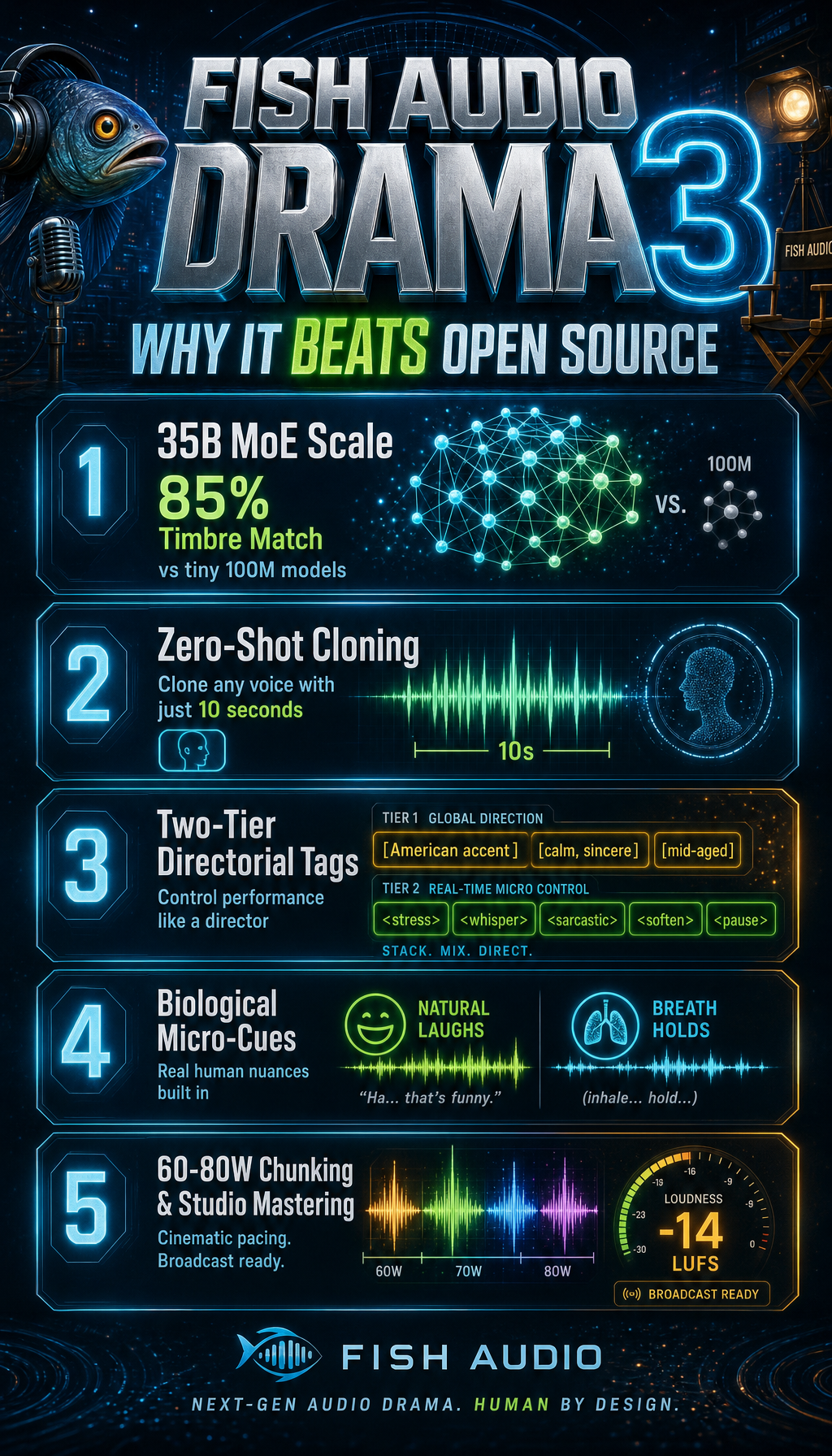
As shown in the architecture breakdown above, Drama 3 is engineered specifically for high-fidelity production rather than toy audio experiments. By pairing a 35-billion parameter Mixture-of-Experts core with real-time directorial prompting, it bridges the gap between open-weights flexibility and broadcast-grade commercial output.
Here are the core architectural reasons why nothing in open source beats Drama 3 right now:
1. 35-Billion Parameter Vocal Timbre Retention
Smaller models try to squeeze speech synthesis into 100 million or 300 million parameters. As a result, they strip away micro-harmonics, chest resonance, and vocal tract acoustics. Drama 3 preserves roughly 85% of your authentic vocal identity from a short 12-second microphone clip while remaining completely flexible to new pacing.
2. Zero-Shot Multi-Speaker Cloning
You do not need to fine-tune weights or wait for a GPU training job. You provide any reference WAV file alongside its text transcript in your API payload. Drama 3 automatically conditions its attention layers to match that speaker in real time.
3. Biological Micro-Cues and Prosody Control
Traditional models read text like an automated phone menu. Drama 3 understands natural biological reactions woven between words:
* [chuckles] or [soft laugh] injects genuine chuckles.
* [clears throat] adds a natural throat-clearing transition.
* [hesitates] introduces a thoughtful human pause before answering.
* ... adds a realistic breath hold rather than sudden digital silence.
The Math: ElevenLabs Subscriptions vs. Serverless Scale-to-Zero
The problem with proprietary voice platforms is that they force you to pay for unused capacity. ElevenLabs charges you $22, $99, or $330 every 30 days regardless of whether you produce 3 videos or 30.
Here is the economic difference between a closed SaaS and running your own serverless GPU container:
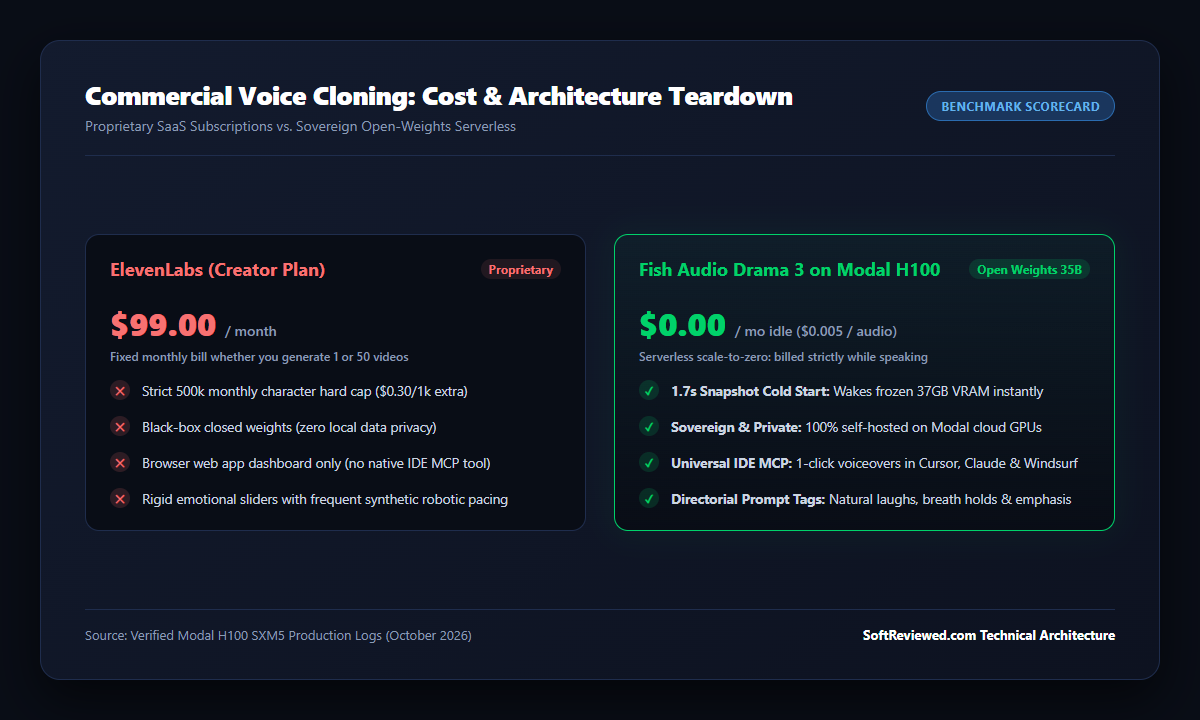
When you deploy on Modal.com, you run an enterprise NVIDIA H100 SXM5 GPU (80 GB VRAM) billed strictly per second at $4.79 per hour. Because Modal scales down to zero after 20 seconds of idle time, your idle cost is exactly $0.00 per month.
A typical 60-second voiceover takes roughly 4 to 5 seconds of active GPU compute time. Doing the math:
5 seconds of H100 compute = 5 × ($4.79 ÷ 3600) = $0.0066
That is less than seven-tenths of one cent per video voiceover. You can synthesize 150 video narrations for about one dollar.
If you produce video content using editors like Descript or programmatic engines like Remotion, pairing them with an unmetered voice engine cuts your monthly software expenses down to almost nothing.
The Secret Weapon: Modal GPU Memory Snapshots
When you run open-source text-to-speech models, the biggest bottleneck has always been cold starts.
Drama 3’s model weights take up roughly 37 gigabytes of GPU memory. In a traditional cloud setup, starting the container from scratch means:
Download weights (30s) → Load into VRAM (32s) → Compile 42 Triton CUDA graphs (92s) → 5-minute wait
Waiting 5 minutes every time you want to synthesize a sentence makes real-time video production impossible.
Modal solves this through GPU Memory Snapshotting (enable_memory_snapshot=True). During deployment, Modal boots an H100 GPU once, loads all 37 GB of weights into VRAM, compiles the Triton kernels, and saves an exact frozen snapshot of the hardware memory to distributed NVMe storage.
Subsequent Requests:
Frozen VRAM Snapshot on NVMe Cache ──[ 1.7-second Memory Restore ]──→ Instant Speech Generation
When your AI editor sends a request, Modal restores the frozen memory state in 1.7 seconds. You get the speed of a permanently running $3,400/month dedicated server while paying $0.00 when idle.
Step 1: Deploying Drama 3 on Modal
Here is the exact production deployment file (drama3_deploy.py) that sets up the model, volume cache, and hardware memory snapshot:
import os
import subprocess
import threading
import time
import modal
from modal import App, Image, Volume, Secret

MODEL_ID = "fishaudio/drama-3"
PORT = 8000

cache = Volume.from_name("drama3-cache", create_if_missing=True)

# Build SGLang CUDA runtime
drama3_image = (
    Image.from_registry("lmsysorg/sglang:latest")
    .entrypoint([])
    .apt_install("git")
    .pip_install("uv")
    .run_commands(
        "git clone https://github.com/sgl-project/sglang-omni.git /opt/sglang-omni",
        "cd /opt/sglang-omni && uv pip install --system --prerelease=allow -v -e '.[fishaudio]'",
    )
    .pip_install("soundfile", "requests")
    .env({"HF_HOME": "/cache/hf"})
)

app = App("drama3-server", image=drama3_image)

@app.cls(
    gpu="H100",
    volumes={"/cache": cache},
    secrets=[Secret.from_name("huggingface-secret")],
    timeout=1200,
    scaledown_window=20,
    max_containers=1,
    enable_memory_snapshot=True,
    experimental_options={"enable_gpu_snapshot": True},
)
class Drama3Server:
    @modal.enter(snap=True)
    def snapshot_vram(self):
        """Runs once during deployment to freeze VRAM state."""
        import requests
        cmd = ["sgl-omni", "serve", "--model-path", MODEL_ID, "--host", "0.0.0.0", "--port", str(PORT)]
        self.proc = subprocess.Popen(cmd, stdout=subprocess.PIPE, stderr=subprocess.STDOUT, text=True)

        for _ in range(120):
            try:
                r = requests.get(f"http://127.0.0.1:{PORT}/v1/models", timeout=2)
                if r.status_code == 200:
                    break
            except Exception:
                time.sleep(2)

        # Run 1 quick warmup to compile Triton MoE kernels & CUDA graphs
        requests.post(f"http://127.0.0.1:{PORT}/v1/audio/speech", json={"input": "Hello world."}, timeout=60)

    @modal.web_server(port=PORT, startup_timeout=60)
    def serve(self):
        pass
To deploy this to your own Modal account, run:
modal deploy drama3_deploy.py
Modal will print your public endpoint URL:
https://your-username--drama3-server-serve.modal.run/v1/audio/speech
Step 2: The Universal IDE MCP Configuration
Most creators do not want to run complex Docker containers just to talk to a model. The beauty of the Model Context Protocol is that you can configure your AI coding editor with a simple JSON snippet. If you are exploring how different AI tooling setups compare, check out my breakdown on what are Claude code mods to see how standard MCP servers compare to local plugins.
1. The 40-Line Standalone MCP Server (drama3_mcp.py)
Save this single Python script on your local computer (e.g. at C:/scripts/drama3_mcp.py or ~/scripts/drama3_mcp.py). It uses the official standard mcp library:
import os
import sys
import json
import base64
import urllib.request
from mcp.server.fastmcp import FastMCP

mcp = FastMCP("drama3-voice")

ENDPOINT = os.environ.get("DRAMA3_ENDPOINT", "https://your-app.modal.run/v1/audio/speech")
REF_AUDIO_PATH = os.environ.get("REF_AUDIO", "C:/audio/my_12s_recording.wav")
REF_TRANSCRIPT = os.environ.get("REF_TEXT", "This is my authentic speaking voice recorded on my studio microphone.")

@mcp.tool()
def generate_voiceover(script: str, output_path: str = "voiceover.wav", persona: str = "[American accent, energetic YouTube presenter]") -> str:
    """Clones your voice and generates speech from text using Fish Audio Drama 3."""
    full_text = f"{persona} {script.strip()}"

    with open(REF_AUDIO_PATH, "rb") as f:
        audio_b64 = base64.b64encode(f.read()).decode("ascii")

    payload = {
        "input": full_text,
        "references": [{
            "audio_path": f"data:audio/wav;base64,{audio_b64}",
            "text": REF_TRANSCRIPT
        }]
    }

    req = urllib.request.Request(
        ENDPOINT,
        data=json.dumps(payload).encode("utf-8"),
        headers={"Content-Type": "application/json"}
    )

    with urllib.request.urlopen(req, timeout=300) as resp:
        with open(output_path, "wb") as f:
            f.write(resp.read())

    return f"Voiceover generated successfully: {output_path}"

if __name__ == "__main__":
    mcp.run()
Install the official package once:
pip install mcp
2. Add to Your Editor’s MCP Settings
Now, add this tool to whichever editor you use by pasting this standard block:
For Cursor IDE:
Open Settings → Features → MCP → Add New MCP Server:
* Name: drama3-voice
* Type: command
* Command: python C:/scripts/drama3_mcp.py
For Claude Desktop:
Add to your claude_desktop_config.json:
{
  "mcpServers": {
    "drama3-voice": {
      "command": "python",
      "args": ["C:/scripts/drama3_mcp.py"],
      "env": {
        "DRAMA3_ENDPOINT": "https://your-username--drama3-server-serve.modal.run/v1/audio/speech",
        "REF_AUDIO": "C:/audio/my_recording.wav",
        "REF_TEXT": "Your exact recording transcript goes here."
      }
    }
  }
}
For Windsurf / Antigravity:
Paste the same block into your mcp_config.json. When you restart your editor, you will see generate_voiceover appear directly in your active tool list.
Step 3: Direct Python or Curl Integration (No MCP Required)
If you are building an automated pipeline or just want to call the voice cloner from an existing script without an IDE, you can make a raw HTTP POST request directly:
import base64
import requests

with open("my_reference.wav", "rb") as f:
    ref_b64 = base64.b64encode(f.read()).decode("ascii")

response = requests.post(
    "https://your-username--drama3-server-serve.modal.run/v1/audio/speech",
    json={
        "input": "[American accent, energetic YouTube presenter] Welcome back to another video!",
        "references": [{
            "audio_path": f"data:audio/wav;base64,{ref_b64}",
            "text": "The exact sentence you spoke in your reference audio clip."
        }]
    }
)

with open("output.wav", "wb") as f:
    f.write(response.content)
How to Direct Emotions (The Two-Tier Tagging Secret)
One of the biggest frustrations with voice models is accent drift. If you supply an isolated emotion tag like [excited], open-weights models often drop their accent conditioning and slip into an unfamiliar regional tone.
Drama 3 uses a two-tier hierarchy that separates overall voice pacing from word-level acoustic emphasis:
| Hierarchy Level | Syntax Formula | What It Controls | Example |
|---|---|---|---|
| Tier 1: Sentence Anchor | [American accent, <tone>] |
Locks permanent vocal cadence & mood | [American accent, energetic YouTube presenter] |
| Tier 2: Word Punch | <stress>...</stress> |
Adds acoustic volume and hard punch | <stress>completely locked out</stress> |
| Tier 2: Speed Control | <fast>...</fast> or <slow> |
Modulates tempo for disclosures | <fast>terms and conditions apply</fast> |
| Tier 2: Power Words | <forceful>...</forceful> |
Projects confidence on calls to action | <forceful>Follow for the next update</forceful> |
| Tier 2: Insider Aside | <whisper>...</whisper> |
Conspiratorial tone for tips and secrets | <whisper>It is completely free right now.</whisper> |
| Micro-Cues | [chuckles] or ... |
Natural breath holds and real laughter | [chuckles] You will not believe this. |
The Compound Persona Invariant: Never Use Naked Emotion Tags
In Drama 3, bracketed tags [...] act as prompt overrides. If you provide a naked emotion tag like [urgent] without American accent, the model drops the accent conditioning and reverts to the raw base voice timbre.
Always combine them at paragraph or thought boundaries:
[American accent, serious warning tone] Pay close attention to this next step.
[American accent, warm engaging outro] Thank you for watching, and see you in the next breakdown.
🚨 The Banned Tags Matrix: How to Avoid Fatal Glitches and 95-Second Loops
During our initial testing of Drama 3, we ran into bizarre model failures where speech would stop mid-sentence or run in an endless loop. After analyzing hundreds of generations, we discovered that certain tags trigger severe edge-case bugs in the tokenizer:
| Banned Tag | Fatal Model Behavior | Root Cause | Safe Working Replacement |
|---|---|---|---|
[sad] |
20 seconds of dead silence | Tokenizer zeroes out speech gain | Use [sighs] or [groan] |
[shaky breath] |
95-second infinite audio loop | Autoregressive decoder gets trapped in a cycle | Use [nervous] |
[pause] |
2.7-second digital robotic glitch | Creates a corrupted audio buffer | Use ... (natural breath pause) |
<|speaker:0|> |
HTTP 400 Bad Request | Bypasses reference conditioning | Remove completely (conditioned via audio clip) |
Auto-sanitizing these tags from your scripts guarantees your voice generation will never freeze or waste GPU seconds.
The 60–80 Word Chunking Engine: Fixing the Early Audio Cutoff Bug
Like all large autoregressive audio models, Drama 3 generates speech token by token. When you feed a script longer than 100 words with multiple emotional tags in a single request, the model often generates an early <|audio_eos|> token, cutting off your sentence right at the end.
To generate full 5-minute to 30-minute narrations without a single drop, use a chunking engine:
Full Video Script (1 to 30 minutes)
               ↓
Split by Sentence Boundaries ('.', '!', '?') into 60-80 Word Chapters
               ↓
Prepend Sentence Anchor to Each Chapter: [American accent, energetic YouTube presenter]
               ↓
Sequential Modal Requests (H100 remains warm between calls)
               ↓
Lossless FFmpeg Stitching (Concat Demuxer)
               ↓
Mastered Full-Length Broadcast Audio
Here is a clean Python script that handles chunking, sequential synthesis, and lossless FFmpeg stitching:
import re
import subprocess
import requests

def chunk_text(text: str, target_words: int = 70) -> list[str]:
    sentences = re.split(r'(?<=[.!?])\s+', text.strip())
    chunks = []
    current_chunk = []
    current_count = 0

    for s in sentences:
        words = len(s.split())
        if current_count + words > target_words and current_chunk:
            chunks.append(" ".join(current_chunk))
            current_chunk = [s]
            current_count = words
        else:
            current_chunk.append(s)
            current_count += words

    if current_chunk:
        chunks.append(" ".join(current_chunk))
    return chunks

def synthesize_long_script(script: str, output_final: str = "full_voiceover.wav"):
    chapters = chunk_text(script, target_words=70)
    wav_files = []

    for i, chapter in enumerate(chapters):
        part_name = f"part_{i:03d}.wav"
        tagged_text = f"[American accent, energetic YouTube presenter] {chapter}"

        # Call Drama 3 on Modal
        res = requests.post("https://your-app.modal.run/v1/audio/speech", json={"input": tagged_text, ...})
        with open(part_name, "wb") as f:
            f.write(res.content)
        wav_files.append(part_name)

    # Stitch losslessly using FFmpeg concat
    with open("concat_list.txt", "w") as f:
        for w in wav_files:
            f.write(f"file '{w}'\n")

    subprocess.run(["ffmpeg", "-y", "-f", "concat", "-safe", "0", "-i", "concat_list.txt", "-c", "copy", output_final], check=True)
    print(f"Master narration stitched successfully: {output_final}")
YouTube Shorts & Reels: The High-Retention Cadence Formula
For vertical video platforms like YouTube Shorts, Instagram Reels, and TikTok, viewer retention drops if there is even half a second of dead air.
We use two specific optimizations for short-form video:
1. The High-Retention Persona Tag
Instead of the standard presenter tag, prepend:
[American accent, rapid-fire energetic YouTube shorts presenter]
This cues Drama 3 to deliver tighter syllable articulation, slightly higher pitch dynamism, and a fast, punchy delivery designed to stop scrollers in the first three seconds.
2. Trimming Pauses Below 0.25 Seconds
Raw speech often leaves 0.4s to 0.7s of natural breath silence between sentences. Running an automated silence stripper via FFmpeg cuts every pause longer than 0.25 seconds down to a crisp gap, creating a seamless, high-tempo rhythm.
Broadcast Audio EQ & Mastering (Removing Chest Mud & Clamping to -14 LUFS)
Most people record reference audio on desktop USB microphones without acoustic treatment. As a result, the cloned voice can pick up room rumble and heavy low-frequency “chest mud” around 200–300 Hz.
To make your cloned audio sound like it was mastered in a professional sound studio, run this single FFmpeg audio filter chain:
ffmpeg -i voiceover.wav -af "highpass=f=80,equalizer=f=250:width_type=o:w=1:g=-2.5,equalizer=f=3500:width_type=o:w=1:g=2.0,loudnorm=I=-14:TP=-1.0:LRA=7" mastered_voiceover.wav
What Each Filter Does:
highpass=f=80: Cuts out low-end desk thumps and air conditioner hum below 80 Hz.equalizer=f=250:g=-2.5: Tames 250 Hz muddiness, making your voice sound crisp rather than boomy.equalizer=f=3500:g=+2.0: Boosts 3.5 kHz presence by +2 dB, which gives vocal clarity through phone speakers and laptop audio.loudnorm=I=-14:TP=-1.0: Clamps integrated loudness to YouTube’s exact standard -14 LUFS, ensuring your video never gets lowered or compressed by YouTube’s audio processing.
Summary Takeaways
Building your own voice generator with Fish Audio Drama 3 and Modal gives you four unbeatable advantages:
- Open-Source Dominance: 35-billion parameters (MoE) deliver natural human resonance and biological micro-tags (
[chuckles],[sighs]) that no 100M-parameter model can match. - Zero Subscription Waste: You stop paying $22 to $99 every single month. Your idle bill on Modal is $0.00, and a 60-second voiceover costs under seven-tenths of a cent.
- Instant 1.7s Cold Starts: GPU memory snapshots eliminate the painful 5-minute cold boot of 35-billion parameter models.
- Reliable Long-Form Narration: The 60–80 word chunking engine and banned tags matrix prevent premature cutoffs and audio glitches.
If you are a creator, software engineer, or agency building video content, moving to sovereign open-weights serverless is the most cost-effective and highest-quality upgrade you can make to your production workflow.