⚡ Executive Summary: 6 Accounts for 1 Subscription
Google allows subscribers on Google AI Pro (5 TB) and Google AI Ultra to share premium AI models, Workspace integration, and massive cloud storage with up to 5 family members (6 total users). However, crucial nuances govern quotas, developer perks, and carrier bundles like Reliance Jio.
Gemini 3 Pro model access, Gmail/Docs AI drafting, Google Flow video tools, and the 5 TB storage pool.
$10 monthly Google Cloud credit, Google Colab compute units, and YouTube Premium Lite.
Jio 5G gives 18 months free (₹35,100 value), but Google blocks YouTube Premium Lite because it is classified as a partner trial.
Watch the Complete Step-by-Step Video Walkthrough
Watch Jovin demonstrate the Reliance Jio 5G offer redemption, family invitation dispatch via families.google.com, 5 TB shared storage activation, and Antigravity quota verification live on screen.
1. The 6-User Ecosystem: How Google AI Family Sharing Works
Most premium artificial intelligence subscriptions—such as ChatGPT Plus, Claude Pro, or Perplexity Pro—are strictly tied to a single user profile. Sharing credentials often triggers multi-factor authentication locks or immediate concurrent-session throttling.
Google has taken a fundamentally different architectural path. By integrating its generative AI models directly into the Google One family infrastructure, a single paying subscriber can extend premium generative AI capabilities to their entire household without sharing a single password or compromising individual account privacy.
[Google AI Pro / Ultra Subscription]
                  │
                  ▼
      [families.google.com Group]
                  │
  ┌───────────────┴──────────────────────────────────────────┐
  ▼                                                          ▼
[1 Plan Manager (Owner)]                      [Up to 5 Family Members (18+)]
• 5 TB Storage Controller                     • Sovereign Google Account Logins
• Full Gemini 3 Pro Engine                    • Full Gemini 3 Pro Engine
• Workspace AI (Gmail & Docs)                 • Workspace AI (Gmail & Docs)
• Exclusive Developer & Cloud Credits         • 100% Zero Chat Visibility to Owner
Under this model, the household consists of 1 Plan Manager (the primary billing contact) plus up to 5 invited members, bringing the total group capacity to 6 people. Each user accesses Gemini using their own personal Google identity, maintaining complete separation of prompts, saved chats, and personal files.
2. Entitlement Breakdown: What Family Members Get vs. Excluded Perks
While Google markets the subscription as a household upgrade, not every single developer perk or third-party service passes through the family gate. Below is the audited entitlement breakdown comparing what family members receive against features reserved strictly for the primary account owner.
| Feature / Tool | Family Members | Plan Manager | Operational Reality |
|---|---|---|---|
| Gemini 3 Pro Models | ✅ Active | ✅ Active | Access to advanced reasoning, large context windows, and multimodal analysis. |
| Gemini in Gmail & Docs | ✅ Active | ✅ Active | In-app sidebar drafting, email summarization, and presentation outlines (18+ only). |
| Google Flow & Video Studio | ✅ Active | ✅ Active | Generative scene and cinematic video rendering powered by Google Veo. |
| Shared Cloud Storage | ✅ Pooled (5TB) | ✅ Pooled (5TB) | Shared central reservoir across Google Drive, Gmail, and Google Photos. |
| AI Usage Credits Pool | ⚠️ Shared | ⚠️ Shared | Monthly allowance of generative image/video credits shared among all 6 users. |
| $10/mo Google Cloud Credit | ❌ Excluded | ✅ Exclusive | Tied strictly to the primary billing account’s Google Developer Program console. |
| Google Colab Compute Units | ❌ Excluded | ✅ Exclusive | High-RAM GPU/TPU instances for data science remain exclusive to the plan manager. |
| YouTube Premium Lite | ❌ Excluded | ⚠️ Conditions Apply | Non-shareable individual perk; subject to Google partner trial exclusions. |
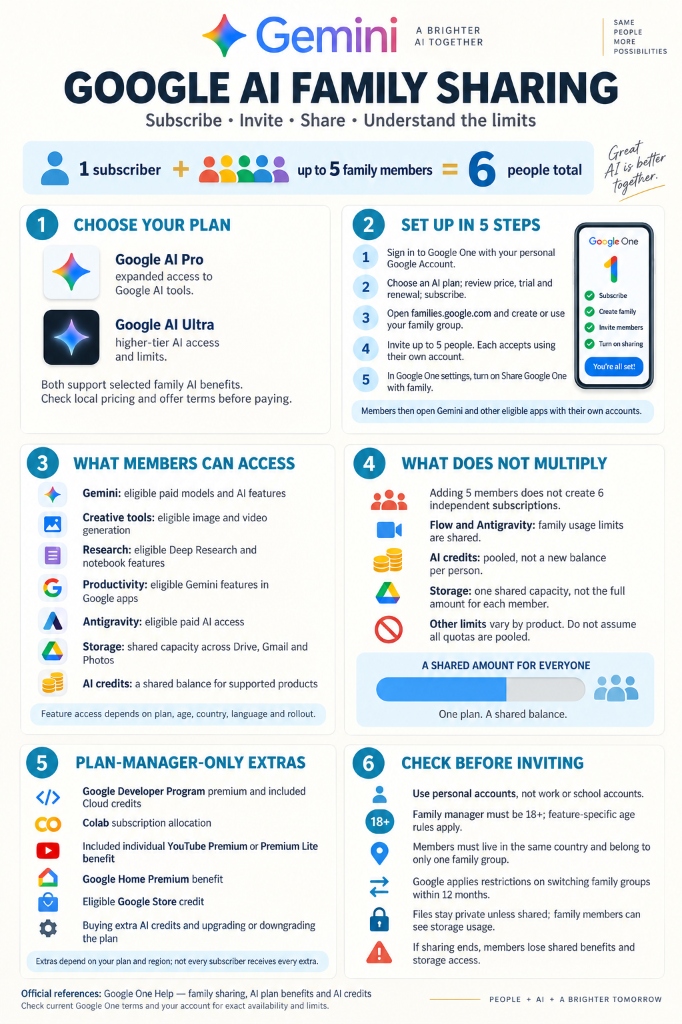
Figure 1: Complete official operational architecture, setup stages, shared assets, and plan manager exclusions.
3. The Reliance Jio 18-Month Offer: ₹35,100 Value Analyzed
In India, Google teamed up with Reliance Jio to execute one of the largest generative AI distributions globally. Under the Jio Google AI Pro Welcome Offer, eligible subscribers receive 18 months of Google AI Pro (5 TB) completely free of cost.
📋 Eligibility Criteria for Jio Google AI Pro
- Network Profile: Active Reliance Jio 5G retail consumer (prepaid or postpaid).
- Recharge Threshold: Enrolled in an Unlimited 5G plan priced at ₹349 or higher.
- Age Requirement: Account owner must be verified as 18 years or older.
- Continuous Renewal: The 18-month complimentary access requires maintaining an active ₹349+ recharge cycle without lapses.
At the standard retail price of ₹1,950 per month, this complimentary subscription delivers ₹35,100 in direct software savings over the 18-month duration. Most importantly, accounts activated through the MyJio application retain full family sharing rights: the 5 TB storage pool and Gemini 3 Pro model access can be extended immediately to 5 household members.
4. Why YouTube Premium Lite Is Missing on Jio Accounts (The Catch)

A common source of frustration among Jio users is the absence of YouTube Premium Lite. While retail Google AI Pro subscribers in supported regions receive ad-reduced YouTube viewing automatically, Jio users find that regular video ads continue uninterrupted.
The root cause is not a technical glitch or an account misconfiguration. It stems from a strict clause codified in Google One Support Answer 17101453:
“Third-party subscribers: Paid Google AI Pro members on qualifying partner plans. This excludes Google AI Pro members in a trial period.”
Because Reliance Jio distributes Google AI Pro as a complimentary 18-month promotional bundle (with zero direct billing to Google), Google classifies the entire duration as an extended partner trial. Under Google’s licensing framework, trials are ineligible for YouTube Premium Lite. Furthermore, because billing is carrier-managed, subscribers cannot attach the discounted in-app YouTube add-on. Users seeking ad-free streaming must maintain a separate standalone YouTube subscription.
5. Step-by-Step Walkthrough: Setting Up Family Sharing in 5 Minutes
Configuring family access requires coordinating two native Google management consoles: Google Families and Google One Settings. Follow this operational checklist to establish the sharing link properly:
Step 1: Form the Family Group
Open families.google.com signed in with your personal Google account (work or educational Workspace accounts are incompatible). Click Create family group.
Step 2: Dispatch Invitations (Up to 5 Members)
Enter the Google email addresses of up to 5 family members. Each invited recipient must have their Google Play country set to the identical region as the plan manager. Each member opens their invitation email and clicks Accept.
Step 3: Enable Google One Sharing Toggle
Navigate to one.google.com/settings. Expand Manage family settings and toggle Share Google One with family to ON.
Step 4: Verify End-to-End Member Activation
Have an invited member visit gemini.google.com. Confirm the model selector displays Gemini 3 Pro. Next, open Google Docs and confirm the Gemini side panel pen icon is operational.
6. The Quota Reality: Why 1 Subscription Does Not Mean 6 Full Accounts
A critical misconception is assuming that adding 5 members creates 6 independent, uncapped enterprise accounts. In reality, Google enforces a strict resource pooling architecture:
Each member continues using their base 15 GB free allocation. Once that threshold is crossed, storage draws from the single shared 5 TB pool. Adding members does not increase total disk space.
High-compute tools like Google Flow, Veo video generation, and Imagen image synthesis consume tokens from a single shared household credit balance.
If two or more family members run heavy Deep Research queries or massive code-debugging sessions simultaneously, Google’s adaptive rate limits throttle the group faster than a solo account.
7. The Privacy Firewall: Can the Plan Manager Read Your Chats?
The primary concern raised by family members before accepting an invitation is surveillance: Can the family organizer see my prompts, generated answers, or private emails?
🔒 Strict Zero-Cross-Visibility Guarantee
Google enforces an absolute zero-visibility policy between family members. The plan manager can never view your Gemini chat logs, prompt history, Google Drive files, Google Photos albums, or personal emails. The only metric visible to the manager is total gigabytes of storage consumed across the shared drive pool.
8. Frequently Asked Questions (PAA Direct Answers)
Can Gemini Advanced be shared with family members?
Yes, subscribers on Google AI Pro and Google AI Ultra plans can share Gemini Advanced access and 5 TB of cloud storage with up to 5 family members via Google Family Groups.
Does Google AI Pro include YouTube Premium Lite for family members?
No, YouTube Premium Lite is an individual, non-shareable benefit reserved strictly for the primary plan manager and cannot be shared across family accounts.
Why is YouTube Premium Lite not working on my Jio Google AI Pro account?
Google’s official terms exclude promotional partner trials from receiving YouTube Premium Lite; because Jio’s 18-month complimentary offer is classified as a trial, the YouTube benefit remains locked.
What happens if a family member is under 18 years old?
Family members under 18 can access basic Gemini features and shared storage, but Google restricts Workspace AI integration (Gmail/Docs) and advanced video creation tools to verified adults.
Can I switch my Google Family Group at any time?
No, Google imposes a strict 12-month cooldown on changing family groups; once you leave or join a group, you cannot switch to a different family group for one full year.