Short version: Ming 3.0 TTS is a free, open source voice cloning model with an MIT license. I ran it offline on my own Windows laptop with a 6 GB graphics card and cloned my voice. The plain result sounded like me. Sound tags like [Sigh] and [Laughter] worked too. Emotion settings and style instructions barely changed my cloned voice, and I explain the one trick that fixed that below.
A minute of audio takes about 3 minutes on my laptop and about 1 to 1.7 minutes on a rented L40S card.
Is Ming 3.0 TTS free, and can it run offline?
Yes to both. The model and the code use the MIT license, so there is no subscription, no sign up and no character limit. After the one time download (about 7.6 GB with the Python environment), it runs fully on your own computer with no internet. That makes it a real free voice cloning option for people who do not want an online tool with usage caps.
What is Ming 3.0 TTS?
Ming 3.0 TTS is a free, open source text to speech model from inclusionAI that can copy a voice from a short audio clip. It comes in two sizes. The small one has 0.5 billion parameters and the bigger one is a mixture of experts model with 7.9 billion total and 1.3 billion active. Both use the MIT license.
I tested the small one, Ming-3.0-tts-0.5B. It speaks Chinese, English, German, Spanish, French, Korean and Japanese. It also has Cantonese and Sichuanese dialect control. Output is 44.1 kHz audio.
I already use Fish Audio Drama 3 for my cloned voice voiceovers, so this was a side by side check. I wanted to know if a much smaller model could do the same job with fewer headaches.
What can Ming 3.0 TTS actually do?
The official cookbook lists nine modes. Each mode is a separate call, and the docs say controls from one mode are rejected by the others. That one rule explains most of what I ran into later.
| Mode | What it does | What I found on my voice |
|---|---|---|
| Voice cloning | Copies a voice from a short clip and its transcript | Sounded like me |
| Sound tags | 14 inline tags like breath, sigh, laughter | Worked, six sounded good |
| Emotion | Seven fixed emotions for the whole line | Only a faint change |
| Free text style | Describe the delivery in plain English | Ignored with my clip, worked after one fix |
| Speed, pitch, volume | Three preset levels each | Ran without errors |
| Voice design | Make a voice from a description | Made a new voice, not mine |
| Built-in voices | Five English voices, 100 plus Chinese | Fine, but not my voice |
| Languages and dialects | Five extra languages plus Cantonese and Sichuanese | Ran with my English clip as the reference |
How do I install Ming 3.0 TTS?

You clone the official GitHub repository, install its requirements, download the model from Hugging Face and run infer.py. You need an NVIDIA GPU with CUDA. The authors tested the 0.5B model on H800 and H20 cards, and I ran it on a mid range 48 GB card without problems. More on memory needs in the next section.
git clone https://github.com/inclusionAI/Ming-3.0-tts.git
cd Ming-3.0-tts
pip install -r requirements.txt
pip install pynini==2.1.6
pip install "huggingface_hub[cli]"
hf download inclusionAI/Ming-3.0-tts-0.5B --local-dir Ming-3.0-tts-0.5b
The pynini line is the one that caught me out. It cleans up numbers and symbols in your text. Without it my first run crashed with a missing module error. The repo says you can skip it by adding --no_text_normalization, and it recommends conda on Windows and Mac because the wheels are unreliable there.
Then check that the download is healthy and run your first clone:
python tools/preflight.py --model_path ./Ming-3.0-tts-0.5b

python infer.py \
  --model_path ./Ming-3.0-tts-0.5b \
  --task TTS \
  --language_id English \
  --text "Welcome to my channel." \
  --prompt_wav_path my_voice.wav \
  --prompt_text "Exact words spoken in my_voice.wav" \
  --use_spk_emb \
  --output output/first_test.wav
Your reference clip needs its exact transcript. The code throws away the audio prompt if the matching text is missing.
What graphics card do I need for Ming 3.0 TTS?
The 0.5B model used about 3 GB of GPU memory when I measured it, and it ran fine on my 6 GB RTX 3050 laptop card. I did not test anything smaller than that. The authors list only H800 and H20 data center cards as tested.
| What I measured | Result |
|---|---|
| Memory after loading the model | 2.78 GB |
| Peak memory while making a 14 second clip | 2.88 GB (3.06 GB reserved) |
| Card used | NVIDIA L40S |
Does Ming 3.0 TTS run on Windows?
Yes. I ran it on my Windows 11 laptop with an RTX 3050 6 GB card, and it cloned my voice with no errors. The official docs do not list Windows as tested, so this is my own result. I used a fresh Python 3.11 environment, PyTorch 2.6 with CUDA 12.4, and skipped the optional pynini package because its Windows packages are unreliable (text normalization off).
| My RTX 3050 6 GB laptop result | Number |
|---|---|
| Model load time (files already on disk) | 3.6 seconds |
| Time to make 12.6 seconds of audio | 23.5 seconds, about 2x slower than real time |
| Time to make 44 seconds of audio in one call | 123.8 seconds, about 2.8x slower than real time |
| Estimated time for 1 minute of audio | About 3 minutes (scaled up from the 44 second run, not a separate measurement) |
| Peak graphics memory | 2.88 GB |
| Disk space used | About 7.6 GB (4.8 GB environment plus 2.8 GB model) |
One thing to watch: Windows and your open apps already use part of a small card. Mine had about 2 GB taken before I started, and 4 GB free was enough.
Does Ming 3.0 TTS run on a Mac?
I could not confirm that it does. The code defaults to an NVIDIA GPU, and it has no support for Apple chips (the MPS backend) that I could find. A CPU run may technically start, but the docs do not cover it and I did not test it. If you are on a Mac, rent a cloud GPU instead.
Can I run it without my own GPU?
Yes. I ran mine on Modal, a pay per second GPU service, with the server asleep until a request arrives and a 30 second idle timer. The recipe is the same four steps inside a container image: a Python 3.10 base, git clone, pip install -r requirements.txt and pip install pynini==2.1.6. Keep the model cache on a persistent volume so the weights download only once.
I read these numbers from the Modal dashboard’s call log, which shows the startup time and run time of each call separately. I used the same script of about 44 seconds of audio on each card.
| GPU | Run time for 44 s of audio | Cold start | Price per hour |
|---|---|---|---|
| NVIDIA L40S | 38.9 seconds (faster than real time) | 13.5 seconds | $1.95 |
| NVIDIA H100 | 66 seconds | 15.8 seconds | $3.95 |
| NVIDIA L4 | 98 seconds | 20 seconds | $0.80 |
| My RTX 3050 laptop | 123.8 seconds | 3.6 seconds (model load only) | Free |
The prices are the per second rates on Modal’s pricing page, converted to hours by me, for the GPU only. The L40S was the fastest in this test and the H100 was slower and twice the price, so skip the H100 for this model. A longer 54 second script on the L40S took 90 seconds, so run time is not perfectly steady from one script to the next.
How much does a minute of audio cost on Modal?
By my math from the listed rates, about 4 cents on the L4 and about 7 cents on the L40S. That counts the run, the cold start and the 30 second idle tail. If you only make a few voiceovers a week, the cost is small either way. If you need the speed, the L40S costs only a few cents more per minute and finishes in roughly half the time of the L4. If you can wait about 3 minutes, your own graphics card costs nothing.
Which GPU should I choose?
| If you want | Use |
|---|---|
| Free and you can wait | Your own NVIDIA card with 6 GB or more |
| Fastest results | Modal L40S |
| Cheapest cloud option | Modal L4 |
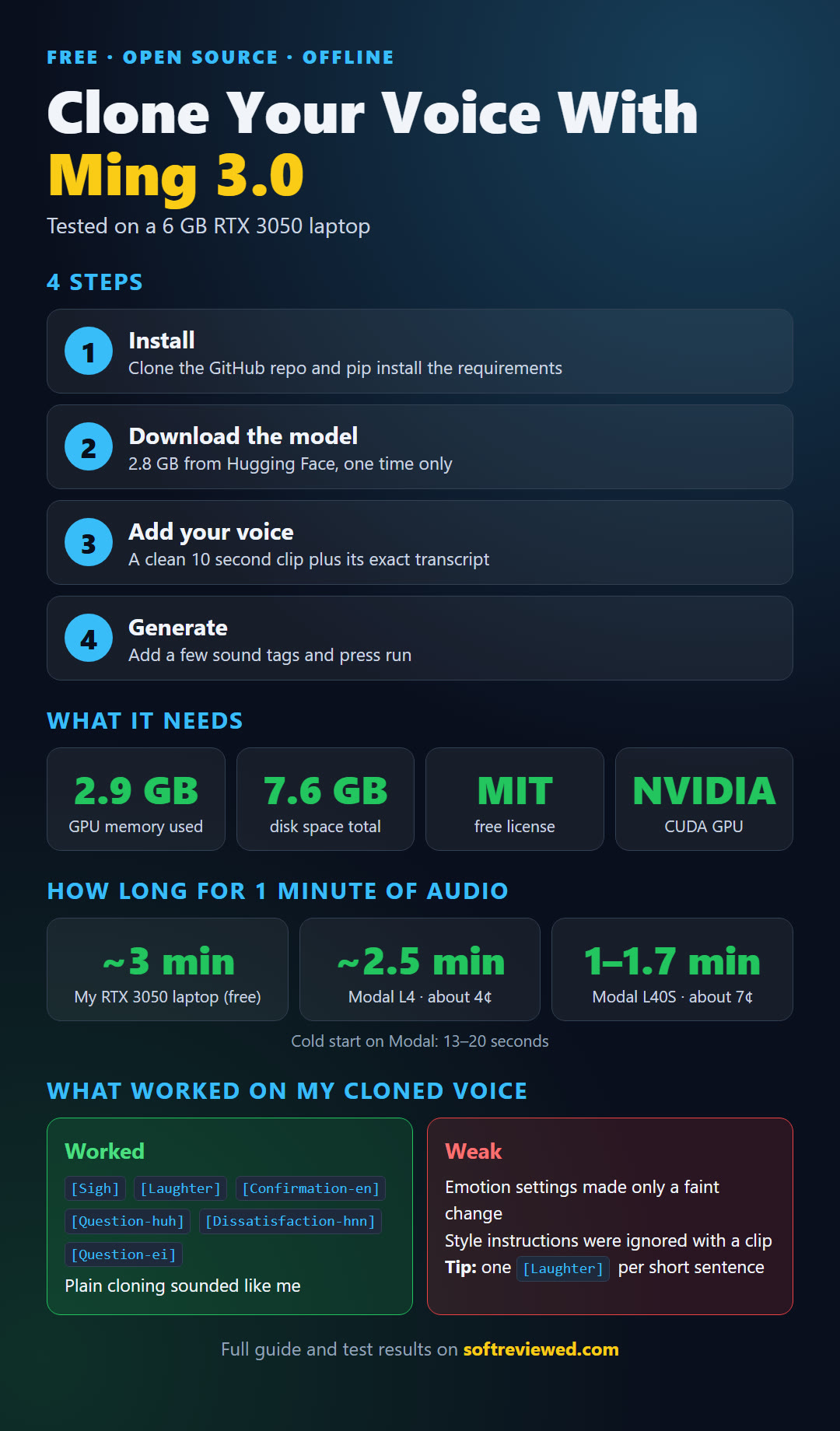
Here is the whole process, the hardware it needs and my results on one page:
Which sound tags work with a cloned voice?
All 14 tags go straight into the text, and they work with the normal cloning call. I used them with my cloned voice and six sounded natural to me: [Sigh], [Laughter], [Confirmation-en], [Question-huh], [Dissatisfaction-hnn] and [Question-ei]. Keep the square brackets and the capital letters exactly as written.
One placement tip: my first [Laughter] did nothing because it was the fifth tag in a long chain. When I retested it on my own laptop in short sentences, with one laugh per sentence, it worked in all eight clips. Put one laugh in a short sentence and do not bury it in a row of tags.
| Sounded good to me | Skip for now |
|---|---|
[Sigh] [Laughter] [Confirmation-en] [Question-huh] [Dissatisfaction-hnn] [Question-ei] |
[Breathing] [Cough] [Uhm] [Surprise-ah] [Surprise-oh] [Question-ah] [Question-en] [Question-oh] |
The skip list is not a verdict that those tags are broken. They did not stand out to me, and a few are Chinese style sounds that may sit oddly in English. Test them on your own voice.
How do I use the tags so it sounds natural?
Put a tag right before the sentence it reacts to, and use only five to seven tags per 90 words. When I used all 14 in one short script it sounded forced, especially with the question tags back to back. Here is an AI news style example built from the tags that worked for me:
Okay big news in AI today. A new open source voice model just dropped and it runs on one small GPU. [Dissatisfaction-hnn] I was hoping for stronger emotion control though. [Sigh] Which is a shame. But the sound tags? [Laughter] Those actually work really well. [Confirmation-en] So is it worth trying? [Question-huh] I think so.Do emotion settings work on a cloned voice?
Barely. The emotion setting takes one of seven fixed values: happy, sad, angry, fear, disgust, surprise or neutral. On my cloned voice the change was faint, even when I used sentences with real emotion in them. You cannot type your own emotion, and you cannot change emotion mid line.
The model page admits this. It says emotion control is harder when the words carry no emotional signal, and the harder emotion benchmark score for this model is 37.33%. My guess from reading the code is that the calm delivery in my reference clip wins over the setting. The docs do not say that, so treat it as my explanation and not a fact.
Why does free text style control fail with my clip?
The official cookbook says adding a reference clip to free text mode is not recommended. Every example in the docs runs without one. I confirmed the reason the hard way. With my clip, instructions like whisper and angry barely changed anything. Without a clip, the same instructions worked.
The fix I found is to keep your voice but drop the clip. The model can read your clip and boil it down to a tiny 192 number file that holds your voice character and none of the delivery. You then pass that file instead of the clip. After I did that, the whisper, angry, sad and news anchor instructions started working on a voice that still sounded like me.
There is a catch. The English drifted toward a native American accent. If your accent matters to you, this trade off may not be worth it. This workaround is my own, and it is not in the official docs.
How does Ming 3.0 TTS compare with other open voice models?
On the public English test set, the small Ming model has a word error rate of 1.584%, which beats F5-TTS and CosyVoice3-0.5B. It does not win on voice similarity. These numbers come from the model’s own page and are not my measurements.
| Model | English word error (lower is better) | Voice similarity (higher is better) |
|---|---|---|
| Ming-3.0-tts-0.5B | 1.584% | 0.691 |
| Ming-3.0-tts-tiny | 1.666% | 0.728 |
| CosyVoice3-0.5B | 2.020% | 0.718 |
| CosyVoice3-1.5B | 1.450% | 0.695 |
| F5-TTS | 1.830% | 0.647 |
Against Fish Audio S2 on the multilingual set, Ming has lower error in German and Spanish and higher error in French, Korean and Japanese. French is its weakest language for matching a voice.
Is Ming 3.0 TTS better than Fish Audio Drama 3?
For plain narration in my own voice, Ming gave me a clean result with a much smaller model and a start up time of about 20 seconds. For emotion and accent control, Drama 3 is still my choice. Its tags can change per sentence on my cloned voice, while Ming applies one emotion to the whole line.
| Need | My pick |
|---|---|
| Plain narration in my voice | Ming |
| Natural sounds like sighs and laughs | Ming |
| Different emotion per sentence | Drama 3 |
| Accent control on my cloned voice | Drama 3 |
| Free license and a small model | Ming |
I did not run a blind listening test, so this is my judgment from using both on the same script and the same reference clip.
Who should use Ming 3.0 TTS and who should skip it?
Use Ming if you want a free, commercially friendly voice cloner for steady narration and natural sound effects. Skip it if your videos need big emotional swings on your own cloned voice, or if your accent has to stay perfectly intact while you change the style.
- Good fit: explainer voiceovers, news style reads, audio with light reactions like sighs and laughs
- Poor fit: dramatic acting, per sentence emotion changes, strict accent control
- Know before you start: one control mode per call, a CUDA GPU, and a 44.1 kHz output
What should I try first?
Clone your voice with a clean ten second clip and its exact transcript. Generate one plain read, then add two tags from the list that worked for me. If that sounds good, you are done. Only move to the voice file trick if you need style control and can live with a changed accent.
Where do the facts in this guide come from?
The model details, modes, tags and benchmark numbers come from the official Ming-3.0-tts-0.5B model page on Hugging Face and the official Ming-3.0-tts repository on GitHub, including its instructions cookbook. Speed, memory, disk and tag results are my own tests on my own voice. GPU prices come from the Modal pricing page, and the run times come from my Modal dashboard call log.