I wanted to remove bloatware from my Android TV without breaking the remote, so I let Claude Code do the boring part over ADB. It only disables apps, it backs everything up first, and one word (“restore”) undoes it. This works the same way if you want to remove bloatware from Google TV. Below are the exact steps for Windows, Mac and Linux.
Quick answer: turn on USB debugging on the TV, connect with adb connect, give Claude Code the safe prompt below, approve ads and tracking in batches of ten, and test after every batch.
New to Claude Code? Read what Claude Code mods are and how Claude Code usage limits work before you start.
Which TVs can you debloat with ADB?
| Your TV | Works? |
|---|---|
| Android TV or Google TV: Sony, Philips, TCL, Hisense, Xiaomi, Nvidia Shield, Chromecast with Google TV | Yes |
| Fire TV | Similar idea, different package names |
| Samsung (Tizen), LG (webOS), Roku | No, they do not use ADB |
If you searched “remove bloatware from smart TV”, check this table first. Only Android TV and Google TV work with this method.
Is it good to remove bloatware from your Android TV?
Mostly yes, with one honest caveat. A cleaner home screen, fewer sponsored rows and fewer background trackers are real. A big speed jump is not guaranteed. In one Fire TV test only about 60 MB of memory was freed, so I say “feels cleaner”, not “twice as fast”.
The risk is disabling something the TV needs. A TCL owner reported losing HDMI after disabling core packages. That is why every step below disables only, never uninstalls, and tests after each batch.
What you need to debloat Google TV or Android TV
| Item | Notes |
|---|---|
| A computer: Windows, Mac or Linux | Claude Code runs on the computer, not on the TV |
| A Claude plan that includes Claude Code | Check current plans on claude.com |
| TV and computer on the same Wi-Fi | |
| About 15 minutes |
Can you do this from an Android phone?
Not directly. Claude Code does not officially run on Android, so borrow a laptop for this one.
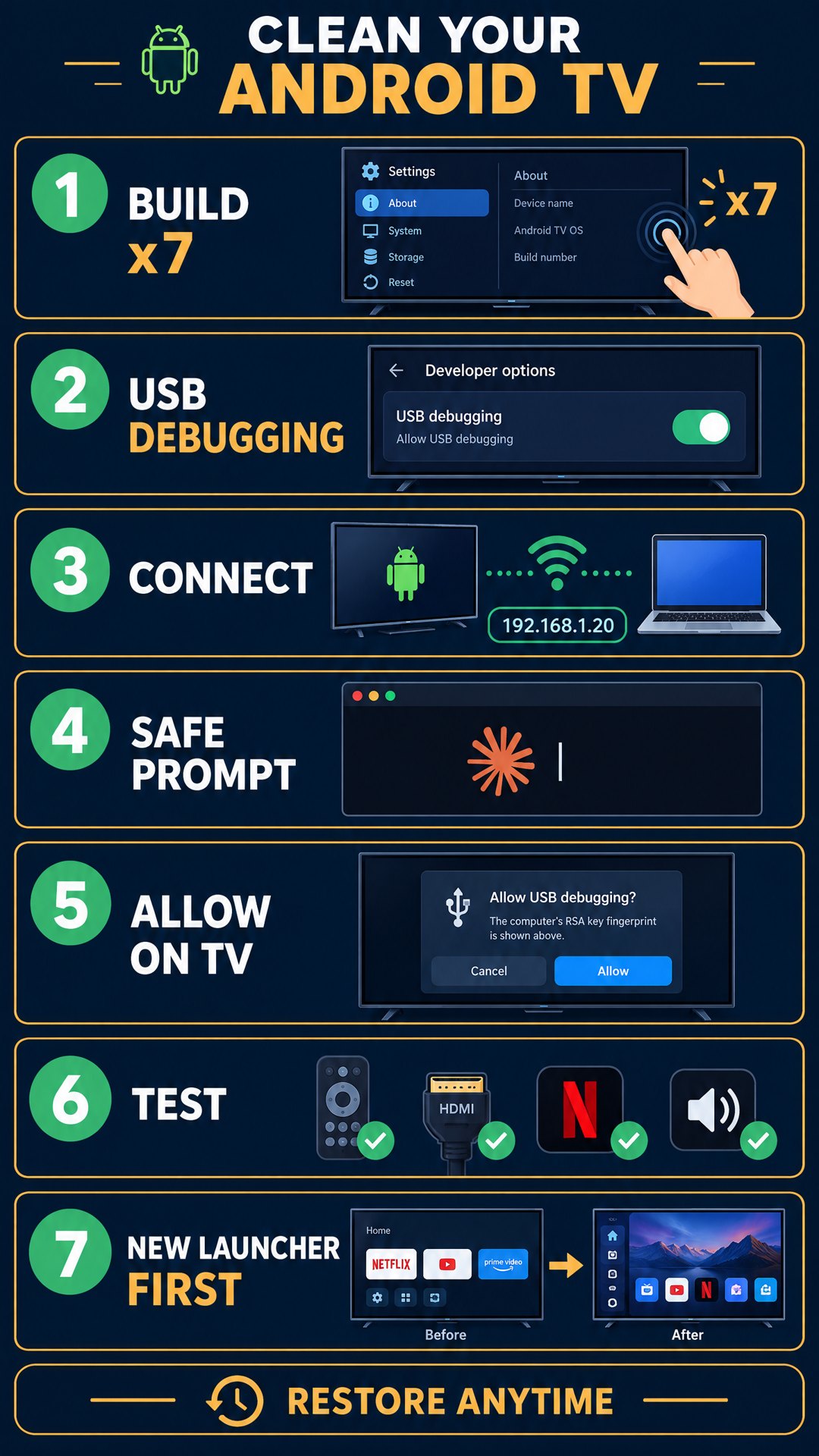
Here is the whole process on one page. Details for each step follow.
Step 1: Install Claude Code and ADB on your computer
ADB (Android Debug Bridge) is the tool that talks to the TV. It comes in Google’s Android platform-tools. Pick your system.
Install ADB and Claude Code on Windows
- Open PowerShell.
- Install Claude Code:
irm https://claude.ai/install.ps1 | iex(orwinget install Anthropic.ClaudeCode). Git for Windows is optional. - Install ADB:
winget install Google.PlatformTools. Or download the official zip from developer.android.com/tools/releases/platform-tools and unzip it. - Close and reopen PowerShell, then run
adb version.
Install ADB and Claude Code on Mac
- Open Terminal.
- Install Claude Code:
curl -fsSL https://claude.ai/install.sh | bash(orbrew install --cask claude-code). - Install ADB:
brew install android-platform-tools. No Homebrew? Download the official Mac zip from developer.android.com, unzip it and run./adbfrom that folder. - Run
adb version.
Install ADB and Claude Code on Linux
- Open a terminal and run
curl -fsSL https://claude.ai/install.sh | bash. - Install ADB from your distro:
sudo apt install adbon Debian or Ubuntu,sudo dnf install android-toolson Fedora. Or use Google’s official Linux zip. - Run
adb version.
Then type claude, sign in, and you are ready. Claude Code needs a paid Claude plan (Pro, Max, Team or Enterprise) or a Console account. The free plan does not include it.
Step 2: Turn on USB debugging on your Android TV or Google TV
- Settings, System, About. Tap Build seven times.
- Back in Settings, open Developer options and switch on USB debugging. On Android 11 and newer you may see Wireless debugging instead, which uses a pairing code. Older TVs call it Network debugging.
- Find the IP address: Settings, Network, your Wi-Fi.
Step 3: Connect your computer to the TV with ADB
Network debugging (older TVs):
adb connect YOUR-TV-IP:5555
Wireless debugging (Android 11 and newer): open Wireless debugging on the TV, choose Pair device with pairing code, then run:
adb pair YOUR-TV-IP:PAIRING-PORT
adb connect YOUR-TV-IP:CONNECT-PORT
Use the ports and the six-digit code shown on the TV. They are not 5555.
Accept Allow USB debugging? on the TV and tick “Always allow from this computer”. Run adb devices. The TV should show as device.
Step 4: Give Claude Code the safe debloat prompt
Paste this with your TV model and IP:
My TV is a [MODEL], Android TV / Google TV, at [IP:PORT]. Connect with adb.
Rules:
1. Back up the list of installed and disabled packages first, and write a restore script.
2. Only use "pm disable-user --user 0". Never uninstall.
3. Show me a list grouped as Ads, Tracking, Preinstalled extras and Core system. Wait for my approval.
4. Never touch: remote and Bluetooth, input and HDMI services, keyboard, Google Play Store, Play Services, location, and the launcher until I install a replacement.
5. Do at most 10 packages per batch, then stop so I can test.
Step 5: Approve the Android TV debloat list in small batches
- Approve ads and tracking first.
- After each batch of ten, test the remote, HDMI input, Netflix or YouTube, and sound.
- If something broke, tell Claude “restore”. It runs the restore script.
How to remove ads from Android TV
Bloatware and ads are two different problems, so I use three layers.
| Layer | What it removes | How |
|---|---|---|
| Home screen rows | The big banner and sponsored rows | Install a replacement launcher (for example FLauncher) first, then let Claude disable the stock home screen |
| Ad and tracking apps | Background trackers | The batches in Step 5 |
| Settings and DNS | Personalized ads, screensaver ads, ads inside apps | Turn off ads personalization in Settings, Privacy. Optionally set a DNS filter such as AdGuard DNS in your router |
How to uninstall apps on Android smart TV (and why I only disable them)
Uninstalling system apps is hard to undo and can break updates. Disabling hides the app and stops it running, and pm enable brings it back. That is the whole reason this guide never uninstalls.
Does debloating make Android TV faster?
Sometimes it feels faster, mostly because the home screen loads fewer sponsored rows and fewer apps wake up in the background. Do not expect a benchmark jump. The one test I found freed about 60 MB on a Fire TV, and the creator said the real win was the experience. If your TV already has plenty of free storage and memory, expect a cleaner screen more than a faster one.
Can you uninstall Google TV?
No. Google TV is the home screen and system layer, not a normal app. You can swap the launcher and disable the extras around it, but I do not recommend removing the core. Treat anything marked Core system in Claude’s list as off limits.
Debloat TCL, Sony, Xiaomi and Chromecast with Google TV
The steps are identical. Only the package list differs by brand, and Claude reads the list from your own TV, so you never copy names from a forum. Be extra careful on TCL: test HDMI after every batch.
What is the best Android debloater?
Free debloater tools exist, including point-and-click Android TV toolkits, but they work from a fixed list. I use Claude Code because it reads your TV’s real package list, explains each package, and keeps a restore script. You approve every batch.
Finish: switch USB debugging off
Turn USB debugging off again and keep the restore script somewhere safe.
Debloat troubleshooting
| Problem | Fix |
|---|---|
adb: command not found |
Close and reopen the terminal, then redo the ADB install for your system |
unauthorized |
Look at the TV for the Allow pop-up |
connection refused |
Check the IP and Wi-Fi. On Android 11 and newer use the ports from the Wireless debugging screen, not 5555. Or toggle debugging off and on |
| Remote stopped working | Restore from the backup right away |
FAQ
Can I remove bloatware from Google TV without a computer? Not safely with this method. Without a computer you can only disable apps one by one in Settings, Apps.
Will this void my warranty? I have not found an official statement either way. I disable only and never touch core packages.
Can I undo it? Yes. Tell Claude “restore”, or run the restore script it wrote.