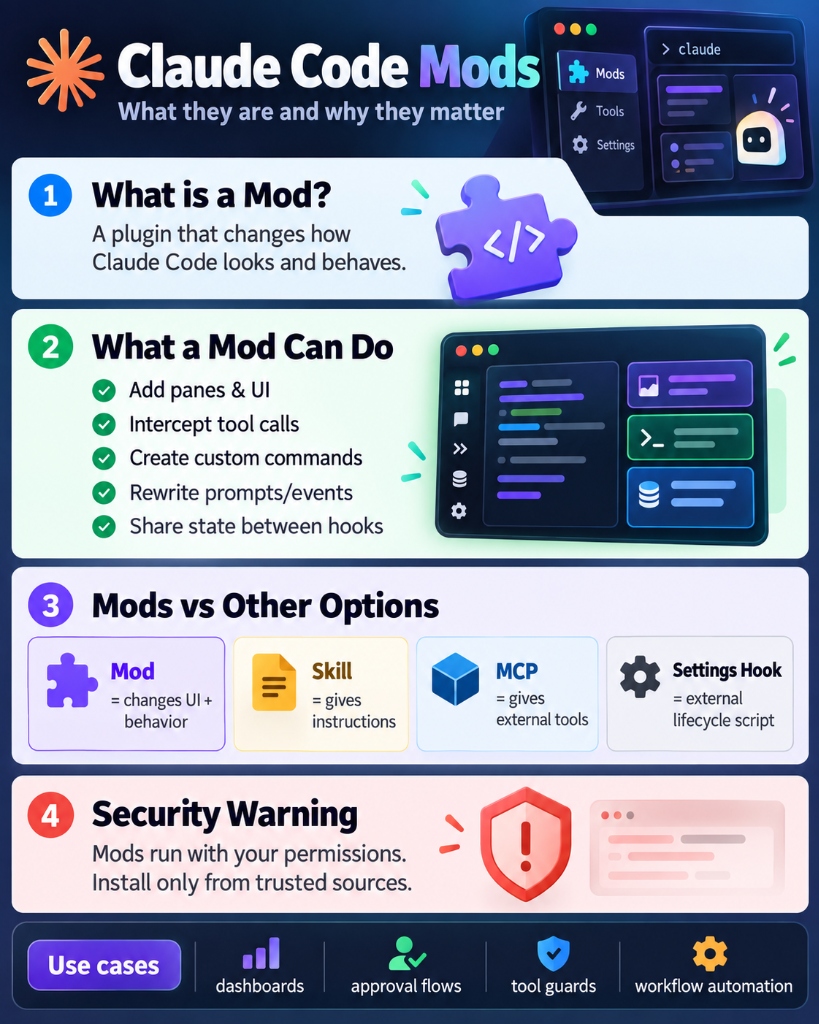
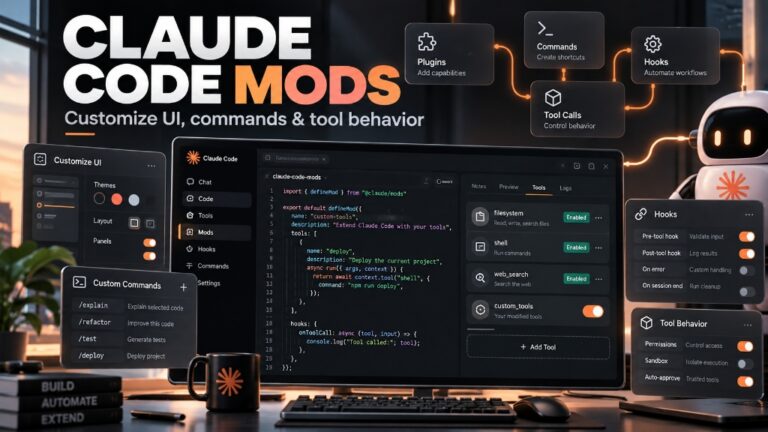
Claude Code Mods are in-process add-ons that change how Claude Code looks, behaves, and handles commands. Released in October 2026 for Claude Code v2.1.287 and later, mods allow developers to add visual dashboard panes, intercept risky terminal commands before they execute, build custom slash commands, and rewrite tool inputs.
Unlike earlier external hooks or skills, mods run directly inside the Claude Code runtime using JavaScript or TypeScript. This guide breaks down what mods are, how they compare to skills and MCP servers, five high-impact day-to-day use cases, and how to install or build your first mod safely.
Watch our Claude Code Mods explainer
This 45-second SoftReviewed short breaks down Claude Code Mods, showing live examples of token forecasting, dangerous command blocking, and file replay.
1. What Is a Claude Code Mod?
In plain English, think of a mod like a browser extension or a video game add-on, but built specifically for Claude Code:
- Traditional hooks and skills operate outside Claude Code. A skill passes markdown prompt instructions, and a settings hook runs an external shell script after a turn finishes.
- A mod runs inside Claude Code. Because it lives inside the core application process, it can listen to events in real time, draw custom interface elements on your screen, pause a tool before it runs, or take over a command completely.
The Three Core Capabilities of a Mod
- Draw Custom Interface Elements: Display status bands above your prompt box, open side panes next to your transcript, and render clickable buttons and input forms.
- Intercept and Guard Tool Actions: Pause dangerous shell commands (such as
rm -rfor Git force pushes), ask for user confirmation, or modify arguments on the fly. - Run Immediate Code Commands: Add custom
/commandshortcuts that run local JavaScript functions instantly without triggering an expensive LLM turn.
2. Mods vs. Settings Hooks vs. Skills vs. MCP Servers
Claude Code offers four distinct ways to customize behavior. Many users mix them up. Here is how they compare:
| Feature / Mechanism | Claude Code Mod | Settings Hook | Skill (SKILL.md) | MCP Server |
|---|---|---|---|---|
| Where It Runs | Inside Claude Code (in-process) | Outside shell / sub-process | In prompt context window | In external server process |
| Language | JavaScript or TypeScript | Any shell command, script, or URL | Plain Markdown | Python, Node.js, Go, etc. |
| Can It Draw UI? | Yes (Panes, bands, buttons) | No | No | No |
| Can It Guard Tool Calls? | Yes (Pause, edit, refuse) | Partial (Exit codes only) | No (Advisory only) | No (Only provides tools) |
| Best Used For | UI meters, safety gates, custom slash commands | Simple post-edit formatters (Prettier, linters) | Coding standards, domain rules, SOPs | Connecting external APIs & databases |
3. Where Do Mods Run?
Mods operate across all official Claude Code environments, but visual elements render where graphical UI is supported:
- Claude Code Terminal CLI: Full support for both background event hooks and interactive terminal UI bands/panes.
- Claude Desktop App (Code Tab): Full support for sidebar panes, tabs, buttons, and custom controls.
- VS Code & JetBrains Extensions: Event hooks run normally; UI elements fall back to concise text notices in the transcript.
- Headless Mode (
claude -p): Runs hooks non-interactively; interface elements are ignored.
Requirement: Claude Code v2.1.287 or higher. Check your current version with claude --version.
4. 5 Practical Day-to-Day Use Cases for Everyday Developers
1. Context Window Capacity Meter (“Token Weather”)
The Problem: As long debugging conversations stretch on, token usage quietly climbs towards limits, triggering sudden auto-compacting and losing vital conversational context.
How the Mod Solves It: Places a live status bar right above your input prompt displaying exact context consumption percentage and turn counts in real time.
2. The “Blast Radius” Command Guardrail
The Problem: When automating refactors, an autonomous agent might run high-risk commands such as rm -rf, destructive git resets, or database drops.
How the Mod Solves It: Intercepts shell tool calls before execution, analyzes the command’s potential impact, and renders an interactive prompt requiring explicit confirmation before proceeding.
3. Step-by-Step Replay Theater
The Problem: After Claude modifies multiple files in a complex turn, reading raw terminal git diffs is difficult and time-consuming.
How the Mod Solves It: Introduces a /replay slash command that opens an interactive review pane, letting you step through file changes one by one with visual diffs.
4. Secret & API Key Redactor
The Problem: Developers frequently paste code containing API keys, private tokens, or database connection strings by mistake.
How the Mod Solves It: Hooks into the prompt.submit event, automatically detecting credential signatures (e.g., sk-, ghp_) and masking them locally before data leaves your machine.
5. Focused Build Error Aggregator
The Problem: Compilers and test frameworks often generate hundreds of lines of noise, obscuring the single failing line.
How the Mod Solves It: A mod can intercept compiler output, extract the primary failing assertion, and display a focused error summary directly to Claude for faster fixes.
5. Step-by-Step Tutorial: How to Install, Build, and Manage Mods
Method A: Install an Existing Mod from a Marketplace
Mods are distributed as plugins. To install an official sample mod:
# Inside a Claude Code terminal session:
/plugin install token-weather@claude-code-playground-mods

# From your regular shell:
claude plugin install token-weather@claude-code-playground-mods
If installed while Claude Code is already active, reload your environment using /reload-plugins.
Method B: Ask Claude Code to Build One for You
Because mods are standard JavaScript/TypeScript code, you can describe your desired workflow directly:
“Create a Claude Code mod that displays my active Git branch and uncommitted file count in a banner above the prompt.”
Claude Code will write the plugin files, register event listeners, and place them in your configuration folder.
Method C: Build a Mod Yourself
A minimal mod requires three files:
.claude-plugin/plugin.json: Identifies the mod’s name, version, and description.hooks/hooks.json: Points to your entry JavaScript module (e.g.,{"module": "./register.js"}).hooks/register.js: Contains your event listener functions.
// hooks/register.js
let toolCalls = 0;

export function register(on) {
  // 1. Intercept every tool call and increment the counter
  on('tool.call', async ($, event, next) => {
    toolCalls += 1;
    $.ui.invalidate('ui.render');
    return next(event);
  });

  // 2. Add the count to the Claude Code spinner
  on('ui.render', { component: 'Spinner' }, async ($, event, next) => {
    return next({
      ...event,
      props: {
        ...event.props,
        suffix: ` · Tools run: ${toolCalls}`
      }
    });
  });
}
6. Security, Permissions, and Safety Warnings
Mods run with your complete operating system permissions. They can read and write files, start background processes, and make network requests. Only install mods from sources you trust.
How to Inspect a Mod Before Installing
claude plugin validate ./path-to-mod
Inspect the output under hooks: and calls: to confirm the mod only requests capabilities appropriate for its stated purpose.
Safe Mode & Emergency Controls
- One-Session Safe Mode: Run
claude --safe-modeto start without loading custom mods or plugins. - Global Emergency Shutoff: Set
"disableAllHooks": truein~/.claude/settings.json. - Interactive Manager: Type
/pluginin Claude Code, click Installed, and disable any problematic mod.
7. Frequently Asked Questions (FAQ)
Are Claude Code Mods free to use?
Yes. Mods are built directly into Claude Code v2.1.287+ with no extra licensing fee. If a mod initiates LLM API requests via the Mods API, those calls use your existing token balance or subscription plan.
Can I use mods inside VS Code or JetBrains?
Yes. Background event hooks (like intercepting tool calls or logging actions) run across all supported environments. However, rich graphical interface elements (such as side panes and status bands) only appear in the standalone terminal CLI and the Claude Desktop application.
How do mods compare to MCP servers?
MCP servers supply external data and tools (like database connections or API wrappers). Mods modify how Claude Code itself looks and runs (like UI widgets and safety guardrails). A mod can easily guard or inspect an MCP tool call.