Google has officially transitioned Gemini from an isolated browser tab into a native desktop operating system companion. Available as a dedicated installer package (GeminiSetup.exe) on Windows 10 and Windows 11 (x64 and ARM64) and macOS (Apple Silicon, macOS 15.0+ Sequoia), the desktop application embeds Google’s multimodal AI directly into your day-to-day computer workflow.
Rather than toggling across crowded Chrome tabs, Windows users can now summon a floating, dark-mode command overlay instantly using the global Alt + Space keyboard shortcut.
Below is the definitive teardown of the new native Windows application, the critical difference between this release and obsolete browser workarounds, hidden background daemon behaviors discovered in first-run audits, and five practical workflows to maximize daily productivity.
Direct YouTube Short: Watch on YouTube (@Softreviewed)
⚡ Executive Summary: What You Get on Desktop
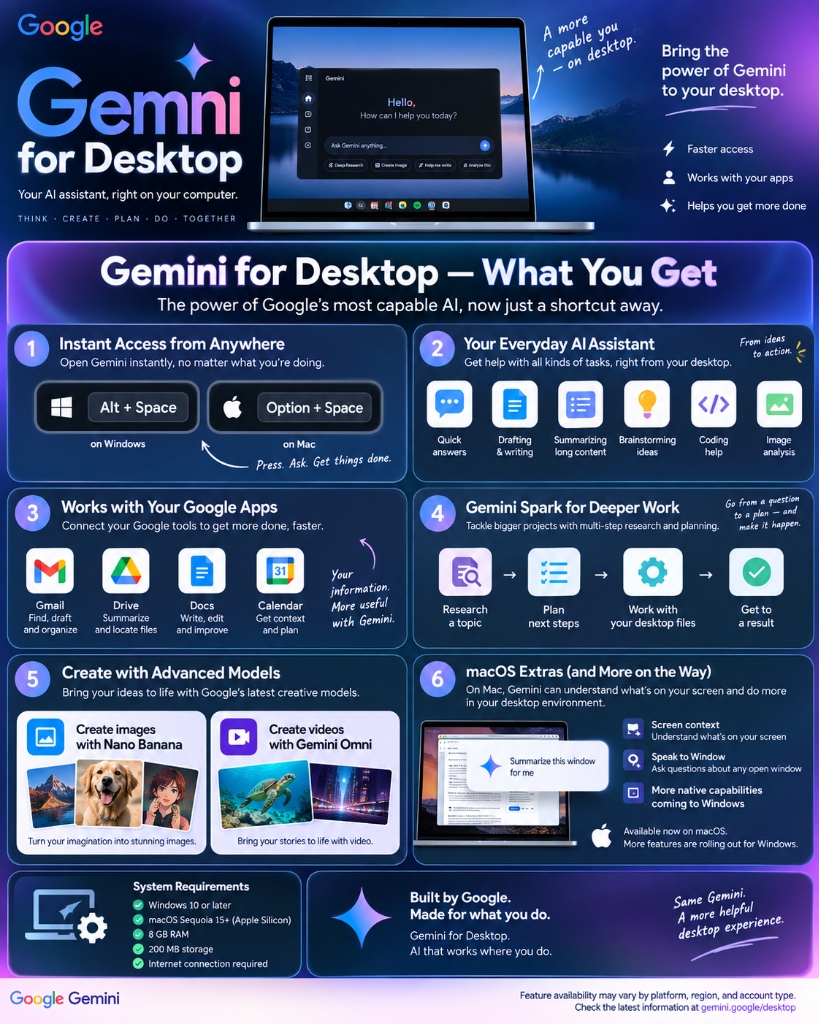
The desktop release introduces a six-pillar architecture designed around low-latency desktop execution:
[Global Hotkey: Alt + Space]
       ↓
[Floating Command Overlay]
       ↓
┌───────────────────────┬───────────────────────────┬─────────────────────────┐
│ Everyday AI Assistant │ Deep Google Apps Bridge   │ Gemini Spark Agent      │
│ (Draft, Code, Image)  │ (Gmail, Drive, Docs, Cal) │ (Autonomous Background) │
└───────────────────────┴───────────────────────────┴─────────────────────────┘
| Core Pillar | Operational Capability | Key User Benefit |
|---|---|---|
| 1. Instant Hotkey Access | Alt + Space (Windows) / Option + Space (macOS) |
Summon or dismiss the assistant over any active application without losing focus |
| 2. Everyday Assistant | Quick answers, code debugging, document summaries, brainstorming | Eliminates context switching during active tasks |
| 3. Google Apps Bridge | Native connectors to Gmail, Google Drive, Docs, and Calendar | Query unread threads, parse drive sheets, and check meeting agendas directly |
| 4. Gemini Spark Agent | Autonomous multi-step research and local desktop file synthesis | Hand off complex tasks to run in the background while you focus on core work |
| 5. Multimodal Generation | Integrated image generation (Nano Banana) and video direction (Omni) | Create visual assets directly inside your document workflow |
| 6. Visual Context | Screen context analysis and window summarization | Debug compiler errors, parse dashboards, and inspect charts live |
🛑 The Critical Shift: Native Binary vs. Obsolete Chrome PWA Workarounds
Before this release, users relied on temporary browser workarounds that compromised speed and system control.
Older Workaround: Chrome Browser → 3 Dots Menu → "Install page as app" (PWA) → Tied to Browser Process
                                                ↓
Current Release: Standalone Installer (GeminiSetup.exe) → OS-Level Daemon → Global Alt + Space Overlay
| Technical Attribute | ⚠️ Older Chrome PWA (Obsolete) | 🚀 Native Desktop App (GeminiSetup.exe) |
|---|---|---|
| Execution Model | Sandboxed inside Google Chrome | Standalone executable running a dedicated background process |
| Browser Dependency | Chrome must remain installed and active | Fully independent; works seamlessly alongside Edge, Firefox, or Brave |
| Global Keyboard Shortcut | None (Window must have active focus) | System-wide Alt + Space listener active across all apps |
| System Tray Integration | Absent | Persistent notification tray daemon with instant-state recall |
| Full-Screen Safety Guard | Absent | Configurable toggle to disable hotkeys during games or presentations |
| Autonomous Agent Hooks | Web-only prompt loop | Native hooks for local folder synthesis via Gemini Spark |
💻 Official System Requirements
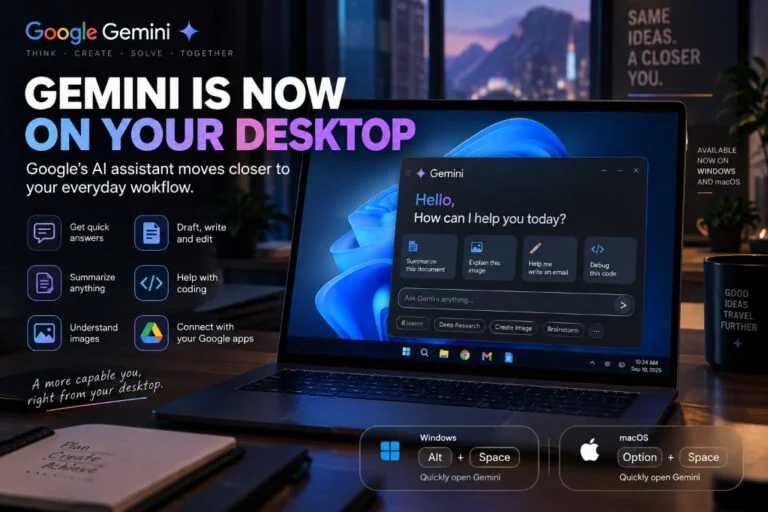
Before downloading, verify that your machine meets Google’s hardware baseline:
- Operating System: Windows 10 (64-bit), Windows 11 (x64 or ARM64), or macOS Sequoia 15.0+ (Apple Silicon).
- Memory (RAM): 8 GB minimum.
- Storage Footprint: ~200 MB free disk space for initial installation.
- Network: Stable high-speed internet connection required for cloud-model inference and Google account synchronization.
🛠️ Step-by-Step Installation & First-Run Configuration
Follow these steps to deploy the app and optimize background system performance:
Step 1: Download and Run the Official Installer
- Navigate to the official download portal: Gemini for Desktop.
- Click Download for Windows to retrieve
GeminiSetup.exe. - Double-click the installer and authenticate with your standard Google Account.
Step 2: Configure System Tray & Background Daemon Settings
[!IMPORTANT]
The Close Button Reality Check:
Clicking the top-rightXdoes not close Gemini. The application minimizes to the Windows System Tray (notification area) and remains loaded in memory to ensure instantAlt + Spaceresponse times.
To fully terminate Gemini, right-click the Gemini icon in the system tray and select Quit.
[Clicking Window 'X'] ───→ Minimizes to System Tray (Continues Running in Background)
[Right-Click Tray → Quit] ───→ Terminates Process & Releases RAM
Step 3: Startup Optimization
By default, the installer configures Gemini to launch automatically upon Windows boot. If you prefer to manage startup resources manually:
1. Open Windows Settings (Win + I).
2. Navigate to Apps → Startup.
3. Locate Gemini launcher and toggle it Off (or toggle Open at login off inside the Gemini application settings).
Step 4: Configure the Full-Screen Gaming & Presentation Guard
To prevent accidental overlay interruptions while in games or video calls:
1. Open Gemini (Alt + Space).
2. Click the top-right profile icon → Settings.
3. Enable “Disable shortcut in full screen apps”.
🎯 Navigating the Interface: 4 Action Cards & Direct Pipeline Pills
When summoned via Alt + Space, Gemini displays a streamlined command center tailored for instant action:
┌────────────────────────────────────────────────────────────────────────┐
│  ✦ Gemini                                                         — □ ✕ │
├────────────────────────────────────────────────────────────────────────┤
│  Hello, How can I help you today?                                      │
│                                                                        │
│  ┌──────────────────┐  ┌──────────────────┐  ┌──────────────────────┐  │
│  │ 📄 Summarize     │  │ 🖼️ Explain       │  │ ✏️ Help me write      │  │
│  │    this document │  │    this image    │  │    an email          │  │
│  └──────────────────┘  └──────────────────┘  └──────────────────────┘  │
│  ┌──────────────────┐                                                  │
│  │ </> Debug        │                                                  │
│  │    this code     │                                                  │
│  └──────────────────┘                                                  │
│                                                                        │
│  Ask Gemini anything...                                            [>] │
│  [🔍 Search]  [⚡ Deep Research]  [🎨 Create Image]  [💡 Brainstorm]    │
└────────────────────────────────────────────────────────────────────────┘
1. The 4 Instant Action Cards
- 📄 Summarize this document: Drag-and-drop or point Gemini to a local PDF, DOCX, or text file for executive summaries and key takeaway extraction.
- 🖼️ Explain this image: Direct OCR and diagram breakdown for charts, technical schematics, or whiteboard snapshots.
- ✏️ Help me write an email: Pre-formatted drafting that pulls recipient context and recent correspondence from connected Google Workspace accounts.
- “ Debug this code: Immediate syntax, logic, and runtime error triage without switching to a separate browser IDE.
2. Dedicated Bottom Pipeline Pills
- Search: Live Google Search grounding for real-time fact checking and verified citations.
- Deep Research: Multi-step autonomous investigation engine that queries dozens of sources, cross-checks data, and compiles structured whitepapers.
- Create Image: Direct prompt-to-render image creation powered by the Nano Banana model.
- Brainstorm: Divergent ideation mode formatted for rapid iteration and strategic planning.
🚀 5 Creative Ways to Use Gemini Desktop to 10x Your Productivity
Workflow 1: Instant Screen Debugging & Visual Error Triage
- The Scenario: You encounter a complex compiler traceback, broken CSS layout, or confusing Excel
#VALUE!error. - The Traditional Method: Copying lines of stack trace, switching to a browser, pasting into a chat tab, and losing editor focus.
- The Gemini Desktop Method:
- Keep your IDE, terminal, or spreadsheet active on your screen.
- Press
Alt + Space. - Click “Debug this code” or share screen context.
- Prompt: “Diagnose this compiler error and provide the exact patch.”
- Press
EscorAlt + Spaceto dismiss the overlay and apply the fix immediately.
Compiler Traceback on Screen → Alt + Space → "Debug this code" → Inline Solution Applied (Zero Window Toggling)
Workflow 2: The Cross-Workspace Information Bridge
- The Scenario: You are writing a project proposal in a local editor and need specific pricing figures buried across three different client email threads and a shared Google Sheet.
- The Traditional Method: Opening Gmail, running search filters, opening Drive, waiting for Sheets to load, and manually copying numbers.
- The Gemini Desktop Method:
- Summon Gemini with
Alt + Space. - Prompt: “Check my Gmail correspondence with Client X from last week and pull the agreed hourly milestone rates from our shared Drive proposal sheet.”
- Gemini queries connected Workspace extensions natively and presents a clean Markdown table right over your active editor.
Workflow 3: Fluid Voice Brainstorming (“Think Out Loud”)
- The Scenario: You have disjointed thoughts after an intensive client meeting and need to produce structured action items.
- The Traditional Method: Staring at a blank document trying to type coherent notes while thoughts escape.
- The Gemini Desktop Method:
- Hit
Alt + Spaceand activate voice dictation. - Speak aloud in conversational stream-of-consciousness for 2–3 minutes without filtering.
- Gemini automatically strips filler words, groups ideas into logical headings, highlights follow-up owners, and formats the output into copy-paste ready bullet points.
Workflow 4: Autonomous Research Delegation via Gemini Spark
- The Scenario: You need a comprehensive competitive audit comparing five cloud hosting providers across pricing, uptime SLAs, and backup policies.
- The Traditional Method: Spending three hours clicking through 15 vendor pricing calculators and reading help docs.
- The Gemini Desktop Method:
- Summon Gemini and select the Deep Research pill.
- Prompt: “Execute a comprehensive technical comparison of Oracle Cloud vs AWS vs Hetzner for ARM-based VM hosting. Include memory pricing, network egress costs, and automated snapshot retention.”
- Hand off the task to Gemini Spark. It navigates sources, validates numbers, and notifies you when the synthesized dossier is compiled, allowing you to focus on your immediate project.
1 Prompt to Gemini Spark → Autonomous Background Synthesis (10+ Sources) → Structured Executive Report
Workflow 5: Rapid Concept Art & Presentation Asset Generation
- The Scenario: You are preparing a slide deck or technical article and need custom visual schematics or editorial hero graphics.
- The Traditional Method: Opening a standalone image tool, waiting for queue times, exporting, and dragging files between folders.
- The Gemini Desktop Method:
- Press
Alt + Spaceand select Create Image. - Prompt Nano Banana: “Editorial graphic showing an AI agent coordinating files across a desktop workstation, dark blue neon lighting, minimalist tech style, 16:9 aspect ratio.”
- Copy the high-resolution output directly to your clipboard and paste it straight into PowerPoint, Photoshop, or your markdown editor.
⚖️ Head-to-Head Comparison: Gemini Desktop vs. Claude Desktop vs. Copilot
| Capability / Feature | 🔵 Google Gemini Desktop | 🟣 Anthropic Claude Desktop | 🟦 Microsoft Copilot (Windows) |
|---|---|---|---|
| Global Quick-Summon | Alt + Space floating overlay |
App window focus | Win + C or Taskbar rail |
| Autonomous Research | ✅ Gemini Spark (Deep Research) | ❌ Standard chat loop | ❌ Single-pass search grounding |
| Cloud Workspace Sync | ✅ Native Gmail, Drive, Docs, Calendar | ❌ None (Local only) | ✅ Native Microsoft 365 / OneDrive |
| Media Generation | ✅ Integrated (Nano Banana & Omni) | ❌ Text/code only | ✅ DALL-E 3 integration |
| Ecosystem Sync | ✅ Cross-device sync (Web, iOS, Android) | ❌ Desktop & Web distinct | ✅ Synced to Microsoft Account |
| System Tray Presence | ✅ Persistent quick daemon | ❌ Standard window closure | ✅ Windows OS service integration |
❓ Frequently Asked Questions (FAQ)
How do I stop Gemini from running in the background when I close it?
Clicking the standard window close button (X) minimizes the client to the Windows notification tray. To shut it down completely, click the arrow in your Windows Taskbar tray, right-click the Gemini icon, and select Quit.
Can I change the default Alt + Space hotkey?
Yes. Open the desktop app, click your profile icon in the upper-right corner, select Settings, and navigate to Shortcuts. You can remap the global summon hotkey to any preferred combination.
Does the desktop app require an active Google One AI Premium subscription?
Core desktop functionality—including Alt + Space quick-summon, Google Workspace querying, and conversational assistance—is available on free Google accounts. Advanced agentic features, specialized reasoning models, and extended Gemini Spark research depth require a Google AI Premium subscription.
Does Gemini Desktop read my local private files without permission?
No. Gemini operates within a sandboxed environment and only accesses files that you explicitly upload, drag into the command window, or connect via Google Workspace and Gemini Spark folder permissions.
🎯 Strategic Takeaway
Google Gemini for Desktop marks a decisive move from browser-bound chat tabs to an integrated desktop productivity accelerator. By combining the zero-friction Alt + Space command overlay with Gemini Spark’s background research power and native Google Workspace bridging, the app gives Windows users a fast, keyboard-first assistant that enhances work right where it happens.