Executive Summary: The Shift to Always-On Digital Coworkers
At DevDay 2026, OpenAI officially introduced Dots: persistent, always-on AI agents powered by the flagship GPT-6 Astra reasoning model. Unlike traditional chatbots that sit idle between prompts, each Dot operates within an isolated cloud virtual machine, connects to 4,000+ software services, and pursues ongoing responsibilities 24 hours a day. Access starts at $100/month via ChatGPT Pro-100 or Business Premium seats (free and $20 Plus tiers are strictly excluded).
Direct YouTube Link: Watch on YouTube (@Softreviewed)
⏳ The Evolution of ChatGPT: From Text Answers to Autonomous Coworkers
To evaluate why OpenAI positions Dots as its most consequential architectural milestone since the original ChatGPT rollout, consider how user engagement has evolved across three distinct eras:
| Era | Product Paradigm | User Input | AI Output | Operational Model |
|---|---|---|---|---|
| ChatGPT 1.0 (2022) | Text Answers | Single prompt / question | Formatted text explanation | Reactive (chat thread terminates) |
| ChatGPT Work / Codex (2024) | Digital Artifacts | Task specifications | Spreadsheets, slide decks, web code | One-shot execution |
| OpenAI Dots (2026) | Ongoing Responsibilities | Broad objective & boundaries | Continuous execution, PRs, updates | Proactive coworker (initiates pings) |
💡 In Plain English
Standard ChatGPT is like dialing a consultant, asking a single question, and ending the call. OpenAI Dots is like welcoming a full-time remote colleague who sits at their own digital workstation, monitors project files every morning, flags discrepancies, drafts fixes, and contacts you only when strategic human approval is required.
🛠️ Inside the Architecture: How OpenAI Dots Operates
Dots diverge fundamentally from stateless API interactions by orchestrating four interconnected operational layers:
[User Interface]  ──► ChatGPT Sidebar / Slack / Teams / SMS Text / Voice Calls
                            │
                            ▼
[Control Plane]   ──► Custom Rules Engine (3-Guardrail Boundary Filter)
                            │
                            ▼
[Compute Layer]   ──► Isolated Cloud Virtual Machine (24/7 Web Browser & Runtime)
                            │
                            ├──── Optional: Local Machine File Access (~/Downloads)
                            │
                            ▼
[Model Engine]    ──► GPT-6 Astra Reasoning Core + 4,000+ App Connectors
1. Dedicated Cloud Virtual Machine
Every Dot is provisioned with a secure, sandboxed cloud computer equipped with a full headless web browser, filesystem, and runtime environment. When you power down your laptop or step away from your desk, your Dot continues analyzing codebases, verifying calendar conflicts, or cross-referencing supplier rates uninterrupted.
2. Dual-Compute Flexibility (Cloud vs. Local)
- Cloud VM by Default: Operates entirely on OpenAI’s managed infrastructure without interacting with personal machine storage.
- Optional Local Access: Users can grant explicit, directory-scoped access (such as a local
Downloads/or project folder), enabling the Dot to inspect uncompressed photography, design assets, or contracts stored locally.
3. The “Spaces” Collaborative Canvas
Alongside Dots, OpenAI unveiled ChatGPT Spaces—a shared operational environment where human collaborators and multiple specialized Dots work side by side. Inside a Space, team members can:
- Directly assign responsibilities to an agent by mentioning
@Dottyin document comments. - Instruct an agent to monitor dependency updates and report blockers directly to Slack.
- Collaborate on dynamic financial spreadsheets and presentation decks that update automatically as new company metrics arrive.
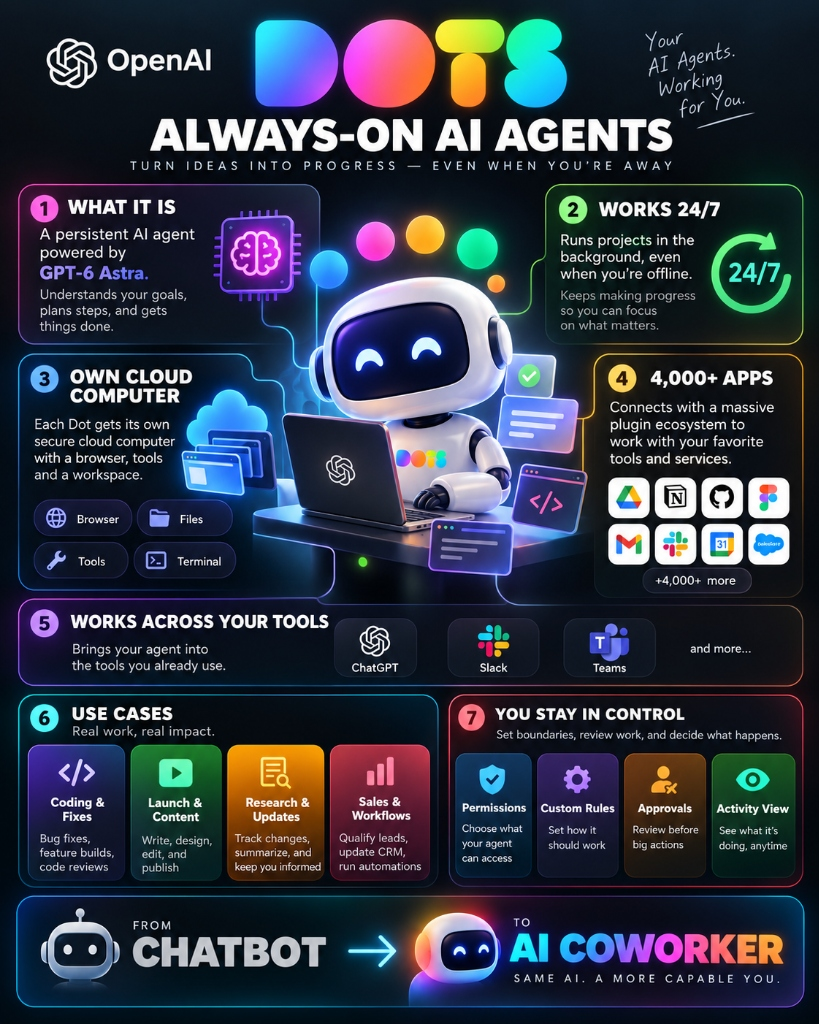
Infographic: OpenAI Dots Architecture, 24/7 Cloud VM Runtime, 4,000+ App Connectors & Control Guardrails
💡 Practical Day-to-Day Use Cases for Everyday Users
During the DevDay demonstrations and early customer trials, OpenAI emphasized that Dots are designed for broad operational utility across everyday knowledge workflows:
🛒 1. Marketplace Listings
Feed a folder of photos to your Dot. The agent inspects images, flags wear or defects (e.g. scratch on furniture), authors accurate listings, and stages them for approval.
🎾 2. Errand & Reservation Booking
Direct your Dot to monitor local sports venues, secure open court slots at target times, and simultaneously reorder dinner based on previous order receipts.
📑 3. Contract & Agreement Auditing
When agreements land in your inbox, the Dot analyzes provisions, flags aggressive indemnification clauses, and tightens liability limits before legal counsel review.
🖨️ 4. 3D Printing & CAD Preparation
From a quick 2D concept sketch, the Dot spins up Blender in its virtual environment, constructs a watertight 3D geometry mesh, and exports a print-ready STL file.
💻 5. Autonomous DevOps & Dependency Maintenance
The Dot actively scans repository package trees, updates deprecated function calls ahead of vendor retirement schedules, runs the test suite to verify zero regressions, and opens cleanly documented GitHub pull requests.
💳 Pricing & Tier Availability: What Does It Cost?
An initial point of confusion following the keynote was that Dots required the $200/month ChatGPT Pro tier. In practice, personal access opens at $100/month:
| Subscription Plan | Monthly Cost | Dots Included? | Key Capabilities & Boundaries |
|---|---|---|---|
| ChatGPT Free / Go | $0 | ❌ NO | Standard interactive prompt response only |
| ChatGPT Plus | $20 / mo | ❌ NO | Standard models; upgrading to Plus does NOT unlock Dots |
| ChatGPT Team | $25–$30 / seat | ❌ NO | Excluded from the initial release wave |
| ChatGPT Pro-100 | $100 / mo | ✅ YES | Lowest personal entry tier for 24/7 background Dots |
| ChatGPT Pro-200 | $200 / mo | ✅ YES | Reopened at DevDay; unrestricted access to all frontier models |
| ChatGPT Pro-500 | $500 / mo | ✅ YES | Includes UltraFast inference (300 tokens/sec) across API & Codex |
| Business Premium | $100 / seat / mo | ✅ YES | Lowest team tier; bypasses the UK/EU personal Pro block |
| Enterprise / Healthcare | Custom Quote | ✅ YES | Disabled by default; requires workspace administrator activation |
🎁 The Launch Month Advantage
For the first 30 days post-launch, all background compute execution, virtual machine sessions, and interactions carried out by your Dot do not consume standard plan rate limits or token allowances.
🛡️ Critical Gotchas & Safety Setup: The 3-Rule Guardrail
Because Dots function autonomously around the clock, defining explicit operational boundaries is paramount to prevent unexpected communications, financial commitments, or data edits.
Recommended Safety System Instructions:
Rule 1 [Action Gate]: "Draft social posts, emails, and listings, but NEVER send, post, or publish without explicit confirmation."
Rule 2 [Financial Lock]: "NEVER alter pricing, initiate financial transfers, or purchase items over $0 without human review."
Rule 3 [Timeline Escalation]: "Any dependency issue or task that threatens to delay a scheduled launch date must be escalated to me immediately."
⚠️ Geographic Access Notice for UK & European Users
Personal Pro subscriptions ($100 and $200) located within the European Economic Area (EEA), United Kingdom, and Switzerland cannot access Dots at launch due to ongoing European AI Act regulatory evaluations. Organizations in these countries can bypass this restriction by deploying via Business Premium ($100/seat) under standard corporate data governance agreements.
⚖️ Strategic Comparison: OpenAI Dots vs. Meta Muse
The autonomous agent sector is dividing into two distinct paradigms: enterprise workplace automation versus consumer mobile companions:
| Evaluation Metric | OpenAI Dots | Meta Muse |
|---|---|---|
| Primary Target Audience | Knowledge workers, engineers, and businesses | Mass consumer smartphone users (2M+ iOS downloads) |
| Compute Environment | Dedicated cloud VM + inspectable browser | On-device execution + centralized cloud API |
| Underlying Frontier Model | GPT-6 Astra | Llama 4 Frontier Family |
| SaaS App Integration | 4,000+ connectors (Slack, Drive, Notion, Teams) | Meta consumer apps (Instagram, WhatsApp, Facebook) |
| Minimum Entry Cost | $100 / month (Pro-100) | Free mobile application tier |
📚 Official Resources & Developer Directory
- 🌐 Official OpenAI Announcement — Complete launch overview and keynote release notes.
- 📖 OpenAI DevDay Keynote Video Stream — Live demonstrations of Dots, Spaces, and UltraFast inference.
- 🔍 SoftReviewed AI Architecture & Agent Benchmarks — In-depth comparisons across frontier reasoning models and enterprise agent frameworks.
🎯 Strategic Takeaway
OpenAI Dots represents the definitive shift from reactive chat windows to ambient digital coworkers. By packaging GPT-6 Astra inside a persistent cloud virtual machine and uniting it with ChatGPT Spaces, OpenAI has introduced an autonomous workplace execution layer. For teams and independent professionals spending hours coordinating multi-step handoffs, the $100/mo Pro-100 tier offers immense productivity upside—provided you enforce robust human-in-the-loop boundaries from day one.
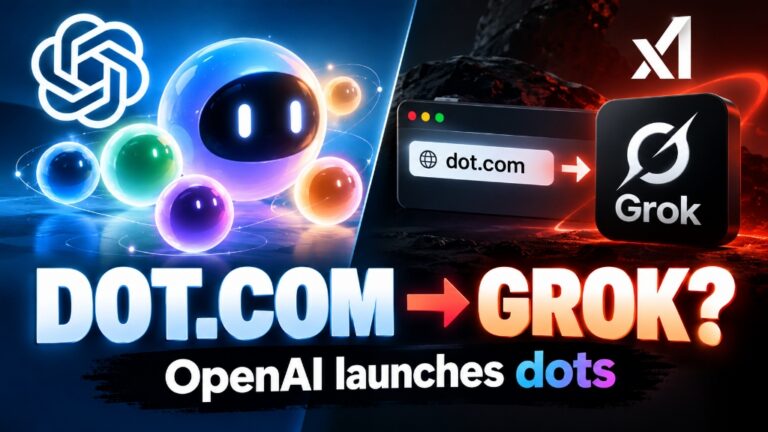
Architectural Investigation: The dot.com Traffic Diversion
Curious why typing the singular domain dot.com routes straight to xAI Grok Bot? Read our complete technical forensic breakdown on how Elon Musk acquired dot.com 7 weeks prior to OpenAI DevDay and captured 100% of singular direct type-in traffic.