

By Thursday afternoon, my weekly Claude Pro limit was 82% gone. I had one long-running chat open, a couple of background helper agents running, and default settings that quietly burned through my quota behind my back.

To reduce token usage on Claude Pro, run Claude Sonnet 5.5 as your locked primary coding model, consult Claude Opus 5.5 strictly for architectural planning, set /autocompact 300 (which sets a 300,000-token threshold), pipe verbose test logs to filter output, and never switch models mid-chat to keep prompt caching intact.
If you use Claude Code or the Claude desktop app for daily programming, you have probably hit that dread-inducing red warning screen: “Usage limit reached until Sunday.”
Here is the real problem: Claude does not bill you per line of new code you write. It bills you for re-reading your entire conversation history from line one on every single message.
In this guide, I will share the exact setup I created to take my usage from draining in two days to comfortably lasting all seven days. I will also give you the exact copy-paste prompt you can feed into Claude Code to automatically configure these rules in seconds.
The Real Problem: The 5-Hour Session vs. Weekly Limit Trap
Anthropic enforces two separate rate limits on paid Claude Pro and Max plans, and confusing them is the primary reason developers run out of tokens:
- The 5-Hour Rolling Session: A short-term throttle that protects GPU servers during peak load. This resets every 5 hours.
- The Weekly Cap (All Models): A strict weekly allotment shared across Sonnet, Opus, and Haiku that resets on a fixed day each week.
Look at what happened on my own account earlier this week:
Firsthand Proof: Real Account Usage
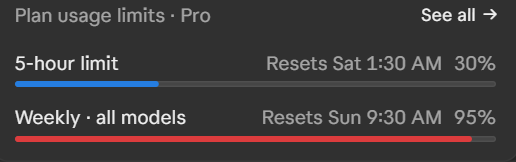
Notice the trap: The 5-hour limit shows 30% (calm blue bar), while the weekly cap across all models is at 95% (critical red bar). One heavy session will freeze the account for the entire weekend.
Why Long Conversations Snowball Your Token Count
Every time you ask Claude a question in an existing conversation, it does not just read your latest message. It re-reads:
- The entire conversation history from message 1.
- All loaded project files and file diffs.
- Your project’s
CLAUDE.mdinstructions. - The schemas for every active Model Context Protocol (MCP) server connected to your environment.
By message 40 or 50, your chat can easily balloon past 230,000 tokens. That means a simple one-sentence question like “can you fix the CSS padding?” sends all 230,000 tokens through the model at full input price.
Step 1: Turn Off the 2 Hidden Settings in Capabilities
Inside the Claude web and desktop interface, there are two default switches that quietly burn tokens without giving you much value:
| Setting Name | Default Behavior | Why It Wastes Tokens | Recommended Action |
|---|---|---|---|
| Artifacts that use Claude | ON | Builds interactive micro-apps that make background API calls to Claude every time you click them. | Turn OFF |
| Charts and diagrams in chat | ON | Forces Claude to construct rich rendered charts inside responses, adding heavy visual syntax tokens. | Turn OFF |
Where to change this: Open Settings → Capabilities, and toggle both options to OFF. Turn charts back on only when you genuinely need to visualize tabular data.
Step 2: Set the /autocompact Window to 300 (300,000 Tokens)
Claude Code includes an automated context management command that prevents runaway token inflation: /autocompact.
By default, Claude Code allows context to expand until the window is completely choked. In Claude Code, you can enter the shorthand value:
/autocompact 300Important Note on Shorthand Notation: Typing 300 automatically sets the threshold to 300,000 tokens. You do not need to type all five trailing zeros. Alternatively, you can configure this permanently in your ~/.claude/settings.json file:
"autoCompactWindow": 300000When your conversation reaches 300,000 tokens, Claude Code automatically summarizes older messages. Rather than letting the raw prompt history compound infinitely, Claude shrinks prior back-and-forth chatter into a structured architectural summary, keeping your working memory fresh without dropping project facts.
Step 3: The Multi-Agent Trap (Stop Chaining 3 Helpers)
When subagents first launched in Claude Code, many developers built multi-agent pipelines: “Opus plans the task, Haiku writes the code, and Sonnet reviews the tests.”
In practice, this burns your weekly quota faster than anything else:
Opus (Planner)  ──► Starts with BLANK memory ──► Re-reads all project files from zero
       │
       ▼
Haiku (Worker)   ──► Starts with BLANK memory ──► Re-reads all project files from zero
       │
       ▼
Sonnet (Checker) ──► Starts with BLANK memory ──► Re-reads all project files from zero
Every subagent starts completely empty. It loads its own system prompt, reads your project rules, and re-indexes your workspace. Running three chained subagents for a simple 10-line bug fix burns three complete context cycles against your account limit.
Step 4: My 3-Model Routing Formula (Sonnet 5.5 + Opus 5.5 + Haiku 5.5)
Instead of chaining subagents, here is the clean, cost-disciplined architecture I implemented in my global configuration using the latest Claude 5.5 series:
| Model | Designated Role | How It Runs | Token Impact |
|---|---|---|---|
| Claude Sonnet 5.5 | Primary Daily Driver | Handles all coding, refactoring, testing, and file editing. Set once in settings.json and never switched mid-chat. |
Optimal balance of high intelligence and efficient token consumption. |
| Claude Opus 5.5 | Strategic Advisor Only | Configured as advisorModel: "opus". Consulted strictly during the initial planning phase or when an initial fix fails. |
Frontier reasoning model called only 1-2 times per major project milestone. |
| Claude Haiku 5.5 | Bulky Reader (Executor) | Dedicated helper subagent (executor.md) used strictly for searching directories and summarizing large log files. |
Ultra-low token cost. Keeps thousands of raw log lines out of the main chat context. |
Crucial Rule on Model Switching: Never switch models inside the same conversation (e.g. starting on Sonnet, switching to Opus, then back to Sonnet). Each model maintains a separate prompt cache. When you switch models mid-thread, Claude discards the cache and bills you for a full uncached re-read of the entire conversation history.
Step 5: Official Documentation Best Practices for Maximizing Token Efficiency
Based on Anthropic’s official Claude Code documentation and verified developer benchmarks, here are five essential operational habits to reduce your token burn:
1. Filter CLI and Test Command Outputs
One of the fastest ways to exhaust your context window is letting Claude run raw test suites (like npm test, pytest, or cargo test) that dump thousands of lines of output. Pipe outputs so Claude receives only relevant failures:
npm test 2>&1 | grep -A5 -E "FAIL|Error|Expected" | head -50Filtering terminal dumps keeps your conversation lean and saves tens of thousands of tokens per run.
2. Leverage Prompt Caching (Up to 90% Cost Reduction)
Anthropic automatically caches prompt prefixes. When Claude reads the same system prompt, project instructions, and repository headers, cached input tokens receive up to a 90% discount. To keep prompt caching effective:
- Keep your root
CLAUDE.mdunder 200 lines and avoid editing it mid-session. - Never switch models mid-conversation, as switching invalidates the cache instantly.
3. Use /clear vs. /compact Correctly
- Use
/compact(or/compact focus on [task]) when working on a large multi-step feature and context begins to feel heavy. - Use
/clearwhenever you finish a task and move to an unrelated feature. Compaction retains summaries; clearing resets context to zero so old debugging history never bleeds into new work.
4. Target Specific Files Directly
Instead of typing broad prompts like “Why is the login page broken?”, direct Claude straight to the target files: “Inspect the error handler in auth/login.ts lines 40 to 80.” This prevents Claude from recursively reading dozens of files across your repository.
5. Prune Unused MCP Connectors (/mcp)
Every active Model Context Protocol (MCP) server injects tool definitions and JSON schemas into every prompt. If you have database, cloud, or scraper servers active that you don’t need for your current task, disable them via /mcp to instantly reclaim thousands of input tokens.
6. The .claudeignore Myth: Use permissions.deny Instead
A widespread misconception is creating a .claudeignore file. Anthropic’s official documentation confirms that Claude Code has no native .claudeignore support. Claude respects .gitignore for file picker suggestions, but it will still read ignored files if targeted.
The official way to strictly block Claude from reading bulky directories (like node_modules/, dist/, build/, or .venv/) is by adding permissions.deny rules inside your ~/.claude/settings.json:
{
  "permissions": {
    "deny": [
      "Read(node_modules/**)",
      "Read(dist/**)",
      "Read(build/**)",
      "Read(.venv/**)",
      "Read(.env*)"
    ]
  }
}
Blocking these massive directories prevents accidental context dumps that burn tens of thousands of tokens in a single command.
7. Monitor Live Token Burn with /statusline
Instead of guessing how close you are to the limit, run the official command:
/statuslineThis allows you to customize a real-time status bar directly at the bottom of your terminal interface, displaying your live context window percentage, token consumption, and session limits as you code.
8. Use Focused Compaction (/compact focus on …)
When running manual compaction during a complex sprint, do not just type /compact. Pass a specific focus:
/compact focus on authentication refactor and database schemasThis tells Claude’s summarization engine exactly what architectural decisions to preserve while discarding routine intermediate chatter.
Step 6: The Ready-to-Use Copy-Paste Setup Prompt
You do not need to edit config files by hand. Copy the prompt below, paste it into your Claude Code terminal, and it will configure your entire environment automatically:
📋 CLAUDE CODE OPTIMIZATION PROMPT (COPY & PASTE):
Configure my Claude Code environment for maximum token efficiency and rate limit protection based on the SoftReviewed blueprint. Execute these steps one by one and show me a confirmation table when finished:

1. Update ~/.claude/settings.json:
   - Set "model": "sonnet" (locked to Claude Sonnet 5.5 to preserve prompt caching).
   - Set "advisorModel": "opus" (Claude Opus 5.5 for architectural guidance).
   - Set "autoCompactWindow": 300000 (300k token threshold).
   - Set "outputStyle": "Concise".

2. Update my global CLAUDE.md (~/.claude/CLAUDE.md) with these operational rules:
   - Chat Model: Claude Sonnet 5.5 runs all daily coding, edits, planning, and tests.
   - Advisor: Consult the Opus 5.5 advisor ONLY at the start of multi-step tasks and when an initial fix fails. When called, report: "Advisor (Opus) consulted: <what it confirmed or changed>".
   - Helper Agents: Use Haiku 5.5 helpers solely for bulky read-and-shrink tasks (searching directories, reading logs). Never use Haiku for logic decisions or code edits.
   - Response Tracking: End every reply with a compact table listing each step, the model that executed it (Sonnet 5.5, Opus 5.5, or Haiku 5.5), and the outcome.

3. Create the Haiku helper file at ~/.claude/agents/executor.md:
   - Name: executor
   - Model: haiku (Claude Haiku 5.5)
   - Purpose: Bulky read-and-shrink tasks (file search, log reading, status checks).

4. Audit active MCP servers and list any unused connectors so I can prune them with /mcp.

5. At the end, output a table showing all modified files and their active values.
Frequently Asked Questions
Does Claude Code have a weekly limit on Pro plans?
Yes. Anthropic enforces a weekly quota across all models (Sonnet, Opus, and Haiku) on paid Pro ($20/month) and Max plans. This weekly cap is shared between Claude Code in your terminal and Claude chat in your browser.
How can I check my remaining token usage in Claude Code?
You can check your active session spend and usage limits at any time by typing /usage or /cost in your terminal. You can also view your rolling limits in the desktop app under Plan usage limits.
Is Claude Code usage unlimited with the Max plan?
No. While the Claude Max tiers offer substantially higher throughput and larger 5-hour session caps, they still have weekly ceilings. Without proper model routing and auto-compacting, power users can still exhaust Max quotas.