
When I first started building software with single-threaded AI coding assistants, I constantly hit a frustrating wall. Every task had to line up in a single file-line queue. If I needed one agent to write a delivery date validator, another to format currency prices, and a third to run our end-to-end test suite, each job had to wait its turn. Worse still, by the time one agent touched five different files in a single chat, its context window got cluttered, leading to hallucinations, broken imports, and bugs that were missed because the same agent was reviewing its own work.
The Google Antigravity Swarm feature changes this dynamic completely. By turning your standard workspace chat into a central coordinator, Swarm lets you assign independent coding tasks to parallel worker agents working at the same time on a shared message board. Instead of waiting for one agent to stumble through several files sequentially, you can run multiple workers simultaneously, enforce strict file boundaries, and assign an independent verifier agent to test the entire codebase before anything gets approved.
In this hands-on guide, I will break down exactly how Google Antigravity Swarm works, walk you through a real-world checkout bug test, and provide the official decision framework to help you choose between Swarm, Teamwork, Boost, and Subagents based on Google’s technical architecture.
- Parallel Execution: Google Antigravity Swarm assigns separate workers to independent files, finishing multi-file updates simultaneously instead of in a slow sequential queue.
- Zero Idle Burn: Swarm workers stay asleep on the shared message board and consume zero tokens until someone tags them with an @mention.
- Unbiased Verification: You can designate a dedicated verifier agent with a higher-reasoning model (like Gemini 4 Carbon) to audit code and run unit tests before merging changes.
- Model Flexibility: You can pin fast, low-cost models (such as Gemini 3.8 Flash) to routine file edits while saving your heavy quota for senior verification agents.
- The Core Boundary: Swarm is strictly designed for tasks that split cleanly across separate files. Sequential dependencies belong in regular chat or /teamwork.
🎬 Watch the 78-Second Video Walkthrough: Watch on YouTube (@Softreviewed)
What Is Google Antigravity Swarm?
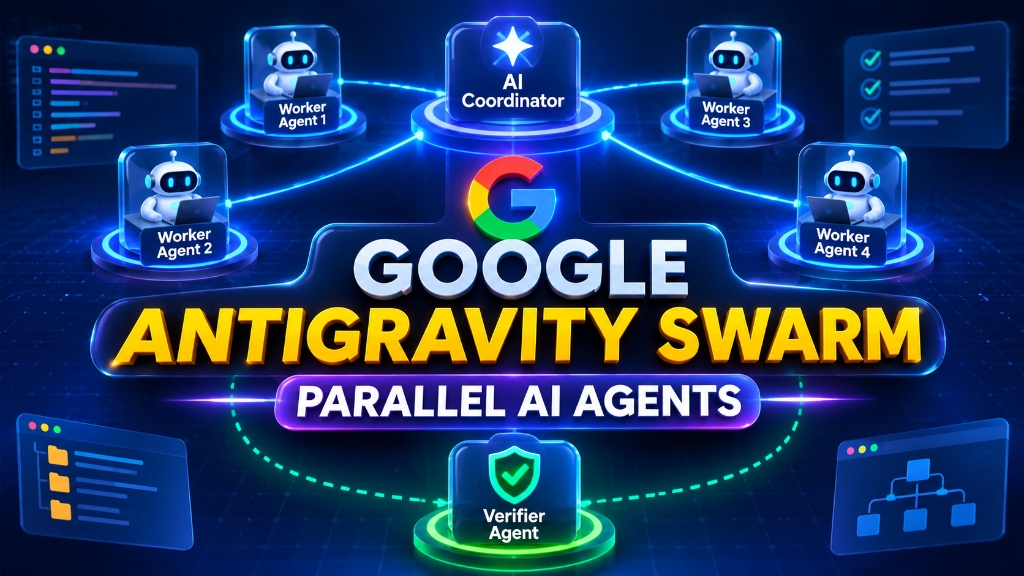
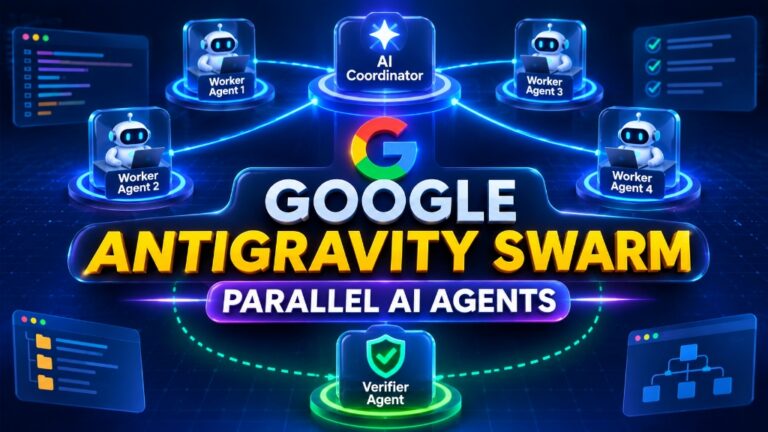
Architecture overview: Central AI Coordinator, parallel coding workers, and dedicated Verifier agent.
At its foundation, Google Antigravity Swarm is an agent orchestration protocol built into the Google Antigravity development environment. When you type /swarm in an Antigravity project conversation, your active chat becomes a coordinator. Instead of executing edits directly within your main context thread, the coordinator generates dedicated worker agents and posts public task briefs to a shared workspace message board.
Here is what makes this architecture fundamentally different from earlier agent implementations:
[Main Coordinator Chat]
        │
        ├── Public Brief on Shared Board ──► @worker-date-test  (Runs in isolated workspace)
        │
        ├── Public Brief on Shared Board ──► @worker-price-test (Runs in isolated workspace)
        │
        └── Post-Completion Trigger      ──► @verifier          (Audits code & runs full test suite)
1. The Shared Message Board Architecture
In standard subagent implementations, an agent spawns in the background and reports privately back to its parent. Swarm replaces this private black-box model with a visible, public message board. Every worker in the swarm can view assignment briefs, monitor updates from other workers, and respond when tagged with an @mention. If Worker 2 needs an exported interface that Worker 1 is currently defining, Worker 2 can read Worker 1’s public progress notes directly on the board.
2. Token-Free Idle State
One common concern with multi-agent frameworks is runaway token consumption. In Google Antigravity Swarm, worker agents do not run continuous, wasteful polling loops. Once a worker finishes its assigned task slice or delivers a status update, it enters a waiting state. While asleep on the board, that worker costs zero tokens until the coordinator or another agent explicitly tags it with a follow-up assignment.
3. Isolated Workspaces with Git Worktree Integration
By default, readers and code verifiers inherit your existing workspace. However, when multiple workers need to write or compile code concurrently, Swarm supports workspace: "share" (which provisions dedicated working copies of your repository using Git worktrees) or workspace: "branch" (which spins up isolated branch clones). This prevents two parallel workers from overwriting the same local files or clashing during simultaneous compiler builds.
The 4-Way Decision Guide: Swarm vs. Teamwork vs. Boost vs. Subagents
A common point of confusion among developers exploring Google Antigravity is deciding when to invoke Google Antigravity Swarm versus one of the platform’s other three multi-agent modes: Subagents, /boost, and /teamwork.
Google’s official documentation defines a clear taxonomy based on task duration, complexity, and communication scope. Here is how they compare side by side:
| Mode | Primary Purpose | Typical Time Horizon | Communication Pattern | Workspace Setup | Quota Consumption |
|---|---|---|---|---|---|
| Subagents | Single, isolated helper task (e.g., scrape data, run linter) | Seconds to minutes | Private back to parent agent | Inherit (sandboxed) | Low |
/boost |
Concentrated reasoning for stubborn concurrency bugs or math logic | Minutes to 1 hour | 3-tier hierarchical verification loops | Inherit | Moderate |
Google Antigravity Swarm |
Parallel tasks split cleanly across separate files or modules | Minutes to hours | Public shared message board with @mentions |
Shared Git worktrees or branches | Moderate to High |
/teamwork |
Massive multi-day software migrations or complete rewrites | Hours to days | Persistent team (PM, engineers, adversarial auditors) | Isolated branch workspaces | High |
Let us examine each mode in detail so you know exactly which command to type.
1. Subagents: Quick Delegated Side Jobs
Subagents are ideal for brief, non-blocking tasks that do not require project-wide coordination. For example, if you are actively writing a new feature and want an assistant to check test coverage or search through external API documentation, you can invoke a subagent. It runs in the background for a couple of minutes, returns a concise summary to your main conversation, and exits. It operates in isolation without posting to a public board.
2. /boost: Deep Reasoning for Tough Single-File Logic
You should not use Swarm when you have one stubborn, deeply complex bug that spans obscure runtime behavior. In those scenarios, splitting the problem among parallel workers only creates confusion. Instead, you invoke /boost. This command triggers an intense, three-tier reasoning hierarchy consisting of an Orchestrator, DeepCoder, and DeepInvestigator. They run multi-round hypothesis testing and adversarial reviews until they pinpoint the root cause of the bug.
3. Google Antigravity Swarm: Parallel Multi-File Feature Work
Swarm is the right choice when your work can be split into distinct, non-overlapping slices. If your team has to update the payment gateway in one directory, rewrite the email notification templates in another, and build a currency converter in a third, running these sequentially in a single chat is painfully slow. With Google Antigravity Swarm, each slice gets an independent worker, and a dedicated verifier audits the merged output.
4. /teamwork: Long-Running Multi-Day Project Migrations
When you are undertaking a multi-day codebase migration—such as moving an entire backend from Express to Fastify or converting a legacy SQL schema—Swarm is too lightweight. For full-scale initiatives, /teamwork deploys a complete project hierarchy. It begins with a structured scoping interview, outputs a formal milestone roadmap, and assigns specialized roles including project managers, developers, and independent auditors working across persistent workspaces.
Hands-On Walkthrough: Running a Swarm on an Online Checkout
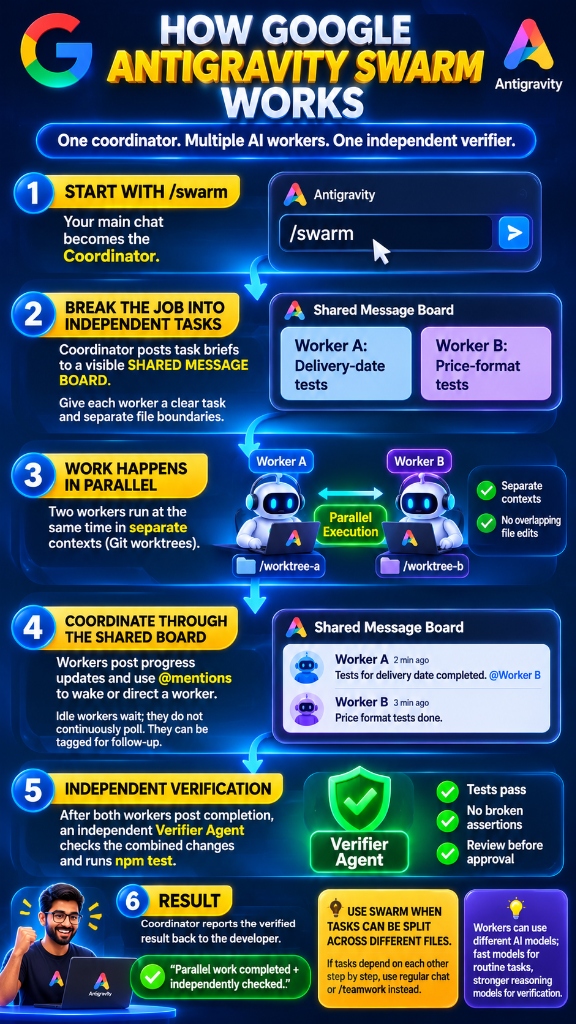
The 6-step Google Antigravity Swarm workflow: Coordinator, parallel worker execution in separate worktrees, shared board coordination, independent verifier, and final pass report.
To test the practical capabilities of Google Antigravity Swarm, I set up a real-world debugging experiment on an e-commerce checkout module. The checkout had two independent bugs that needed unit test coverage:
- Delivery Date Validation Bug: The checkout system allowed users to submit invalid calendar dates, such as February 30th.
- Price Formatting Bug: The payment layer occasionally displayed cents as raw integers, printing
1250cents instead of formatting them as$12.50.
Here is the exact step-by-step workflow I used to resolve both issues simultaneously using Swarm.
Step 1: Initiating /swarm in the Antigravity Chat
Inside your Antigravity project conversation, type /swarm and press Tab to bring up the swarm starter block. I passed the following prompt to the coordinator:
/swarm
Assign worker-date to tests/unit/checkout_date.test.ts. Have it write a comprehensive
unit test verifying that February 30 is rejected as an invalid delivery date.

Assign worker-price to tests/unit/checkout_price.test.ts. Have it write a unit test
proving that 1,250 cents displays formatted as $12.50.

Keep each worker's file edits strictly within its assigned test file.

After both workers post completion notices, have verifier run the complete test suite
via 'npm test' and report any broken assertions.
Step 2: Parallel Worker Execution
Once I submitted the prompt, the coordinator created two parallel worker agents (worker-date and worker-price) and assigned them their respective files.
Because both tasks operated on distinct files in the test directory, both agents ran concurrently:
* worker-date inspected the date parsing helper, created test fixtures with leap-year boundary cases, and asserted that February 30th threw a ValidationError.
* At the exact same second, worker-price inspected the currency utility and authored assertions verifying zero-padding on decimal cents (1250 to $12.50, 50 to $0.50).
Neither agent suffered from context pollution because their execution contexts were kept completely separate.
Step 3: Automated Verification by the Verifier Agent
Once both workers completed their assignments and posted their diffs to the shared board, the coordinator automatically awakened the verifier agent.
The verifier executed npm test across the entire workspace, validated that both test suites executed cleanly without syntax regressions, and returned a verified test pass report to the main chat. Having this third, unbiased agent conduct the test run prevented the typical blind spot where an author agent assumes its own code is flawless.
Step 4: Monitoring Progress in the Swarm UI
Google Antigravity provides three visual tabs to monitor your active swarm:
- The Board Tab: Shows the live status of every worker (
working,waiting, orcompleted), recent status messages, and current token usage. - The Members Tab: Lets you jump directly into the individual conversation history of any worker to inspect its internal chain of thought or provide direct guidance.
- The Graph Tab: Renders an interactive node graph illustrating message flows and task dependencies between the coordinator, workers, and verifier.
You can also inspect the board directly from the Antigravity CLI at any time by running /swarm board or pressing Alt + S.
Managing Models and Quota in Google Antigravity Swarm
While Google Antigravity Swarm dramatically accelerates development velocity, running several agents concurrently consumes API quota faster than a standard single-agent chat. Understanding how to manage model assignments is critical for keeping your workflow cost-effective.
Cost-Optimized Model Routing Strategy:
┌───────────────────────────────┬───────────────────────────────┐
│ Worker Roles                  │ Assigned AI Model             │
├───────────────────────────────┼───────────────────────────────┤
│ worker-date (Routine Code)    │ Gemini 3.8 Flash (High Speed) │
│ worker-price (Routine Code)   │ Gemini 3.8 Flash (High Speed) │
│ verifier (Quality Gate)       │ Gemini 4 Carbon (High Reason) │
└───────────────────────────────┴───────────────────────────────┘
Pinning Different Models to Specific Workers
By default, newly spawned swarm workers inherit whatever base model your main chat is running. However, you can pin specific models to individual workers using the model parameter:
Assign worker-date model="gemini-3.8-flash" to tests/unit/checkout_date.test.ts
Assign worker-price model="gemini-3.8-flash" to tests/unit/checkout_price.test.ts
Assign verifier model="gemini-4-carbon" to run verification audits
This model routing strategy provides the best balance of speed and security:
* Routine Workers: Assigned to high-speed models like Gemini 3.8 Flash. They write boilerplate code and standard unit tests in seconds at minimal token cost.
* Senior Verifiers: Assigned to top-tier reasoning models like Gemini 4 Carbon. They conduct thorough security audits, inspect compiler edge cases, and catch subtle logic flaws that faster models might overlook.
Handling Rate Limits and Paused Workers
If an individual worker runs into a token rate limit or quota ceiling during an extensive coding run, it automatically enters a paused state. Unlike single-threaded assistants that crash and discard their scratchpad, Swarm preserves each worker’s conversation memory on the board.
Once your quota resets, you can wake the worker up simply by posting a short mention on the board:
@worker-date Please resume from your last checkpoint.
The worker picks up right where it left off without re-reading the entire repository.
Final Verdict: When to Add Swarm to Your Development Toolkit
After running multiple real-world development cycles with Google Antigravity Swarm, I consider it one of the most effective multi-agent features available for professional software engineers. It solves the fundamental limitation of traditional AI chat interfaces: the slow, sequential bottleneck of a single agent trying to juggle multiple files simultaneously.
Here is my practical rule of thumb for using Google Antigravity:
- Use Regular Chat when you are exploring ideas, doing quick single-file refactoring, or working through linear changes where each step depends on the previous one.
- Use Subagents when you need a single helper to handle a background errand—like checking API documentation or running a quick lint script—without interrupting your main conversation.
- Use
/boostwhen you are wrestling with a deep, complex concurrency bug or mathematical race condition that demands intensive multi-stage verification. - Use
Google Antigravity Swarmwhenever you have a substantial feature or test suite that can be divided cleanly across independent files and verified by a dedicated reviewer. - Use
/teamworkwhen you are executing a multi-day, multi-phase system overhaul that requires formal milestone planning and dedicated project management.
By matching the structure of your task to the right Antigravity mode, you can eliminate artificial bottlenecks, safeguard your code quality with automated verifiers, and finish complex multi-file engineering jobs in a fraction of the time.