
When I first started pushing Google Antigravity to its limits on real-world codebases, I quickly realized that running multiple AI agents isn’t a one-size-fits-all solution. In fact, picking the wrong multi-agent mode is the fastest way to drain your monthly quota, clutter your context window with hallucinations, or waste twenty minutes waiting for an over-engineered committee to fix a five-minute bug.
The platform provides three distinct orchestration commands alongside lightweight background helpers: Google Antigravity Boost vs Swarm vs Teamwork, plus native Subagents. Each mode was engineered for a completely different scale, task horizon, and concurrency model.
In this comprehensive guide, I will break down the architectural differences between Google Antigravity Boost vs Swarm vs Teamwork, share practical hands-on examples from my own testing, and provide the exact decision rules I use to orchestrate parallel AI workflows without burning quota.
Quick Diagnostic Guide
🎬 Watch the 68-Second Video Walkthrough: Watch on YouTube (@Softreviewed)
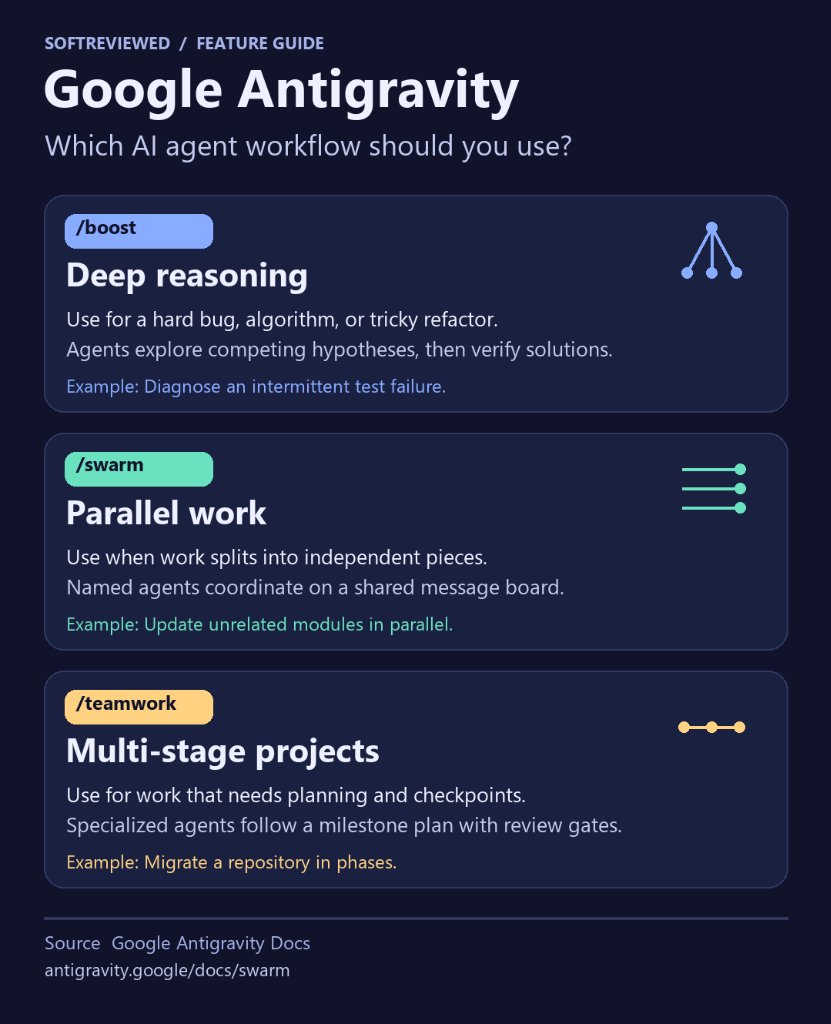
Technical decision guide: Choosing between Subagents, /boost, /swarm, and /teamwork in Google Antigravity.
The Core Dilemma: Why Multi-Agent Selection Matters
When developers talk about AI coding assistants, they usually picture a single LLM chatting inside a terminal or IDE. That model works well for writing a single function or explaining an error stack trace. But as soon as you task an AI with modern software engineering—such as testing three microservices at once, refactoring database schemas, or debugging intermittent race conditions—a single-agent workflow collapses.
The single agent suffers from context saturation. As it reads dozen of files, its short-term memory fills up, earlier instructions blur, and it starts hallucinating interfaces or breaking previously passing tests. Worse, when the same agent reviews its own code, it rarely spots its own blind spots.
Google Antigravity addresses this by splitting complex cognitive work across specialized agent architectures. But invoking the wrong architecture creates new bottlenecks:
                  ┌── Over-Engineering: Running /teamwork for a 5-minute bug wastes hours in scoping.
Choosing The ─────┼── Token Exhaustion: Running /boost to rename variables across 40 files drains quota.
Wrong Mode        ├── File Collisions: Running /swarm without worktrees causes git merge conflicts.
                  └── Agent Starvation: Using subagents for complex debates leads to shallow fixes.
Understanding how Google Antigravity Boost vs Swarm vs Teamwork operate under the hood ensures you apply exactly the right amount of compute power to the problem at hand.
1. Native Subagents: The Zero-Overhead Errand Runner
Before examining the three slash commands, you must understand the simplest multi-agent primitive in Antigravity: the Subagent.
A subagent is an isolated, lightweight agent spawned in the background to handle a specific, bounded chore. When you ask your primary agent to look up an API documentation page or check an open terminal task, it doesn't need to bloat your conversation history with raw HTML or log dumps. Instead, it delegates that task to a subagent.
[Main Conversation] ────► Spawns Subagent (Reads Doc in Sandbox) ────► Returns Clean 2-Line Summary
When to Use Subagents
- Documentation Lookups: Fetching parameter lists or SDK examples from official sites.
- Isolated Verification: Running a quick linter command or verifying that a local port is listening.
- Non-Interactive Tasks: Scraping a webpage or formatting a scratch data file.
When NOT to Use Subagents
- Multi-File Code Edits: Subagents report back privately to their parent agent. They cannot collaborate on a shared board or see what other subagents are doing.
- Deep Architectural Debates: If a bug requires iterative testing and adversarial verification, a single subagent will quickly give up or loop.
2. Antigravity Boost: The Deep Reasoning Lane
The /boost command is designed for tasks where the problem is hard, not big.
In programming, a "hard" problem is one where the codebase might only be a few hundred lines long, but the logic is notoriously tricky. Think of intermittent race conditions, memory leaks, subtle off-by-one errors in custom sorting algorithms, or tricky cryptographic padding bugs.
/boost Find why the WebSocket heartbeat fails intermittently under high concurrent connection loads.
How Antigravity Boost Works Under the Hood
When you trigger /boost, Antigravity does not simply hand the prompt to a standard chat turn. Instead, it routes the query through an intensive multi-agent reasoning pipeline:
[Prompt] ──► [Lead Analyst] ──► [Hypothesis Generator] ──► [Implementation Agent] ──► [Adversarial Verifier]
                  ▲                                                                            │
                  └─────────────────── Fails Unit Test Proof ──────────────────────────────────┘
- Hypothesis Generation: Multiple internal agents debate possible root causes and formulate concrete hypotheses.
- Implementation Proofs: The coding agent writes minimal reproducing test scripts to verify the bug exists before attempting a fix.
- Iterative Verification Loop: The verifier agent rigorously tests the patch against boundary conditions until the fix is mathematically or logically sound.
Hands-On Example: The Flaky Payment Gateway Test
During my own testing, our payment integration test suite failed approximately one out of every twenty runs. A standard single agent kept slapping await sleep(100) patches onto the code, which hid the problem instead of solving it.
When I ran /boost, the engine spent nearly four minutes analyzing thread locks, identified an unhandled promise rejection in the database connection pool, and generated a robust retry mutex with zero race conditions.
When NOT to Use Antigravity Boost
Never use /boost to rename methods across fifty files or scaffold boilerplates. That task is wide, not deep. Because Boost consumes heavy reasoning tokens per minute, using it on routine grunt work wastes your expensive Pro or Ultra plan allocations.
3. Antigravity Swarm: The Parallel Worker Board
If Boost is meant for problems that are deep and narrow, Google Antigravity Swarm (/swarm) is built for problems that are wide and parallel.
A classic wide problem is building or testing multiple independent components at the exact same time. For example, if you need to build the API endpoints for Users, Products, and Orders, there is no reason to make each endpoint wait for the previous one to finish. Each task touches different controllers, different models, and different test files.
/swarm Implement unit tests for the Users, Orders, and Products endpoints concurrently. Add a verifier to audit the suite.
The 4 Non-Negotiable Rules of Swarm Architecture
As I detailed in our Google Antigravity Swarm Guide, Swarm operates on four foundational architectural principles:
                      ┌── 1. The Coordinator Never Writes Code (Watches & delegates only)
                      ├── 2. The Shared Message Board (Public briefs & updates via @mentions)
Antigravity Swarm ────┼── 3. Zero-Token Idle Sleep (Workers cost zero tokens while waiting)
                      └── 4. Git Worktree Isolation (workspace: "share" prevents merge conflicts)
- The Coordinator Never Writes Code: The moment you type
/swarm, your chat becomes the central coordinator. Its sole job is sizing the swarm, writing unambiguous task briefs, and monitoring worker progress. A coordinator that writes code is a coordinator not watching the swarm. - The Public Message Board: Unlike subagents that communicate in private siloes, Swarm workers collaborate on an append-only shared message board. Every worker sees the full conversation timeline and can read updates from peer workers.
- Token-Free Idle Sleep: Swarm workers do not poll in endless loops. Once a worker finishes its task slice, it enters a
waitingstate and burns zero tokens until someone tags it with an@mention. - Git Worktree Isolation: When workers edit code simultaneously, Swarm leverages
workspace: "share"orworkspace: "branch", spinning up independent Git worktrees. Workers can edit and compile simultaneously without touching each other's disk files. - The Dedicated Adversarial Verifier: For every 2 to 4 workers, the coordinator assigns a dedicated verifier. The verifier runs the full test suite and sends errors straight back to whoever introduced them before any work lands in main.
When NOT to Use Antigravity Swarm
Never use Swarm when Step B strictly depends on the output of Step A. If Worker 2 cannot write a line of code until Worker 1 compiles a shared library, putting them in a parallel swarm produces deadlocks and confused agents. Furthermore, avoid Swarm for tiny one-file tweaks—the overhead of spinning up workers and writing briefs outweighs the execution time.
4. Antigravity Teamwork: The Multi-Day Engineering Squad
When you are facing a massive engineering overhaul that spans days or weeks—such as migrating an entire monolithic backend from Express to Fastify, migrating a legacy database from MySQL to PostgreSQL, or refactoring a 50,000-line repository—neither Boost nor Swarm is sufficient.
You need Google Antigravity Teamwork (/teamwork).
/teamwork Migrate our backend API from Express to Fastify. Maintain complete test parity and document every endpoint transition.
The Two-Phase Autonomous Framework
Teamwork represents Google's most sophisticated agent capability. Instead of jumping immediately into terminal commands, it divides the project into two distinct phases:
[Phase 1: Scoping Interview] ──► [Binding Blueprint Spec] ──► [Phase 2: Milestone-Driven Execution]
  (Sentinel Agent Alignment)                                    (Specialists + Gate Auditors)
Phase 1: The Interactive Scoping Interview
When you trigger /teamwork, a senior Sentinel Agent initiates an interactive interview. It questions your architectural assumptions, clarifies edge cases, evaluates deployment constraints, and drafts a binding specification document. Execution cannot begin until you review and approve this blueprint.
Phase 2: Milestone-Gated Execution
Once approved, Teamwork mobilizes a full engineering squad composed of specialized roles:
- Architect Agents: Maintain repository-wide structural blueprints and enforce coding standards.
- Implementation Agents: Execute code changes within assigned subsystem boundaries.
- Auditor & Critic Agents: Perform adversarial code reviews and run security scans at each milestone gate.
- State Managers: Record progress in persistent sidecar state files, ensuring that if you close your laptop or the session restarts, the agents pick up right where they left off.
When NOT to Use Antigravity Teamwork
Never use /teamwork for everyday debugging, single-endpoint additions, or tasks that should take under an hour. The upfront scoping interview and milestone audit architecture are built specifically to prevent runaway drift on massive projects. For simple tasks, this rigor feels sluggish and wasteful.
The 4-Way Comparison Guide: Boost vs Swarm vs Teamwork vs Subagents
To help you choose the right tool instantly, here is how the four Antigravity multi-agent options compare across every technical dimension:
| Technical Feature | Subagents | /boost | /swarm | /teamwork |
|---|---|---|---|---|
| Primary Focus | Quick isolated chores | Deep, stubborn bugs | Parallel multi-file work | Massive multi-day projects |
| Typical Horizon | Seconds | Seconds to Hours | Minutes to Hours | Hours to Days |
| Execution Pattern | Request / Response | Multi-agent reasoning loop | Parallel workers + verifier | Scoping interview + gates |
| Communication | Private to parent | Hierarchical verification | Public shared message board | Formal artifact handoffs |
| File Isolation | Sandboxed inherit | Inherit workspace | Git Worktrees (share/branch) | Modular subsystem directories |
| Token Cost | Minimal | High per minute | Moderate (zero idle burn) | High cumulative over days |
| Model Strategy | Inherits parent | Fixed reasoning tier | Model pinning per worker role | Multi-model tier assignments |
| Plan Requirement | All Tiers | Google AI Pro & Ultra | Google AI Pro & Ultra | Google AI Ultra |
Quota, Cost & Model Pinning Architecture
One of the greatest strengths of Google Antigravity is that multi-agent execution does not have to break your monthly budget—if you understand how to pin models.
How Model Pinning Saves Your Quota in Swarm
In Google Antigravity Swarm, you are not forced to run every worker on Google's heaviest, most expensive model (such as Gemini 4 Carbon or Gemini Ultra). You can strategically assign models based on worker responsibility:
┌─────────────────────────────────────────────────────────────────────────────┐
│ High-Efficiency Swarm Model Assignment Strategy                             │
├─────────────────────────────────────────────────────────────────────────────┤
│ • Coordinator:  Pinned to Gemini 3.8 Flash (High speed, low cost routing)   │
│ • Worker 1:     Pinned to Gemini 3.8 Flash (Routine file formatting)        │
│ • Worker 2:     Pinned to Gemini 3.8 Flash (Standard CRUD unit tests)       │
│ • Verifier:     Pinned to Gemini 4 Carbon (Senior adversarial code audit)   │
└─────────────────────────────────────────────────────────────────────────────┘
By assigning fast, lightweight models to routine drafting and reserving your heavy reasoning models strictly for the adversarial verifier, you achieve senior-developer quality at a fraction of the token cost.
Token Consumption Profiles Compared
- Boost: Burns tokens rapidly in short bursts. Expect thousands of reasoning tokens per minute as internal agents debate hypotheses.
- Swarm: Token consumption scales linearly with worker count, but drops to zero during idle periods because workers go to sleep.
- Teamwork: Generates the highest cumulative token volume over 24 to 72 hours, which is why it requires Google AI Ultra plan allocations.
Claude Code vs Google Antigravity Multi-Agent Architecture
Many developers ask how Google Antigravity's multi-agent system compares with Anthropic's Claude Code:
| Dimension | Claude Code | Google Antigravity (2.0 / CLI) |
|---|---|---|
| Multi-Agent Philosophy | Single-threaded CLI loop with subagent dispatch | Native multi-paradigm: Boost, Swarm, Teamwork |
| Parallel Execution | Serial subagent queries; user must orchestrate terminals | Native /swarm with automated worktree isolation |
| Visibility & State | Terminal text output; subagents report privately | Visual Swarm UI, live message board, graph dependency tabs |
| Verification Strategy | User checks git diffs manually in terminal | Built-in adversarial verifiers audit code before merge |
| Long-Horizon Support | Relies on manual context compaction (/compact) |
Native /teamwork milestone gates with persistent state |
While Claude Code remains an exceptionally fast, high-dexterity terminal companion for quick single-agent tasks, Google Antigravity was architected from the ground up as a true multi-agent development environment capable of orchestrating entire squads of AI engineers simultaneously.
Frequently Asked Questions (FAQ)
Can I run a Swarm inside a Boost session?
No. /boost, /swarm, and /teamwork are mutually exclusive orchestration modes. Boost operates as a deep, linear reasoning loop, while Swarm operates as a broad, parallel board. You cannot nest a swarm inside a boost session.
What happens if two Swarm workers edit the same file?
If you assign two workers to the same file without using Git worktrees, they will trigger write conflicts. The best practice is designing the swarm so each worker owns completely non-overlapping files. If simultaneous edits are unavoidable, initialize workers with workspace: "share" or workspace: "branch" so changes stay cleanly isolated in git worktrees until verified.
Which Google Antigravity plan do I need for /swarm and /boost?
Both /boost and /swarm require a paid Google AI Pro or Ultra subscription. /teamwork is currently supported on Google AI Ultra plans due to the significant token requirements of multi-day autonomous sessions.
How do I stop a Swarm or Teamwork session that is burning too many tokens?
In Swarm, you can kill individual workers or terminate the entire session directly using swarm{action: "kill"} or by issuing a cancel command in the chat coordinator. In Teamwork, the Sentinel agent pauses execution at each milestone gate, giving you full authority to halt or redirect the squad before further tokens are spent.
Summary & Actionable Checklist
Before you type your next slash command in Google Antigravity, run through this quick checklist:
- Is the task a tiny 30-second errand? → Delegate to a Subagent.
- Is the task a hard, subtle bug in a single subsystem? → Use
/boost. - Can the task be divided into independent files edited at the same time? → Use
/swarm. - Is the task an architectural overhaul that will take days to finish? → Use
/teamwork.
By selecting the right multi-agent engine for each specific task, you keep your repository clean, prevent merge collisions, and get the absolute maximum performance out of your Google Antigravity workspace.