
Most apps still use full text-generating chatbots for jobs that only need a yes, a category label, or a number. You send a prompt, wait for the model to generate JSON token by token, pay for every output token, and write validation code in case the formatting breaks. On November 11, 2026, Google’s Gemini Decisions API announcement introduced Gemini Decisions API (gemini-decision-1) inside Google AI Studio to replace that slow loop with a single scoring pass.
Quick Summary
gemini-decision-1, a specialized AI decision model that evaluates up to 1,000 closed-ended questions (noul yes/no, choice up to 255 options, or score rubrics) against text, images, audio, video, or PDFs up to 256K tokens. It responds in 150-250 ms, costs $0.10 per 1M input tokens with $0 output charges, and currently omits Context Caching and Batch API support.
Quick Diagnostic Guide
I dug through Google's launch specifications, the google-genai SDK examples, and independent benchmark tracking on the Artificial Analysis Decision Index to see where Gemini Decision 1 actually beats rivals like TypeSafe Jev 1.14 and OpenAI's GPT-6 Luna, and where it falls short. If you are also tracking Google's broader November lineup, you can pair this breakdown with my Gemini 4 Carbon release review.
Prefer a quick walkthrough first? Watch my 2-minute video breakdown below before we dig into the SDK examples, benchmarks, and pricing limits.
2-Minute Video Breakdown: Watch Gemini Decisions API on YouTube (@Softreviewed)
What is the Gemini Decisions API and how does Gemini Decision 1 work?
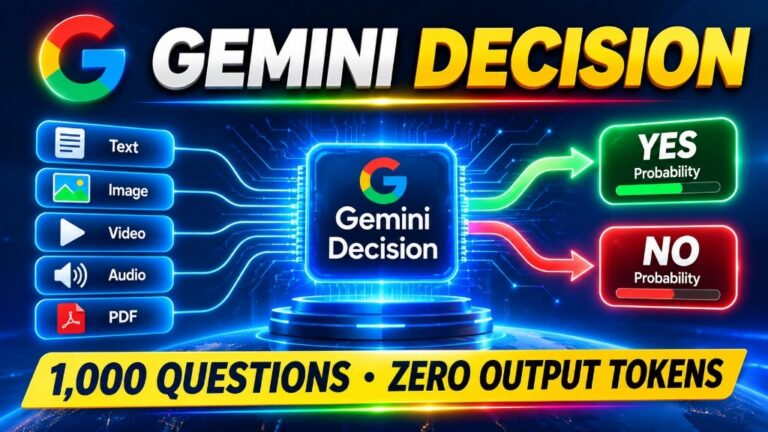
The Gemini Decisions API is a specialized endpoint in Google AI Studio (v1beta) powered by gemini-decision-1 that evaluates structured questions without generating text tokens. You pass one shared multimodal input up to 256K (262,144) tokens alongside up to 1,000 questions, and the model returns calibrated probabilities and confidence scores in 150-250 ms.
When I looked at Google's engineering breakdown, the biggest change from standard Gemini models is how the response gets built. A regular language model predicts and streams text one token at a time. gemini-decision-1 skips token-by-token generation completely. It reads your input once in a single prefill pass (roughly 50-100 ms of model compute) and scores every question in parallel. Because all questions share that single input pass, running 100 checks takes almost the same time as running one check.
Three question primitives: noul, choice, and score
Every question you send to the Gemini Decisions API uses one of three closed-ended types:
| Question Type | Plain Meaning | Option Limit | What You Get Back |
|---|---|---|---|
noul |
Yes or No check | 2 states (true/false) | Calibrated probability (0.01 to 0.99) plus a confidence score |
choice |
Single-select pick | 2 to 255 labeled options | Winning option label, probability per option, plus confidence |
score |
Ordered rubric rating | 2 to 255 ordered levels | Weighted score, level probabilities, plus confidence |
In Google's counter-spill example, one photo and a short text note go into a single API call with three questions attached. The noul check (has_spill) returns 0.95 for yes, the choice check (next_action) picks wipe_with_cloth at 98% confidence, and the score check (severity) rates it 1.19 out of 2 for a minor localized spill.
Google already runs this pattern inside its own products: Gemini Notebook uses it to route incoming prompts between smaller and larger models (cutting everyday latency by up to 40%), Stitch uses it for rapid wireframe checks, CC uses it to select 1 of 200+ emoji, and Google Search runs MCP tool safety checks through it.
How does Gemini Decisions API compare to Structured Outputs?
The Gemini Decisions API is built for closed-ended classification and confidence gating, whereas Structured Outputs force a generative LLM to write free-form JSON fields matching a schema. Use decisions.create() when your app needs fast routing, policy checks, or calibrated probabilities; keep Structured Outputs when you need extracted names, invoice line items, or open text.
A lot of developers asked me whether this replaces JSON Schema mode in generate_content. It solves a different problem. If you are pulling a customer's street address, SKU numbers, and dollar amounts off a receipt, gemini-decision-1 cannot help you because it never writes arbitrary strings or numbers. You have to know every possible answer ahead of time.
| Comparison Factor | Gemini Decisions API (gemini-decision-1) | Traditional Structured Outputs (JSON Schema) |
|---|---|---|
| How it works | Single prefill pass scoring fixed questions | Token-by-token text generation constrained to a schema |
| Allowed answers | Closed sets only: yes/no, 2-255 choices, or rubric scores | Open-ended strings, numbers, arrays, and nested objects |
| Confidence numbers | Native calibrated probability and confidence per question | No built-in probability score per field |
| Output token cost | $0 (zero output tokens generated) | Billed for every generated JSON key and value token |
| Typical latency | 150-250 ms end-to-end (tested up to 16K input tokens) | Scales up as the output JSON grows longer |
| Best workflow fit | Ticket triage, safety guardrails, model routing, grading | Receipt parsing, entity extraction, form filling |
Gemini Decision 1 vs TypeSafe Jev 1.14 vs GPT-6 Luna: Benchmark and cost trade-offs
On Google's 9-benchmark launch suite, Gemini Decision 1 ranks first on 7 tests and posts the lowest calibration error (0.0250), while TypeSafe Jev 1.14 wins two agentic benchmarks and costs less ($0.68 vs $0.88). On the independent Artificial Analysis Decision Index v2.1, Jev 1.14 edges ahead on score (~66.23 vs ~66) and runs roughly twice as fast (~92 ms vs ~211 ms).
Separating Google's self-reported launch table from independent evaluation numbers matters here. Google's launch comparison scores refusals, safety blocks, and unsupported input formats as incorrect across the full benchmark denominator. Here is how the numbers stack up directly from Google's chart:
| Benchmark (Google Launch Table) | Scope / Metric | Gemini Decision 1 | TypeSafe Jev 1.14 | GPT-6 Luna (OpenAI Decisions API) | Gemini 3.5 Flash-Lite (minimal) |
|---|---|---|---|---|---|
| JevBench | Public split | 92.2% | 90.0% | 90.9% | 86.6% |
| Amazon ESCI | Macro-F1 | 58.7% | 56.7% | 54.7% | 47.2% |
| New Yorker Caption | Text-only | 79.7% | 72.0% | 68.4% | 73.7% |
| Mind2Web Multimodal | Top-1 Acc | 86.2% | 86.8% | 81.8% | 78.0% |
| PubMedQA | Top-1 Acc | 79.8% | 78.2% | 74.4% | 77.6% |
| Global-MMLU-Lite | Non-English | 86.0% | 85.0% | 79.6% | 78.8% |
| When2Call | Top-1 Acc | 79.9% | 82.0% | 70.4% | 60.9% |
| MMAU (Audio) | Top-1 Acc | 71.8% | Not reported | Not reported | 67.7% |
| Video-MME | No subtitles | 69.1% | Not reported | Not reported | 63.3% |
| Calibration (Top-1 ECE) | 7 shared evals (lower better) | 0.0250 | 0.0494 | 0.0721 | 0.2104 |
| Total Price (7 shared evals) | USD | $0.88 | $0.68 | $0.93 | $4.14 |
Notice two important gaps in that table. First, TypeSafe Jev 1.14 and GPT-6 Luna show "Not reported" on both audio (MMAU) and video (Video-MME), which reflects Gemini Decision 1's native audio and video handling rather than a direct head-to-head loss. Second, Jev 1.14 actually beats Gemini Decision 1 on Mind2Web Multimodal (86.8% vs 86.2%), When2Call tool selection (82.0% vs 79.9%), and raw cost ($0.68 vs $0.88).
Independent numbers from the Artificial Analysis Decision Index v2.1 (which covers AA-Omniscience-Decision, HLE-MultiChoice, When2Call, AA-Paperclip, EvalSafe-O*NET-AA, and Brier calibration) reinforce that split:
| Model (Artificial Analysis Decision Index v2.1) | Decision Index Score | Average Speed / Task | Standardized Task Cost (per 1M tasks) |
|---|---|---|---|
| Gemini Decision 1 | ~66 | ~211 ms | ~$345 |
| TypeSafe Jev 1.14 | ~66.23 | ~92 ms | ~$156 |
| GPT-6 Luna (Decisions) | ~60.0-60.25 | ~206 ms | ~$339 |
Which AI decision model should you shortlist?
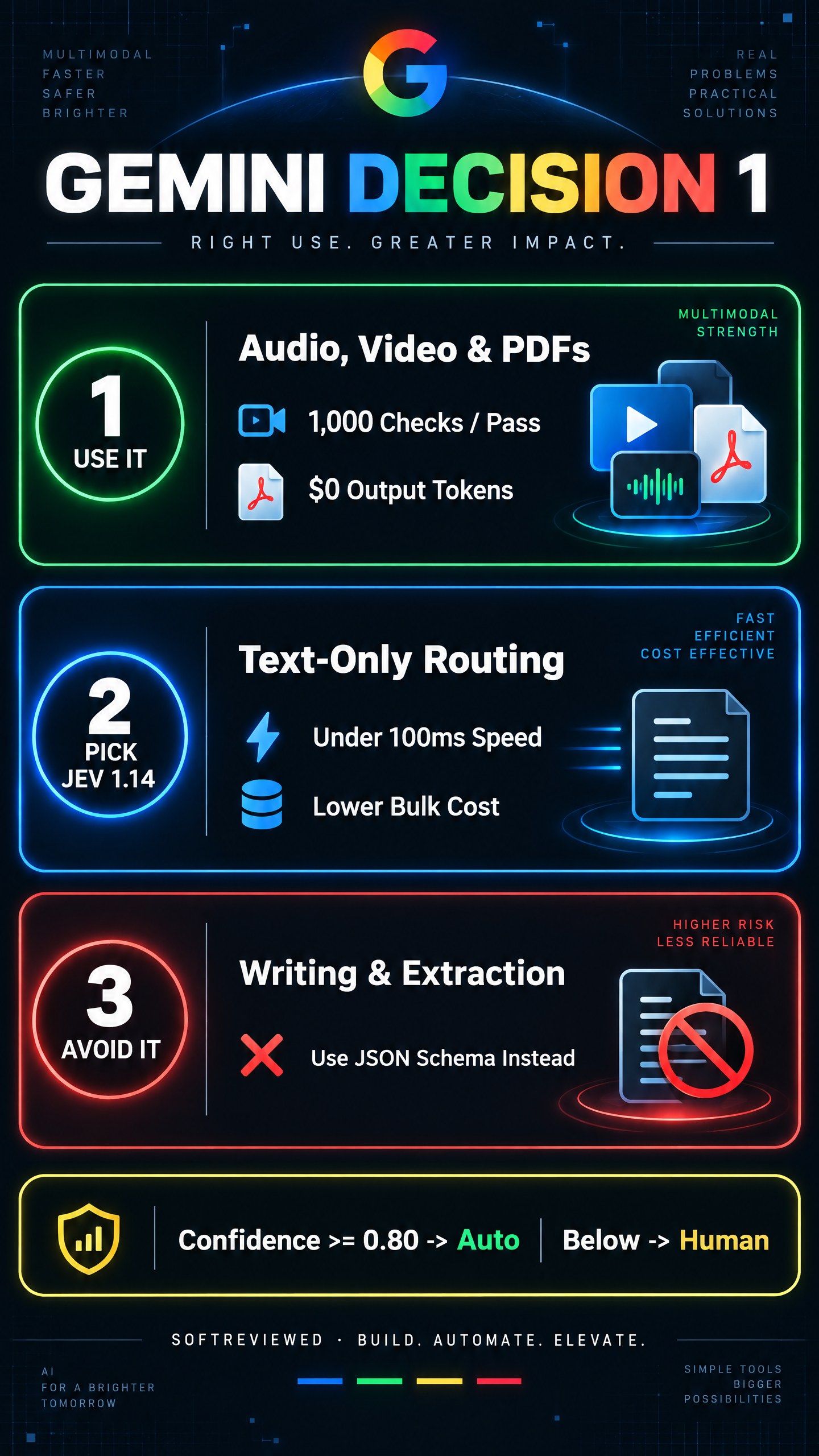
- Shortlist Gemini Decision 1 when your inputs include raw audio, video clips, multi-page PDFs, or mixed images and text, or when tight probability calibration (0.0250 ECE) drives human-escalation rules.
- Shortlist TypeSafe Jev 1.14 when your workload is mostly text or basic image tool-calling (
When2Call), you want sub-100 ms compute speed (~92 ms), and lowest dollar cost per million checks (~$156 on the index, $0.042 per 1M tokens) matters most. - Shortlist GPT-6 Luna (Decisions) only if your stack is already standardized on OpenAI billing and enterprise contracts, since it trails both Decision 1 and Jev 1.14 on the Artificial Analysis Decision Index (~60) at a similar cost to Google (~$339).
What does Gemini Decisions API cost, and what are the rate limits?
The Gemini Decisions API costs $0.10 per 1 million input tokens with $0 output charges, and your shared input payload is billed only once per request even if you attach up to 1,000 questions. A free prototyping tier is available in Google AI Studio with 200 RPM and 10,000 daily requests.
That single-bill shared input rule changes the math for batch checklists. Suppose you feed a 1,000-token customer support thread or policy PDF along with 10 short classification questions. You pay for the 1,000 input tokens once, plus the tiny token count of the 10 questions themselves, and zero dollars for the answers. Google reports that on its 7 shared evaluations, Decision 1 cost $0.88 compared to $4.14 for Gemini 3.5 Flash-Lite (Interactions API).
| Tier / Channel | Price (Input / Output) | Rate Limits | Important Caveats |
|---|---|---|---|
| Google AI Studio (Free Tier) | $0 / $0 | 200 RPM, 50,000 TPM, 10,000 RPD | Google may use free-tier data to improve products |
| Google AI Studio (Tier 1 Paid) | $0.10 per 1M input / $0 output | 1,500 RPM, 1,000,000 TPM, 50,000 RPD | Data excluded from product-improvement training |
| Higher Tiers (Tier 2 / 3) | $0.10 per 1M input / $0 output | 5,000 to 15,000+ RPM | Scales up daily request ceilings |
OpenRouter (google/gemini-decision-1) |
Pay-per-token via Google AI Studio | Provider-dependent | Live at launch for unified API routing |
Before moving a production pipeline onto gemini-decision-1, check four real limitations confirmed in the current launch specs:
- No Context Caching yet: If you send the exact same 40-page company policy manual on every API call, you pay the $0.10 per 1M input tokens rate every time because prompt caching is not supported on this endpoint.
- No Batch API, Flex, or Priority tiers: Asynchronous 50%-off batch jobs are not available for
gemini-decision-1. - 16K vs 256K speed caveat: The 256K (262,144) token window is the input limit, whereas Google's 150-250 ms latency measurements were tested up to 16K input tokens. Expect larger PDFs or long videos to take longer.
- Google Cloud Vertex AI is "coming soon": Right now,
gemini-decision-1runs through Google AI Studio (v1beta) and OpenRouter, not Vertex AI enterprise deployments.
When should you use an AI decision model, and when should you avoid it?
Use the Gemini Decisions API for fast closed-set routing, safety gating, media triage, and rubric grading where confidence thresholds hand edge cases to a person. Avoid it whenever you need written explanations, open-ended data extraction, or answers outside a fixed option list.
| Workflow Candidate | Supplied Material | Requested Output | Supporting Evidence | Success Check |
|---|---|---|---|---|
| Support inbox routing | Customer email + order history | noul refund flag, choice team queue, score urgency (0-3) |
One shared input billed once; calibrated 0.0250 ECE | Check if confidence >= 0.80 routes cleanly and < 0.80 goes to human review |
| Agent MCP tool safety gate | User prompt + proposed tool call (e.g., delete_rows()) |
noul policy violation check before execution |
Used inside Google Search for MCP tool safety checks | Verify blocked calls stay below false-positive threshold on 100 test prompts |
| Multimodal compliance / damage check | Delivery photo, support call audio, or video clip | noul damage check + score severity level |
Tested on MMAU (71.8%) and Video-MME (69.1%) without separate OCR/ASR | Spot-check 50 edge-case media clips against human reviewer labels |
| Model router (cheap vs frontier) | Incoming user query | choice between small fast model and reasoning model |
Used in Gemini Notebook for up to 40% lower everyday latency | Measure end-to-end cost drop and answer accuracy on 200 real queries |
| Invoice / receipt parsing (AVOID) | Scanned PDF receipt | Extracted line items, tax, and vendor address | Closed-set only; cannot emit arbitrary strings | Switch to Gemini Flash Structured Outputs with JSON Schema |
| Root-cause explanation (AVOID) | Error logs or contract text | Written summary explaining why something failed | Zero text generation by design | Use a generative model after Decision 1 flags the failure |
What are developers noticing in early Gemini Decisions API testing?
Developers testing Gemini Decision 1 praise native multimodal inputs (dropping raw audio, video, and dense PDFs directly into a rubric without an upstream transcription or OCR pipeline) while warning that teams still need strict code-level confidence gates.
From the engineering feedback I have been following since launch, two practical lessons keep coming up:
- Confidence thresholds still matter more than benchmark averages. Even with a low calibration error (0.0250), developers building database or payment guardrails are locking automated execution behind strict confidence cutoffs like
>= 0.80and routing anything uncertain straight to human approval. - Comparing decision models requires checking your exact modality. Teams running pure text classification notice that TypeSafe Jev 1.14 is faster and cheaper, whereas teams dealing with mixed PDFs, screenshots, and voice recordings see immediate pipeline savings because one
gemini-decision-1call replaces two or three preprocessing tools.
How do I test Gemini Decisions API in Python right now?
Install or upgrade the google-genai Python SDK to version 3.2 or newer, grab a free API key in Google AI Studio, and call client.decisions.create() with api_version="v1beta". You can test all three question types (noul, choice, and score) in one short script.
Follow these four steps to run your first local evaluation:
- Get a free API key: Open Google AI Studio, sign in, and click Get API key (do not send confidential production data on the free tier).
- Install the updated SDK: Run
pip install -U "google-genai>=3.2.0"and set yourGEMINI_API_KEYenvironment variable. - Send one shared input with typed questions: Use
client.decisions.create(model="gemini-decision-1", ...)as shown below. - Gate actions on
confidence: Never trust a bare label whenconfidenceis 0.55; branch low-confidence results to a human queue.
from google import genai

# Requires google-genai SDK 3.2+ and GEMINI_API_KEY set in your environment
client = genai.Client(http_options={"api_version": "v1beta"})

result = client.decisions.create(
    model="gemini-decision-1",
    input="The blue mug I ordered on Monday arrived cracked on Wednesday.",
    questions={
        "is_damaged": {
            "type": "noul",
            "instructions": "Did the item arrive damaged?",
        },
        "queue": {
            "type": "choice",
            "instructions": "Which support queue should handle this message?",
            "criteria": {
                "billing": "Payment, invoice, or refund questions.",
                "replacements": "Damaged, missing, or wrong items.",
                "general": "Product questions and account updates.",
            },
        },
        "urgency": {
            "type": "score",
            "instructions": "Rate customer urgency from low to critical.",
            "criteria": [
                "Low urgency general question",
                "Moderate issue with no deadline",
                "High urgency damaged or missing order",
            ],
        },
    },
)

damaged = result.answers["is_damaged"]
queue = result.answers["queue"]

print(f"Damaged probability: {damaged.noul:.2f} (confidence: {damaged.confidence})")
print(f"Queue pick: {queue.choice} (confidence: {queue.confidence})")

if queue.confidence >= 0.80:
    print(f"Auto-route to: {queue.choice}")
else:
    print("Send to human review")
Here is the structured response shape returned without output token charges:
{
  "answers": {
    "is_damaged": {
      "type": "noul",
      "noul": 0.99,
      "confidence": 0.99
    },
    "queue": {
      "type": "choice",
      "choice": "replacements",
      "probabilities": {
        "billing": 0.01,
        "replacements": 0.98,
        "general": 0.01
      },
      "confidence": 0.98
    }
  },
  "usage": {
    "total_input_tokens": 324,
    "input_tokens_by_modality": [
      {
        "modality": "text",
        "tokens": 324
      }
    ],
    "total_output_tokens": 0,
    "total_tokens": 324
  }
}
Frequently asked questions about Gemini Decisions API
What is the difference between Gemini Decisions API and standard Gemini models?
Standard Gemini models generate text, code, or JSON one token at a time and bill you for both input and output tokens. The Gemini Decisions API (gemini-decision-1) generates zero text tokens, evaluates up to 1,000 closed-ended questions in one pass, and charges $0 for output.
How many questions and options can Gemini Decision 1 evaluate at once?
A single client.decisions.create() request supports up to 1,000 independent questions over a shared input up to 256K (262,144) tokens. Each choice or score question supports between 2 and 255 labeled options or rubric levels, while noul handles binary yes/no checks.
Is Gemini Decisions API free to test?
Yes. Google AI Studio includes a free tier for gemini-decision-1 capped at 200 requests per minute, 50,000 tokens per minute, and 10,000 requests per day. Keep in mind that Google may use free-tier requests to improve its products, whereas paid Tier 1 ($0.10 per 1M input tokens) excludes your data from training.
Does Gemini Decisions API support Context Caching or the Batch API?
No. At launch, neither Context Caching nor the asynchronous Batch API (nor Flex or Priority tiers) is supported on gemini-decision-1. Every request bills the shared input payload once at $0.10 per 1 million input tokens, and Google Cloud Vertex AI support is marked as coming soon.
Should I pick Gemini Decision 1 or TypeSafe Jev 1.14?
Pick Gemini Decision 1 if your workload evaluates audio, video, or mixed PDFs and images, or relies on tight calibration scores (0.0250 ECE). Pick TypeSafe Jev 1.14 if you only evaluate text or static tool calls and want faster raw speed (~92 ms vs ~211 ms on Artificial Analysis) at lower cost ($0.042 vs $0.10 per 1M input tokens).