🍌 Nano Banana vs. GPT-Image 🖼️
A comparative analysis of two leading AI image generation tools and their unique strengths
⚡ Speed Advantage
The Nano Banana engine renders complete images in approximately 10 seconds, while GPT-Image typically requires 30-60+ seconds for similar complexity prompts. This 3-6x speed improvement significantly enhances workflow efficiency for professionals working with multiple iterations.
👤 Photorealism Edge
Nano Banana consistently delivers more natural skin textures, realistic eye highlights, and reduced “over-polishing” effects in human faces. While GPT-Image produces highly detailed images, they sometimes exhibit the telltale AI “perfection” that can trigger uncanny valley responses in viewers.
✋ Hand Accuracy
One of AI’s historical weaknesses – rendering human hands – shows marked improvement with Nano Banana, which displays fewer anatomical errors in complex details like finger positioning and hand proportions. GPT-Image still occasionally produces the infamous “extra finger” or unusual hand configurations in complex poses.
📝 Text Generation
When it comes to rendering text within images, GPT-Image takes the lead with superior clarity, consistency, and readability. For projects requiring text elements like signage, book covers, or product labels, GPT-Image provides significantly more reliable results than Nano Banana.
🔄 Editing Consistency
Through multiple editing iterations, Nano Banana maintains better visual consistency, preserving subtle details like facial features, clothing textures, and background elements. GPT-Image sometimes introduces unexpected variations when making small adjustments to existing compositions.
🤝 Strategic Pairing
Industry-leading creative teams are increasingly adopting a hybrid approach: using Nano Banana for fast, realistic base portraits and compositions, then switching to GPT-Image for precision editing, text elements, and final compositing work. This strategic pairing leverages the strengths of both platforms for optimal results.
New ChatGPT Images (GPT‑Image‑1.5) Explained for Creators and Developers
OpenAI has launched a new version of ChatGPT Images powered by GPT‑Image‑1.5, its latest flagship image generation model. This update focuses on faster image generation, better control, and more reliable results for everyday users, content creators, and developers.
The model is available both inside ChatGPT (as the Images experience) and via the OpenAI API under the model name gpt-image-1.5. That means you can use the same engine manually in ChatGPT and automatically in your apps, scripts, or automation platforms.
Key Improvements in GPT‑Image‑1.5
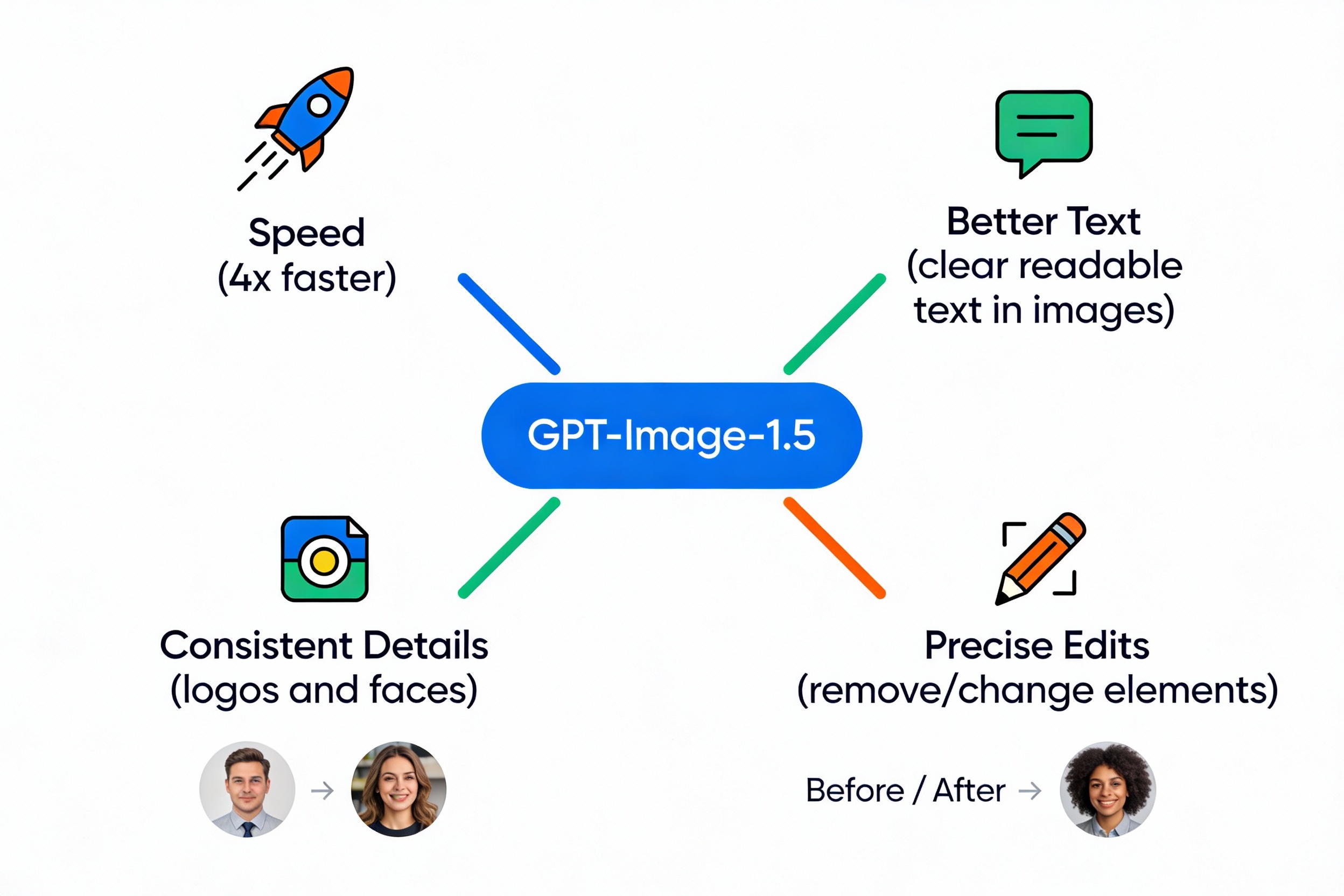
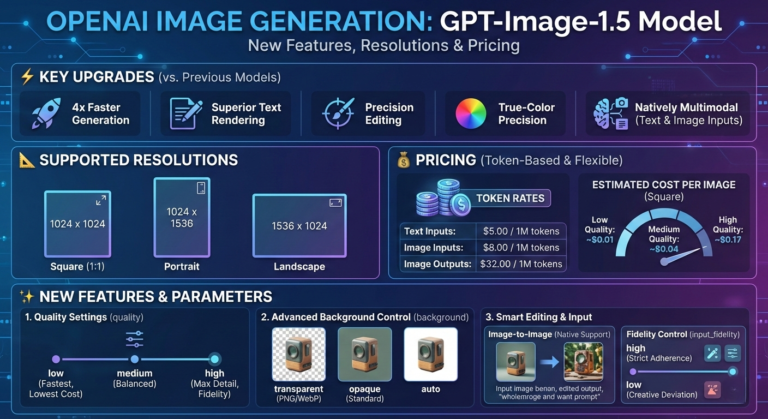
The headline upgrade is speed. GPT‑Image‑1.5 is designed to generate images up to about 4× faster than the earlier image model used in ChatGPT Images. For you, this means you can test more versions of a thumbnail, banner, or ad creative in less time.
The model also brings better instruction following and precise edits. When you ask for “a flat illustration, blue background, white icons, bold title at the top,” it is much more likely to follow all of those details correctly. Edits like “remove the background,” “make the shirt red,” or “keep the same logo but change the text” work more reliably.
Text Inside Images and Brand Consistency
Older image models often struggled with text inside images. Words on posters, thumbnails, or social media graphics could look broken or unreadable. GPT‑Image‑1.5 is built to render clearer and more accurate text, which is very important for YouTube thumbnails, ad banners, and Instagram carousels.
Another major improvement is consistency for faces, characters, and logos. When you create multiple images in a series, it is easier to keep a similar look: same character style, same logo, same general layout. This makes the model far more useful for brand‑focused work like channels, newsletters, and product visuals.
How to Use the New ChatGPT Images in the ChatGPT App
Inside ChatGPT, you can use the new Images experience by:
- Typing a prompt such as “Create a YouTube thumbnail for a video about GPT‑Image‑1.5 vs Google’s image models”.
- Choosing a style or giving extra instructions if the interface allows style options.
- Iterating: “Make it brighter”, “Use yellow text”, “Add a laptop on the right” and so on.
The key point is: you do not have to choose a model name in the normal ChatGPT UI. The system automatically uses GPT‑Image‑1.5 behind the scenes when you use the new ChatGPT Images feature.
Using GPT‑Image‑1.5 in the API (For Devs and Automators)
For developers and automation builders, GPT‑Image‑1.5 is exposed as a named model in the API:
- Model name:
gpt-image-1.5 - Usage: through the standard Images API (create, edit, or variations)
You send a text prompt (and optionally an input image for editing), and the API returns one or more generated images. This fits well into tools like Make.com, n8n, custom Node.js backends, or any workflow where images need to be generated or updated automatically.
GPT‑Image‑1.5 Pricing Explained (With USD + INR)
OpenAI uses a token‑based pricing model for GPT‑Image‑1.5, similar to its text models, but with separate prices for input, cached input, and output:
-
💰 Input:
- $8.00 (≈ ₹670) per 1 million input tokens
- These tokens come from your prompt text and any image inputs that you send.
-
💰 Cached Input:
- $2.00 (≈ ₹170) per 1 million cached input tokens
- This is a cheaper rate when you reuse the same prompt or input through OpenAI’s prompt caching mechanism.
-
💰 Output:
- $32.00 (≈ ₹2,680) per 1 million output tokens
- These tokens correspond to the generated images that come back from the model.
Important: this is per 1 million tokens, not per single image. Each image at a given resolution consumes some number of tokens; the exact token count depends on resolution and model internals. So the effective cost per image varies, but overall GPT‑Image‑1.5 is designed to be cheaper for image inputs and outputs than the older GPT‑Image‑1 model.
For most small to medium projects, the real‑world cost per image typically lands in a few cents per image in USD (a few rupees to a few tens of rupees in INR), depending on how many images and what resolutions you use. For very large batches, you should calculate based on logged token usage from the OpenAI dashboard.
What “Model / Input / Cached / Output” Means in Simple Terms
When you see a pricing row like:
gpt-image-1.5 — $8.00 — $2.00 — $32.00
it maps like this:
- Model name:
gpt-image-1.5 - Input price ($8.00): cost of all prompt + image inputs per 1M tokens.
- Cached input price ($2.00): discounted cost of reused prompts per 1M tokens.
- Output price ($32.00): cost of generated image output per 1M tokens.
You never have to count tokens manually for each image. The OpenAI dashboard shows total tokens and total dollars spent. But understanding this breakdown helps you optimize costs, for example by reusing prompts through caching and not regenerating unnecessarily large or repeated images.
Practical Cost Tips for Creators and Agencies
Here are some simple ways to keep costs under control while using GPT‑Image‑1.5:
-
✅ Reuse prompts and templates.
Create a small set of “base prompts” for thumbnails, Instagram posts, or blog banners and tweak them slightly instead of writing completely new descriptions each time. -
✅ Standardize resolutions.
Use only the resolutions you actually need (for example, 16:9 1280×720 or 1920×1080 for YouTube, 1080×1080 or 1080×1350 for social). Bigger images mean more tokens and higher cost. -
✅ Generate in batches.
For A/B testing, generate 3–4 options at once instead of 10–20. Shortlist with your human eye first, then request small edits rather than brand‑new images. -
✅ Use automation where it saves time.
Connect the API to tools like Make.com so that blog banners, podcast covers, or product shots are created automatically when new content is published, instead of doing everything manually.
Creative Use Cases for Content Creators
GPT‑Image‑1.5 works very well for YouTube, blogging, and social media. Some high‑impact ways to use it:
-
⚡ YouTube thumbnails:
Ask for “bold, click‑worthy thumbnails” with a clear subject, large readable text, and contrasting colors. Use edits to quickly try multiple text and color combinations. -
⚡ Blog and newsletter banners:
Generate consistent banner art for each content category (AI tools, automation, productivity, etc.) so your website and emails feel branded and professional. -
⚡ Social media posts and carousels:
Create square or vertical designs for Instagram, LinkedIn, and X with readable text, icons, and your logo in the same position across posts. -
⚡ Course and product covers:
Design covers for online courses, PDFs, and lead magnets with matching style, character, and color schemes.
Automation and Developer Use Cases
For developers and automation pros, GPT‑Image‑1.5 slots nicely into backend workflows:
-
👉 Auto‑generate blog and product artwork:
When a new post or product is created in your CMS, trigger an API call that creates a matching banner or product image based on the title and description. -
👉 A/B test creatives at scale:
Use the API to generate multiple ad images for the same campaign and feed them into your ad platform for performance testing. -
👉 White‑label “AI design” inside your SaaS:
Offer your users automatic covers, thumbnails, or social cards generated by GPT‑Image‑1.5, while you just pay for API usage in the background. -
👉 Programmatic personalization:
Dynamically insert user names, avatars, or localized backgrounds into images (for example, different city skylines for different regions).
Example Workflow: From Prompt to Automation
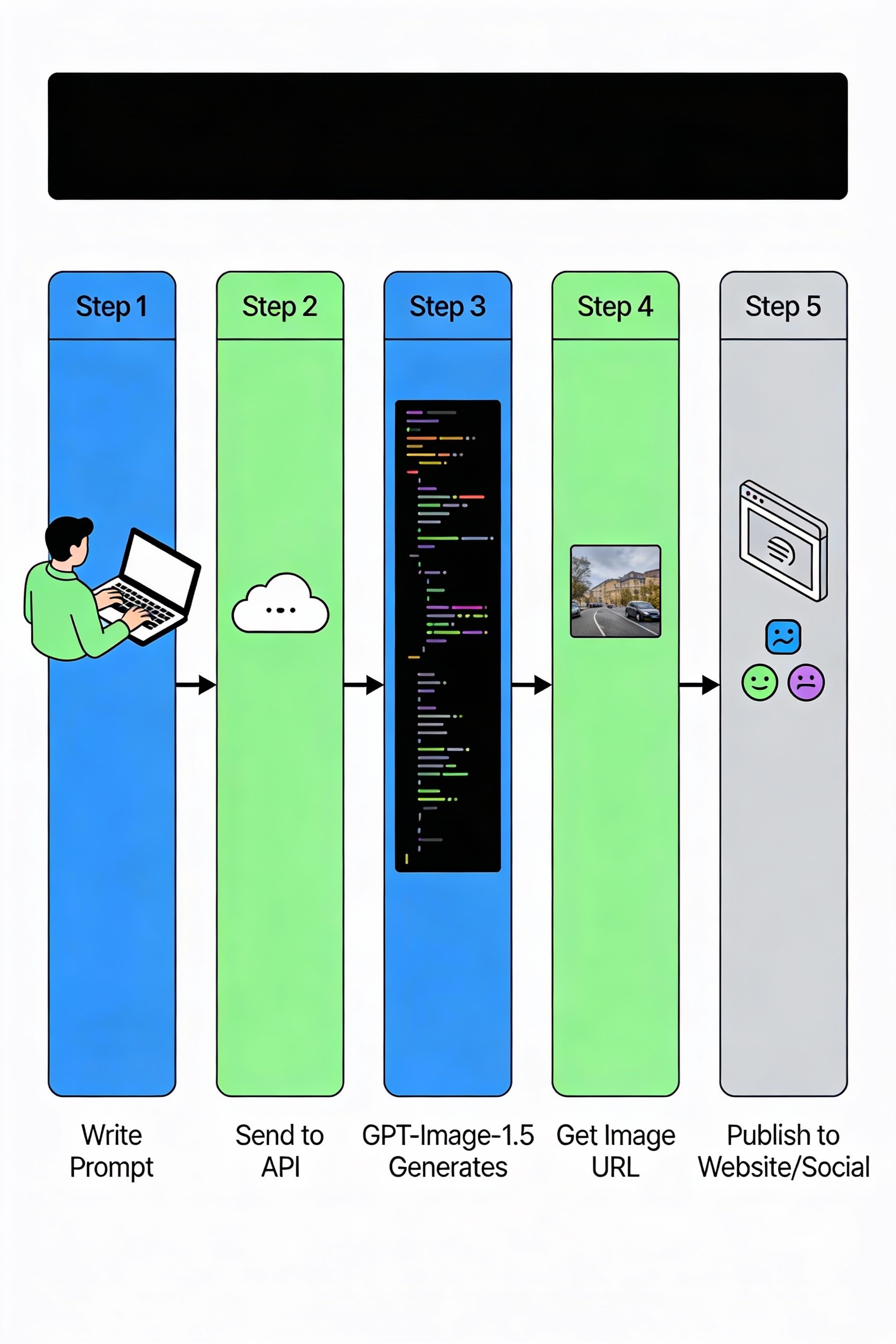
Here is a simple mental model of how a GPT‑Image‑1.5 workflow looks in practice:
-
Prompt stage:
You define a clear, reusable prompt like “Flat vector style, blue background, white icons, bold title text at top, space for logo in top‑right corner.” -
API call:
Your app or automation platform sends this prompt (and parameters like size and number of images) to thegpt-image-1.5model. -
Image generation:
The model generates one or more images matching the description and returns them as URLs or binary data. -
Post‑processing:
You optionally resize, compress, or add extra overlays with a standard image library or design tool. -
Publishing:
The final image is saved to your storage (for example, S3, Cloudflare R2, or your own server) and used in your website, app, or social media.
What We Still Do Not Know (And Should Not Guess)
Some technical details about GPT‑Image‑1.5 are not publicly documented in detail, such as exact internal context window sizes, full benchmark score tables, and precise token counts per resolution. These are not necessary to use the model day‑to‑day and should not be guessed.
If you need exact cost estimates, the best approach is to generate a small sample batch, check your usage and billing in the OpenAI dashboard, and then scale up based on real numbers. That way, you get accurate rupee and dollar costs for your own use case instead of theoretical estimates.