

Automate X (Twitter) on Make.com with Full API Control
Unlock the full power of the X API (v2) directly within your Make.com scenarios. This custom app is built for power users and developers, allowing you to connect your own X Developer App to automate posting, media uploads, and audience engagement without the restrictions of shared rate limits. If you’re new to the platform, you can sign up for a free Make.com account to get started.
🔥 Key Features
- 📝 Create Posts & Threads – Publish posts with text, polls, and quotes. Control who can respond with advanced reply settings.
- 📸 Robust Media Workflow – A complete, multi-module solution for media handling:
- Simple Upload: Instantly upload images and GIFs up to 5MB.
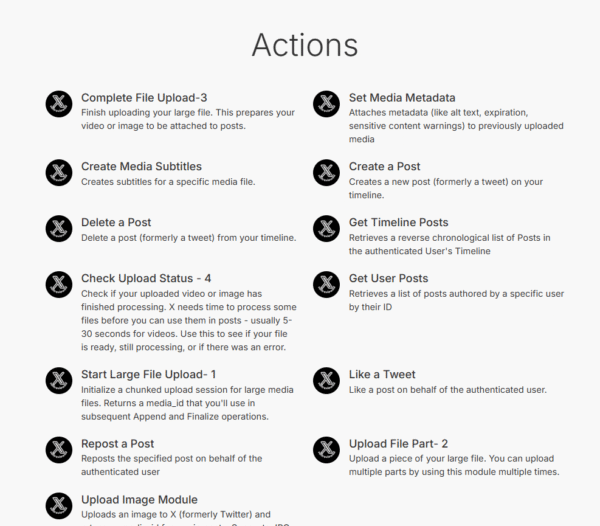
- Large File Upload: A dedicated 4-step flow (Start → Upload Part → Complete → Check Status) lets you reliably upload and process large videos for your posts, bypassing common timeout limits.
- 🏷️ Advanced Metadata Control – Use the “Set Media Metadata” module to add essential Alt Text, sensitive content warnings, and geo-restrictions to your media files.
- ❤️ Full Engagement Automation – Build workflows to automatically Like, Repost, Delete, and retrieve posts based on your criteria.
- 🔍 Powerful Search & Retrieval – Find posts by ID, search recent posts, or retrieve user timelines to use as triggers for your automations.
🚀 Why Use This X App for Make.com?
Standard app integrations share API rate limits, creating a bottleneck for everyone. This app uses a “Bring Your Own Key” architecture. By connecting your own X Developer App, you get exclusive access to your own API quota. This makes it the perfect solution for leveraging the Free Tier of the X API without interference.
🛠️ How It Works
The app provides a suite of granular modules that give you precise control over your workflows:
- Upload Media: Use the “Upload Image” module for quick posts or the full “Start Large File Upload” → “Upload File Part” → “Complete File Upload” flow for videos.
- Check Status: In your video upload scenario, use the “Check Upload Status” module within a repeater to wait until your media is fully processed before continuing.
- Add Metadata: Attach crucial accessibility and context data to your media before posting.
- Create Post: Combine your text and the final
media_idto publish your content.
🛡️ Secure & Private
Your API credentials are required for each connection and are stored securely within your own Make.com account. You maintain complete ownership and control over your X Developer App and its permissions.
Refund Policy
Due to the digital nature of this product, all sales are final. I do not offer refunds once the purchase is made. Please review the features and documentation carefully before purchasing. If you have any questions about the app’s capabilities, please reach out before buying.






Reviews
There are no reviews yet.