
Unified Multi-Modal AI Automation for Make.com
The OpenRouter Custom App for Make.com solves the fragmentation and cost overhead of modern AI operations. Instead of managing individual API keys, rate limits, and billing cards across OpenAI, Anthropic, Google, and specialized media platforms, this integration consolidates your entire AI automation stack into one reliable, high-throughput connection inside Make.com.
Platform Architecture & Compatibility
This custom integration is engineered specifically for Make.com, supporting all operational tiers:
- Make.com Core Engine: 100% native integration operating directly within Make’s visual scenario builder.
- Direct API Binding: Connect your own OpenRouter credentials with zero intermediary proxy fees or platform markups.
- Fault-Tolerant Routing: Dynamic fallback mechanisms prevent broken executions by routing requests to secondary providers during outages.
- Instant Deployment: Single-click workspace invitation with no server configuration or code deployment required.
Modular Feature Breakdown
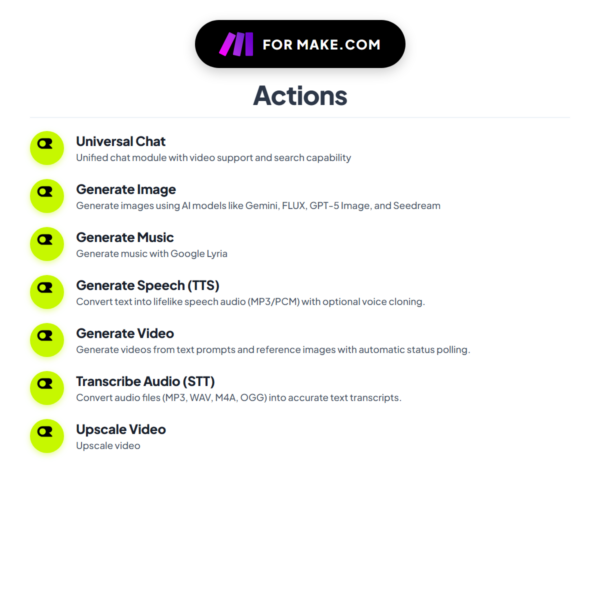
I engineered 7 specialized modules into this application to provide complete multi-modal coverage:
1. Universal Chat & Vision
The primary reasoning engine for document analysis, multi-turn dialogue, and structured data generation:
- 300+ Model Catalog: Dynamically route prompts across reasoning models and lightweight endpoints from a single dropdown menu.
- Live Web Search Grounding: Retrieve real-time search engine data, market updates, and factual citations directly into your workflow responses.
- Structured JSON Schema Output: Enforce strict JSON schemas to ensure reliable downstream database inserts and webhook triggers.
- Free Tier Routing: Route non-critical background jobs through free endpoints to eliminate API token expenditure.
2. Generate Image (Raster & Vector SVG)
Automate commercial graphic creation and scalable vector generation:
- Frontier Image Synthesis: Produce high-resolution imagery using top generation models for e-commerce mockups, social graphics, and banners.
- Precision Vector SVG Output: Generate scalable, editable SVG code for logo automation and vector icon libraries.
- Custom Dimensions: Render in square (1:1), widescreen (16:9), vertical (9:16), or standard (4:3) aspect ratios.
3. Generate Speech (TTS)
Synthesize studio-quality voiceovers from dynamic text streams:
- Natural Voice Models: Convert text into lifelike audio using premier voice synthesis engines.
- Standard Audio Formats: Output high-fidelity MP3 and WAV audio streams ready for direct cloud storage transfer.
4. Transcribe Audio (STT)
Convert recorded audio files into structured text transcripts:
- Whisper Speech-to-Text: Multilingual transcription engine for customer calls, voice memos, and podcasts.
- Timestamped Segments: Returns sentence-level timestamp markers for automated video captioning and index generation.
5. Generate Video
Automate video scene generation from text prompts and source imagery:
- Text-to-Video & Image-to-Video: Render short-form video clips and product animations.
- Asynchronous Status Polling: The module automatically tracks render progress and delivers the finalized video URL upon completion.
6. Generate Music
Synthesize original instrumental tracks and background music:
- Custom Audio Synthesis: Create theme tracks, intro melodies, and ambient soundscapes on demand.
- Genre & Mood Control: Tailor instrumentation and duration to match specific video production requirements.
7. Upscale Video
Enhance visual resolution and clarity for digital publishing:
- AI Resolution Upscaling: Upgrade low-resolution footage to crisp high-definition quality with edge sharpening and noise reduction.
Practical Business Automation Architectures
1. Autonomous Market Intelligence & Competitor Monitoring
A scheduled Make.com scenario triggers daily. The Universal Chat module (with web search grounding enabled) scans competitor product catalogs and pricing updates across the web, extracts strategic adjustments into structured JSON, and posts an executive briefing to Slack or Microsoft Teams.
2. Multi-Modal Invoice & Document Parsing
Incoming PDF invoices, receipts, and shipping manifests are captured from email attachments. The Universal Chat vision engine extracts supplier names, invoice numbers, tax breakdowns, and line items with high precision, automatically updating your accounting ledger and CRM records.
3. E-Commerce Product Visual & SVG Asset Factory
When a new SKU is created in your store, Make.com routes product specifications to Generate Image to render 4 lifestyle marketing visuals and clean vector SVG asset badges, instantly attaching the public URLs to your product database.
4. Automated Audio Content & Podcast Repurposing
Drop recorded customer interviews or podcast episodes into cloud storage. The Transcribe Audio (STT) module transcribes the audio with timestamps. Next, Universal Chat summarizes key takeaways, drafts social media posts, and formats an email newsletter automatically.
5. Social Media Video Production Pipeline
When a new blog article is published, Make.com summarizes the content into a 45-second script via Universal Chat, generates a voiceover using Generate Speech (TTS), produces visual scenes with Generate Image, and creates an animated video clip ready for multi-channel distribution.
6. Zero-Cost Bulk Data Categorization
Process thousands of unstructured customer survey entries, support logs, or lead forms by routing the workload through OpenRouter’s free-tier endpoints, categorizing your data at zero API token cost.
Installation & Configuration Guide
- Obtain API Credentials: Generate an API key from your OpenRouter dashboard with your preferred usage limit.
- Accept Invitation Link: Click the private installation URL provided in your purchase receipt to add the app to your Make.com organization.
- Establish Connection: Add any OpenRouter module to your scenario, click Add Connection, paste your API key, and save.
- Build & Run: Select your desired model from the dropdown list, configure your input fields, and activate your scenario.
Frequently Asked Questions
Q: Do I need separate API keys for individual model providers?
A: No. A single OpenRouter API key provides unified access to all 300+ supported models.
Q: Are there any monthly maintenance or platform subscription fees?
A: No. You pay a one-time purchase price for permanent access to this custom integration. You only pay OpenRouter for the raw API compute you consume.
Q: Can I use free models with this integration?
A: Yes. OpenRouter provides various free endpoints that you can use inside your Make.com workflows at zero token cost.
Q: What if I encounter an “Access Denied” error during installation?
A: If your Make.com organization permissions restrict external app installs, invite [email protected] as a developer to your Make.com workspace, and I will install it for you directly.
Q: What is your refund policy?
A: As this is a digital product with immediate invite access, I do not offer refunds. If you need any assistance with setup, contact me directly and I will help you.






Reviews
There are no reviews yet.