
Centralized Multi-Modal AI Gateway for Boost.space
The OpenRouter Custom App for Boost.space provides cloud automation builders, data architects, and operations teams with a centralized gateway for connecting multi-modal AI intelligence directly into their master data records. Instead of connecting disjointed AI providers across separate scenarios, this native integration allows you to enrich, analyze, transcribe, summarize, and synthesize multi-modal data inside Boost.space using over 300+ leading models through a single API key.
Platform Architecture & Compatibility
This custom integration is engineered specifically for the Boost.space Integrator and Master Data Engine:
- Native Boost.space Compatibility: Fully compatible with Boost.space scenario builders and system records.
- Two-Way Master Data Enrichment: Feed database records directly into multi-modal models and write structured JSON outputs back to custom fields.
- High-Availability Infrastructure: Leverage smart fallback routing to protect critical database sync pipelines from third-party API downtime.
- Zero Code Installation: Instant installation via your private invite URL with direct API credential binding.
Modular Feature Breakdown
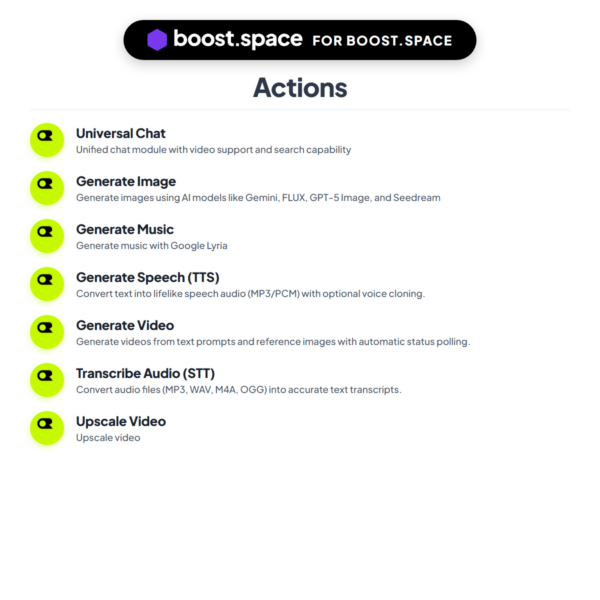
I structured this custom app into 7 powerful modules to give you complete multi-modal coverage across your Boost.space workflows:
1. Universal Chat & Vision
The primary reasoning engine for database records, customer inquiries, and unstructured document analysis:
- 300+ Models: Query frontier reasoning engines and lightweight models from a unified interface.
- Real-Time Web Search Integration: Ground your master data with live online search results, citations, and market facts.
- Strict JSON Schema Validation: Output deterministic JSON objects tailored for automatic insertion into Boost.space custom fields.
- Free Tier Routing: Utilize free endpoints for zero-cost batch data processing.
2. Generate Image (Raster & Vector SVG)
Automate raster visual creation and vector graphic generation for marketing records and inventory assets:
- Frontier Image Generation: Access leading image synthesis engines for marketing visuals and product mockups.
- Scalable SVG Vector Engine: Generate clean, editable SVG code for logo creation and icon asset pipelines.
- Custom Aspect Ratios: Render in square (1:1), widescreen (16:9), vertical (9:16), or standard (4:3) formats.
3. Generate Speech (TTS)
Turn dynamic text fields and notifications into natural, studio-quality speech audio:
- Human-Like Voice Models: Produce lifelike speech audio for training clips and automated audio alerts.
- Multi-Format Audio Outputs: Output MP3 and WAV audio streams for cloud storage attachments.
4. Transcribe Audio (STT)
Convert audio files, phone calls, voice notes, and meeting recordings into searchable database text:
- Whisper Speech-to-Text: Multilingual transcription engine for call logs and audio assets.
- Segmented Timestamps: Generates precise timestamp markers for subtitle generation and transcription indexing.
5. Generate Video
Create automated promotional video clips and product teasers from text prompts or base images:
- Text & Image-to-Video: Generate video scenes from text prompts or reference images.
- Automated Background Polling: The module polls the generation cluster automatically and outputs the finalized video file URL.
6. Generate Music
Generate original music tracks and background audio for media libraries:
- Custom Audio Synthesis: Synthesize instrumental melodies, background tracks, and audio themes.
7. Upscale Video
Enhance lower-resolution video renders to crystal-clear high definition:
- AI Video Upscaling: Enhance clarity and sharpness from 720p to 1080p or 4K.
Practical Business Automation Architectures
1. Automated Customer Profile & Lead Enrichment
When a new lead enters your Boost.space database, the Universal Chat module (with web search enabled) researches the company website, identifies key executive contacts, extracts industry tags, and enriches your master contact record with clean structured data.
2. Multi-Lingual Customer Audio Call Archiving
Sync audio recordings from your VoIP phone system into Boost.space. The Transcribe Audio (STT) module transcribes the conversation, while Universal Chat analyzes customer sentiment, extracts action items, and attaches the summary directly to the client profile.
3. E-Commerce Product Catalog Image Enhancement
When new inventory records are synced into Boost.space, Generate Image renders 4 high-resolution lifestyle mockups and vector SVG asset badges, attaching the public image URLs directly to your product catalog fields.
4. Automated Content Marketing & Social Video Studio
When a new article is drafted in your content database, Boost.space generates a 60-second voiceover via Generate Speech (TTS), produces visual scene stills with Generate Image, and creates an intro animation with Generate Video.
5. Invoice & Expense Document Parsing Pipeline
Upload receipts and supplier invoices into Boost.space. The Universal Chat vision engine extracts supplier names, invoice dates, VAT numbers, and line items with high precision, automatically updating your accounting ledger.
6. Real-Time Market Intelligence & Competitor Radar
Schedule a daily Boost.space scenario that scans industry news using Universal Chat web search grounding, filters for critical competitive moves, and generates a structured briefing delivered to your executive dashboard.
Installation & Setup Guide
- Obtain API Credentials: Generate an API key from your OpenRouter dashboard with your chosen usage limit.
- Accept Invitation Link: Click your private Boost.space invite URL provided after purchase to install the custom app into your account.
- Configure Credentials: Add an OpenRouter module inside a Boost.space scenario, click Add Connection, and paste your API key.
- Start Automating: Pick your desired AI model from the dynamic dropdown, map your database fields, and run your scenario.
Frequently Asked Questions
Q: Do I need separate subscriptions for individual AI model providers?
A: No. Your single OpenRouter account provides unified access to all 300+ models. You never need individual subscriptions with separate providers.
Q: Can I use free AI models with this Boost.space integration?
A: Yes. OpenRouter offers various free endpoints that you can use inside your Boost.space scenarios at zero API cost.
Q: What happens if a provider experiences an outage?
A: OpenRouter includes automatic provider failover to re-route requests and keep your Boost.space data pipelines running uninterrupted.
Q: What is your refund policy?
A: As this is a digital product with instant invite access, I do not offer refunds. If you need any assistance with setup, contact me directly.




Reviews
There are no reviews yet.